WPTavern: #199 – Brian Coords on WooCommerce’s Challenges and Innovations in a Changing WordPress Landscape
[00:00:19] Nathan Wrigley: Welcome to the Jukebox Podcast from WP Tavern. My name is Nathan Wrigley.
Jukebox is a podcast which is dedicated to all things WordPress, the people, the events, the plugins, the blocks, the themes, and in this case, WooCommerce’s challenges and innovations in a changing WordPress landscape.
If you’d like to subscribe to the podcast, you can do that by searching for WP Tavern in your podcast player of choice, or by going to wptavern.com/feed/podcast, and you can copy that URL into most podcast players.
If you have a topic that you’d like us to feature on the podcast, I’m keen to hear from you and hopefully get you, or your idea, featured on the show. Head to wptavern.com/contact/jukebox, and use the form there.
So on the podcast today, we have Brian Coords.
Brian has been active in the WordPress space for over a decade, starting out in agencies, building and managing websites, and is now a developer advocate at WooCommerce, bridging the gap between woo’s internal engineers and the wider developer community. His journey includes being a high school teacher, working for nonprofits, and writing for the WP Tavern before landing his role at Automatic.
If you’re interested in where WooCommerce and WordPress itself are headed, this episode will help as Brian shares insights on WordPress’s evolving focus, the importance of embracing AI, and how a slower pace of change can be a strength in any open source ecosystem.
He talks about the massive rebrand at WooCommerce, the challenges and opportunities in competing with SaaS giants, and the unique developer relations role that balances his technical experience with communication skills.
We get into how the team Brian works with supports developers and agencies with documentation, office hours, and feedback loops, and how WooCommerce’s global Reach makes for a complex but thriving ecosystem.
There’s discussion about recent marketing efforts, the realities of open source support, and the surprising diversity of WooCommerce users worldwide.
Towards the end, we look ahead to what’s coming for WooCommerce, which is greater integration with block based editing in WordPress Core, major investments in AI to streamline store management, and the future landscape of online shopping.
If you want to hear how WooCommerce and WordPress are responding to a rapidly changing tech environment, this episode is for you.
If you’re interested in finding out more, you can find all of the links in the show notes by heading to wptavern.com/podcast, where you’ll find all the other episodes as well.
And so without further delay, I bring you Brian Coords.
I am joined on the podcast by Brian Cords. Hello Brian.
[00:03:09] Brian Coords: Hey, thank you for having me.
[00:03:11] Nathan Wrigley: You’re very welcome. I have a lot of respect for Brian. I’m hoping that by the end of this podcast you also have a lot of respect for Brian.
Brian has been kind of part of my browsing on the internet and WordPress journey, I want to say, for five or six years, something along those lines, I’ve known about you and followed your stuff. Pretty much everything that you’ve done. I’m really pleased that you’ve come on the podcast to talk to me today about WooCommerce.
Those people that don’t know Brian, I’m going to give you an opportunity just to introduce yourself. So would you mind, I know it’s a banal question, but little potted bio, couple of minutes about your WordPress journey, or you can talk about the guitars in the background if you prefer.
[00:03:47] Brian Coords: Yeah, nobody wants to hear me talk about or play a guitar.
Yeah, so I’m Brian. I’m a developer advocate at WooCommerce, so I work on sort of the community side, bridging the gap between the community of developers that build on top of WooCommerce or build stores with WooCommerce, and then our internal engineers and make sure that communication channel stays open.
But before that, I spent probably 10 years working at a WordPress agency. So building sites, managing team of developers, doing all the kind of work that a WordPress agency does and sort of lived through that time from early page builders all the way until the last few years in the rise of the block editor. So I kind of have that personal experience of what it’s like just selling WordPress websites for a living.
And before that, my career went through a whole bunch of different places. Was a high school teacher, worked at nonprofit, all sorts of different things. So happy to be at Automattic, where I get to sort of teach, sort of build websites and just hang out with people.
[00:04:44] Nathan Wrigley: I had no idea that you were a high school teacher. I have enormous respect for anybody who takes on a role in public education. So that’s interesting.
So I’m going to segue a little bit. This question’s just occurred to me from everything that you’ve just said, given that you’ve been in the space of WordPress for the last 10 years, more.
So it’s a bit of a peculiar one, but are you as excited about it as a project as you were, let’s say, 10 years ago? Do you still think that it’s got the future that you probably thought it had a decade ago?
[00:05:13] Brian Coords: Yeah, I mean that’s a good question. I would say overall, yes, I am excited about it. I think that if there’s any concerns about WordPress or things to be not excited or scared about, it has nothing to do with WordPress and has everything to do with the internet as we know it, and AI and everything changing and economics and all these other sorts of things.
The project itself, it seems to, I would say over the last year, really narrowed its focus on what it thinks its role is. And I think it’s adopted the AI change really well, and that’s made me very excited. I think it understands, you know, I think some of the things about WordPress is sometimes the day to day, you feel like the decisions are a little confusing, but if you look at it over the long term, it’s half the internet. So clearly the decisions tend to work out in the long run. So I think I still have faith in the project.
[00:06:01] Nathan Wrigley: I find that the slow pace of change is actually one of its greatest strengths, but it takes an awful lot of mulling it over and sitting down and being calm with yourself to think, why hasn’t it got all these features? Why is it not keeping track of this, that, and the other thing that’s going on on the internet? But broadly, when you look back at any 2, 3, 4, 5 year period, I think usually that was the right decision, although it feels like it might not have been the right decision when that moment is passing.
[00:06:32] Brian Coords: Yeah, there’s a lot of people who look at a lot of decisions, like say the block editor and they say, well, why didn’t they just take Elementor and stick that in Core and stuff, you know? Regardless of the fact that Elementor is a successful business that probably doesn’t want their software stolen and taken into Core. But I think if you look at it now you, a lot of those decisions would’ve seemed a little crazy.
And the fact that it doesn’t throw everything and that it just throws the kind of basic foundational layer, and then it allows something like Elementor or any of these other page builders to be successful businesses and do their thing. The fact that it empowers that to exist, or it empowers all the other builders to exist, or it empowers WooCommerce or all these other plugins to exist, is a testament to the fact that it didn’t try to be everything to everyone, and it just kind of stayed in its lane as a foundational layer. And so I think it’s, it doesn’t feel like it’s doing that much, but it’s working out well for everyone in the ecosystem.
[00:07:24] Nathan Wrigley: We don’t want to get into this, in fact, I’m going to insist that we don’t get into this. But I think it is a really interesting time with the tsunami of things that are going on with AI to see how a CMS can cope with the future with AI as a possible tool to do everything. To do every single thing that would be required in building a website. It’ll be interesting to see how the project goes.
And, you know, there’s a lot going on there, and I think this is one of those moments where we have to just sort of sit down and be calm and see what the teams are doing and just have faith. I think at least that’s my position anyway. So you don’t have to respond to that if you don’t want to.
[00:08:00] Brian Coords: Yeah, I’m just overwhelmed by AI sometimes on my day-to-day work. And so I do have to remind myself the only thing you can do is sit and go slow and just see what happens, because I don’t think we can predict it.
[00:08:11] Nathan Wrigley: No, I think you would be right. So when you joined Automattic, how long ago was that now? Roughly.
[00:08:16] Brian Coords: Almost a year. Early this year.
[00:08:18] Nathan Wrigley: Yeah. Did you have intuitions at that point that WooCommerce was where you were going to end up? Was that where you were heading or is that just sort of serendipity?
[00:08:26] Brian Coords: No, well, not really. When I first started, I kind of was all over the place. I was here at WP Tavern for a few weeks as part of that trial writing project. I did some work with wordpress.com and kind of got to see behind the scenes of that, and I had friends at all different parts of the company.
What I knew that I wanted to do was developer advocacy or what some people call developer relations. I knew that that’s where the role that I wanted, but I don’t think I would’ve thought of Woo. But then when the opportunity came up, there was a lot that I really liked about WooCommerce that I thought it had such a strong idea of what the product is, who the customers are. They had just done that rebrand where they had the new logo and the new colours and the new design. It felt like the whole company was kind of just doing really cool things.
So once the opportunity came up, I’ll be honest, I didn’t build a lot of WooCommerce stores before I joined. So other than being kind of afraid of learning all of this stuff it was, definitely it made sense once the opportunity came up.
[00:09:22] Nathan Wrigley: Yeah. With the sort of WooCommerce side of things, are you happy with that move? You know, you’ve got your feet onto the table now and you feel that’s where you’re going to stay, I guess, for the near future.
[00:09:32] Brian Coords: Yeah, definitely. What’s interesting about Automattic is over the last year, since I joined it’s been kind of a turbulent year at the company, but one of the things they’ve been really trying to do is centralise things and be more consistent.
So in WooCommerce, there’s a lot of stuff that WooCommerce would go off and do, and it would be kind of different from say, Core WordPress or wordpress.com or WordPress VIP, or all these different kind of parts of WordPress inside of Automattic.
And over the last year, they’ve tried to kind of centralise and say, why do we have three different plugins that are doing similar things. Or why can’t we streamline all of this or have everybody working on the same stuff. So WooCommerce has been doing a lot of work really towards Core WordPress, and making the Core WordPress experience better so that WooCommerce can use those tools instead of doing it.
So in a weird way, I’ve actually gotten to collaborate a lot more with some of the other sides of the company and people who do this job but are not in WooCommerce. There’s a whole team that has people like, let’s see, Ryan Welcher, Justin Tadlock, Jonathan Bossenger, that whole group. So it’s kind of nice. We’re in our little Woo bubble too, but then I get to work with them and learn from them, and work on Core WordPress too. So it’s kind of, it’s been nice. We’ve kind of brought everyone a little closer, I think.
[00:10:42] Nathan Wrigley: It is kind of interesting over the last 18 months or so, having spoken to quite a few Automatticians, it does feel like the landscape inside the company has changed. I don’t think we need to go into that, but it is interesting you saying that, because feels there was some realignment and moving around, and decisions about which teams were going to collaborate more with which teams. And that seems like what you are saying as well, so there we go.
So on the WooCommerce side of things, you mentioned that you are a developer, well, you said developer advocate, developer relations, kind of the same term really. For anybody listening to this who doesn’t know what that is, basically, what is the job contract that you’ve got there? What is your role?
[00:11:19] Brian Coords: Yeah, so we cover a few different things. From a high level, it really is, we’re there to help developers inside the company know what developers outside the company are doing and vice versa. So if you’re building stores with WooCommerce or you’re building extensions to sell in the marketplace, you know, like plugins that add-on to WooCommerce, or you’re working at one of our partner companies like Stripe and Google and Snapchat and Reddit and all these companies that integrate with WooCommerce, our job is to make sure that you have access to good documentation and good examples.
We make sure that when a new version of WooCommerce comes out, which is every five weeks, that we publish all the release notes, and make sure that that information is, you know what’s coming, what’s changing, what’s different. We do some video content, we do some office hours hangouts in a community Slack, we keep an eye on the repo for community contributions. So it’s a lot of different things, but it’s really just, at the end of the day like, hey, does this help developers on either side of the wall move forward basically?
[00:12:19] Nathan Wrigley: Do you have to be technical in order to carry out your role, or would there be any scope for somebody in your position to be non-technical? Let’s say, you’re a marketing person or something like that. Is there any aspect of that to it? Or is everybody doing your kind of role a technical person with a background in coding and what have you?
[00:12:37] Brian Coords: It’s a unique role and it’s kind of a long debate inside of the developer relations community is, does this team go in an engineering department or does it go in the marketing department?
So for example, at Automattic there is another developer relations team that handles a lot of that WordPress Core stuff that I was talking about, and they’re kind of a little more attached to engineering.
For our team, we’re part of the WooCommerce marketing department. So of course that’s going to change a little bit of what we work on, how our decisions are made, that sort of stuff. I don’t think it changes that much, and in some ways it gives us access to a lot of cool stuff like their design team, which is really nice to have.
So it goes both ways, but you really have to be a unique person where you have to be a good communicator, and you have to have some amount of technical experience. You kind of really need both, because at the end of the day we look at a new version of WooCommerce and it’s, oh, we changed this API and it’s going to affect developers in this way. It’s like, I need to be able to communicate that. I need to be able to understand it. I need to be able to know what the implications of that are. So it’s kind of both.
[00:13:35] Nathan Wrigley: Do you produce this content in multiple languages or is it kind of English first and then it gets translated in some other department, or indeed does it get translated into another language, do you know?
[00:13:45] Brian Coords: No, I think pretty much English first. There is a lot of stuff that is translated for, I would say on the, what we call like the merchant side, sort of like the user side. So if you’re looking for extensions in the marketplace, that’s available in a lot of different languages. The software itself is translated, but the developer stuff is pretty much English only. Because we’re a really small team. Like when we look at, there’s only, at any time, three or four of us working on this for software that’s on whatever, 8% of the internet, so English only for now.
[00:14:13] Nathan Wrigley: Yeah, the reason I ask, maybe you were present at State of the Word where Matt went through a bunch of statistics. And it was curious to see, for the first time, so WordPress more broadly, not WooCommerce specifically, but WordPress more broadly is now used on non-English websites more than it is on English websites. And so if we’d have had this interview a week ago, that question probably would not have arisen.
But I’m guessing that WooCommerce goes along for the ride there. I’m guessing it’s not just on English speaking websites, I’m guessing WooCommerce is just literally in more or less every part of the world, in every locale and every jurisdiction. There are people who are using your code, but probably not speaking English.
[00:14:52] Brian Coords: That’s definitely the case. So we have a free Slack, that’s the WooCommerce Community Slack, and it’s more than 30,000 people in there. It’s all over. You can definitely tell that people are coming from all over the world.
One of the weird things about e-commerce is it’s very geographically based because the currency matters. The payment provider that handles the payments matters. The shipping options matter. So there are certain places where you can only use WooCommerce because you want to use the custom bank payment provider that’s only in this one country, that sort of stuff.
So because of how diverse the types of integrations you would need, yeah, WooCommerce is very global. That was one of the things that really surprised me was finding out that, oh yeah, there’s payment providers you’ve never heard of, and banks you’ve never heard of, and shipping companies you’ve never heard of and they need to integrate.
[00:15:40] Nathan Wrigley: And tax. So much tax, I’m sure.
[00:15:43] Brian Coords: Oh my, yeah.
[00:15:45] Nathan Wrigley: I’m sure it gets brutal. I don’t know exactly when the time was, but it feels like about, I’m going to say 18 months or something, when Woo underwent a fairly significant rebranding. So from a marketing point of view, the logo changed, the colour palette changed, the website changed.
I didn’t really notice until that moment when it did change that it needed to have changed, if you know what I mean? It just always looked fine to me. But the moment it changed, I kind of got a sense that, oh, okay, this is real now. We’ve kind of identified that there are these SaaS players, so you know, we don’t need to name them, we all know who they are, where you pay your monthly fee and you get a shop and yada, yada, yada. But I don’t know if that’s a part of the roadmap.
And summing it up as more serious, obviously that’s trivial and a bit, really not the right term, but do you know what I mean? It feels like WooCommerce has, I don’t know, grown up a little bit over the last 18 months and realises the, I don’t want to use the word fight, but I’m going to, the fight that it’s in with the SaaS players.
[00:16:41] Brian Coords: Yeah, I think that was the intention of that rebrand. So I think the goal was to go from saying, hey, we’re a WordPress plugin that lets you sell things. To saying, we’re an e-commerce solution, and we happen to run on WordPress. It’s kind of just a different framing.
But one of the big things is a huge investment in marketing. And so the marketing team has gotten really big. We have a pretty killer CMO. There’s a ton of investment into different types of ads and demand generation and leads and all this stuff that I kind of don’t understand, a lot of like acronyms that are thrown around that I don’t fully track. But it’s a huge investment to basically reposition WooCommerce as something that feels a bit more modern and, not a SaaS, but kind of can sit there next to the SaaS. So when a company is looking at the options and they’re saying, oh, do we want to use Magento or BigCommerce or Shopify or WooCommerce, we look like we belong there, and it looks like it’s an option.
[00:17:36] Nathan Wrigley: Yeah, it’s kind of curious that there’s, real money has to be spent on this endeavor because, I was in London just a few weeks ago and I walked onto the Tube, you know, the underground train network. And the platform that I was on, the first thing that I saw when I walked onto the platform was this huge ad for Shopify. And then I looked left and I looked right and it was Shopify ads all the way down. They’d obviously, I mean I can only imagine how expensive that real estate is.
But the same thing would be true on radio, on TV, online, on print. These companies have gigantic, I mean truly eye watering budgets. And I don’t know if the WooCommerce side has to be a bit more guerrilla or if you also have a fairly gigantic budget. I don’t know if you’re able to peel any of that back. It sounds like marketing’s not really your thing, but maybe there’s bit of interest there.
[00:18:25] Brian Coords: Yeah, I mean since we’re in the team, we see a lot of it. We did an event earlier this year where our marketing team walked through some of this stuff, so I can maybe give you a link to put in the show notes. We kind of wrote it, did a write up about that very concept. Because we get asked that a lot, why am I seeing Squarespace and Shopify ads everywhere? And it’s, you know, obviously if you look at the size of the companies, it’s a fact, like a whole factor difference, like we’re not anywhere near the size of those companies.
And part of the issue is that you don’t just go to woocommerce.com and hand us money, you know? The Core plugin is free so the way we monetise is a lot different. You can run it anywhere. You can, a lot of people that run WooCommerce, they’re not paying us in any way because they’re using their own payment providers and those sorts of things.
So it is definitely more of a challenge. But this past year, that’s why the rebrand started, that’s why they’ve been investing in it. And it’s been kind of cool. There’s a lot of podcast ads that we’ve been running and LinkedIn ads and all these sorts of things. And part of the issue too is that our target market is just much more narrowly defined, and so WooCommerce is much more customisable. It’s extensible. You can do whatever you want with it. And that’s just a different value proposition then you would say to somebody who just wants the easy SaaS solution.
So it’s a lot of things, but it’s kind of just knowing who we want and targeting directly to them. And so you probably won’t see ads on the Tube at any time, but for certain areas you’re going to start seeing really targeted ads for people at the places that would actually really benefit from having WooCommerce.
[00:19:51] Nathan Wrigley: That was the thought that I had about seeing the Shopify, in this case, ad on the London underground was just how much the audience, the eyeballs that were actually staring at that had no interest in it at all. And so almost like the bottomless pit of money that they must have to throw at these things. And obviously it sounds like you are targeting people.
Are you kind of like riding on the coattails of WordPress in general? In other words, are you targeting existing WordPress users in the hope that they’ll think, okay, yeah, we’ve got a WordPress site, now it’s time to upgrade to WooCommerce, or is it a bit more scatter gone, you need a website, you need e-commerce, we’re your solution?
[00:20:26] Brian Coords: Yeah, I mean that’s an interesting question because I think when WordPress was growing, it was a lot easier to target inside of WordPress, and I think now we’re seeing all the big companies reevaluate that. So I would say the ads that I see a lot are, you know, Hostinger, Elementor, wordpress.com. And I think a lot of them are realising now, you know, we need to target outside.
So for example, WooCommerce this year, we go to all the WordCamps, but we started going to e-commerce expos that are trade shows that are not anything to do with WordPress. It’s just for people in the commerce industry and partnering with companies that are in the marketing and commerce side. And so, yeah, it really is about branching out and finding those new areas.
I think all WordPress companies are going to kind of have to start facing that as well because WordPress is 43% of the web. It’s like, how much bigger realistically can you get, once we pass 50%? I mean that’s, it’s pretty hard to grow at that point.
[00:21:19] Nathan Wrigley: Did you attend any of those events? The sort of expos for e-commerce more generally?
[00:21:23] Brian Coords: No.
[00:21:24] Nathan Wrigley: Yeah, I was going to follow up with a question about whether or not there was brand recognition. At those events, if you’ve got a WooCommerce stall, I was curious as to know what proportion of the public would walk past a WooCommerce sign and go, yeah, yeah, I know what that is, I’ve got complete familiarity with it. I feel like some of the SaaS ones, maybe they’ve done that job so well that that brand recognition is there, but maybe that work still needs to be done on the Woo side, I’m not sure.
[00:21:49] Brian Coords: There’s definitely not going to be the same level of brand awareness. I think, like you said, like guerrilla marketing is definitely part of it. One of the things they do at these is they’ll find a local store that uses Woo and use them for swag. So they’ll get really good swag. They did like homemade, like embroidery things and all this sort of stuff. And so they end up getting very popular because of how cool the swag is, and how meaningful it is, and it supports a local merchant. But yeah, it’s a big battle, you know, to raise that brand awareness.
[00:22:18] Nathan Wrigley: Okay, let’s just turn a bit more to your Dev Rel stuff. And you were saying that, well, I don’t need to repeat what you said. You said a little while ago, who it is that you are interfacing with out in the real world.
How does that work? Like, do you just sort of put content out there and tutorials out there and videos out there and change logs out there, and kind of hope that the people that need it get to see it somehow? Or is there more of an endeavor of, I don’t know, providing the bat phone, for want of a better word, to agencies and people so that they can communicate directly with you? How does that whole thing work?
[00:22:48] Brian Coords: Yeah, so it’s interesting because there’s definitely different audiences that we have. So we have developers who are building extensions and are, you know, they’re selling WooCommerce plugins basically. And so we have them that we need to communicate with. And then we have the agencies and the agencies are building WooCommerce stores for people. So they’re setting up WooCommerce.
And those two audiences, they both need some of the same information, but they also need a lot of different information. And so we’ve kind of seen a lot of change over the last year.
Automattic has launched a program called Automattic for Agencies. I’m not sure if you’ve seen this. It’s kind of like an agency program where you sign up and you get access to extensions, you can get affiliate fees, you can get kickbacks on payments, volume, all that sort of stuff.
So that side has really, sort of owned the agency space. And so what’s nice is we can go to them with any new information. We could say, hey, just pass this along to your audience in your next newsletter, that sort of thing. But really, if we want to have the conversations, I would say the Slack is the most common and we never lack for feedback. We get plenty of feedback. We do a monthly office hours in Slack or sometimes on Zoom, where developers will come and share their questions, that sort of thing. So we get tons of feedback. But yeah, it’s really just about being present there, being present on Twitter. We’re ramping up YouTube, because YouTube’s really important right now. And we’re just, like I said, small team and trying to hit all of those different content areas.
[00:24:13] Nathan Wrigley: My sort of follow up question there really was going to be something about shouting into the void and I wondered if that, it was in fact what was happening. But it sounds from what you are saying is if, no, there is an actual loop there. You put stuff out and you get feedback. I mean I’m guessing, from the sounds of it, there’s maybe more feedback than you can actually cope with, which is intriguing. I had an intuition that would be the other way around.
[00:24:32] Brian Coords: Yeah, I mean it definitely depends on, sometimes you get feedback that’s kind of the same. We know what people want, and we’re trying to work as fast as we can to make the changes that developers and the community want. And sometimes you put out a feature and it doesn’t resonate.
But generally when we do calls for testing of a new feature we’ll post, all right, we have a new feature coming, it’s in experimental mode, here’s how to turn it on and then let us know if it’s working for you, if it’s working with your plugin and stuff. We definitely have a pretty healthy group that will take the time to contribute back, let us know if things are working. I mean it’s an open source project. We get community pull requests. We get people, they need a feature, they build it and submit it and, you know, hopefully we merge it. And so the feedback loop is definitely there.
But if you’re, the thing that I’ve learned about WordPress is that I think it’s like an iceberg and like 90% of the WordPress community, they’re not really listening to WordPress content, and they’re not listening, they’re not even tracking WordPress in general. And so I think there’s probably a much broader community that we’re not getting access to, and they’re just living their daily lives and just building stores and stuff. And so I would love to find more of those groups. I think Facebook is probably a place that we haven’t even touched yet, and I’m sure a lot of them are there. There’s definitely work to be done there.
[00:25:46] Nathan Wrigley: Yeah, I think that was maybe the piece that I was thinking. Is that Woo is the biggest solution out there. If memory serves, Woo is the biggest e-commerce platform out there. It kind of dwarfs all the others. I don’t even know if WooCommerce is bigger than the rest of them combined but, you know, it’s on that kind of level.
And yet, if you were to have a, I don’t know, a Shopify store or something, there is probably like a little submit feedback button in the UI somewhere, and you can talk to the support representatives, and they’ll have the answer specifically because they know exactly what the platform does.
But the jigsaw puzzle over on the Woo side is, yeah, it must be much more messy, much more kind of difficult to wrangle everything. You know, you’ve got people, end users who are using WooCommerce. You’ve got developers who are building plugins. You’ve got agencies who are building on behalf of clients. You’ve got people who are building rival things so you’re in direct competition with people in the plugin space who are building rivals to WooCommerce. It’s just, well, messy. But that’s open source, right?
[00:26:44] Brian Coords: I mean that’s exactly what it is. You know, we have, you have WooCommerce support, right? And our support team is really great. Every time I go to a conference and one of our support engineers is there, I’m always pointing to them to answer all the questions because they know the product so deeply.
But if you imagine the, you know, most WooCommerce stores will come to us for support, but there’s no financial relationship. If they’re not using our hosting company or they’re not using Woo Payments, or they’re not using extensions that they bought in the marketplace, maybe they bought their extensions just off the internet or something, there’s a good chance they might not be paying us any money at all. And yet, you know, we’re going to support them and make sure that they’re having a good experience, because that’s kind of the goal of it. So it’s definitely a bit of the Wild West out there.
[00:27:28] Nathan Wrigley: There must be some kind of strange tension there as well. I mean, you’ve described it very eloquently and I think you’ve stepped around that beautifully, but that is a peculiar thing, isn’t it, that you would not have to deal with elsewhere? The fact that you may very well be dealing with rivals. You may well be dealing with people who are using up your time, but like you said, they have no relationship with you financially at all, but they built something, third party thing on top of the WooCommerce ecosystem, and I guess that’s just the broader philanthropic goal of something like WooCommerce. You’ve just got to step up and be there.
[00:28:00] Brian Coords: Yeah, I mean I think wordpress.com probably has a lot of the same things because if you Google WordPress, you know, you’re probably going to end up on wordpress.com, even if you’re not their customer.
On the flip side though, you know, the benefit of being open source is that, like I said, we get community contributions. We get a lot of eyes on the software. A lot of people, they give us feedback, they give us code, they give us all sorts of things. So it is a bit of a trade off.
But I think it’s kind of worth it for the software to just exist freely and for everybody who runs on it, to always kind of know deep down that they own their store and they can do whatever they want with it, and they can put it wherever they want, and Automattic or WordPress or WooCommerce is never really going to take that away from them or take them down, you know?
[00:28:38] Nathan Wrigley: Yeah, I’d be curious to know what proportion of Woo kind of props up the broader WordPress project, if you know what I mean? I don’t think we need to go into that, and I don’t know if there’s any data out there anywhere, but there must be a lot of money sloshing around inside the WooCommerce ecosystem. It’d be interesting to know what proportion the broader WordPress ecosystem was was made up of just Woo stuff. That’d be an interesting thing to dig into.
[00:29:01] Brian Coords: When I worked at an agency, the kind of rule was if you wanted to make money making websites, you did websites that made money. So e-commerce was a big part. People, you know, their website’s more critical to their business, so they’re going to be buying more plugins, they’re going to be paying more developers, they’re going to be using more tools. So I think that’s part of it. E-commerce isn’t the only way websites make money. There’s definitely a lot of other things, big publishers and that sort of stuff. But yeah, it’s definitely a big part of the community.
[00:29:26] Nathan Wrigley: Well, big and not going anywhere. Speaking of going places though, what’s coming up in the near future? So when we’re recording this, it’s kind of the middle of December. I imagine this episode will hit in the beginning of 2026 at some point. Roughly around that kind of time, what’s the thinking? What are the, some of the top level items that people may not know about? What’s the stuff that you’re working on? Roadmap stuff, I guess.
[00:29:46] Brian Coords: Yeah, I would say the big things that I’ve seen that are really the big focus right now is, number one is really making WooCommerce closer to WordPress Core, which means making WordPress Core a little better. So WooCommerce has been pretty ahead of the curve of transitioning to blocks, using block templates and block based everything. So, I mean you can do your whole WooCommerce store in the block editor, which gives you a lot of kind of design freedom. But that means if we need something better in the block editor, we’ve got to commit that up to the block editor and make Gutenberg better. So there’s a lot of work to improve a lot of stuff inside of Gutenberg so that your WooCommerce experience is better.
So that’s been a lot of the focus. And so we’re, there’s a lot of cool stuff coming around just new blocks, new block designs, patterns, things you can do to really customise the visual aspects of your store. And then the second big thing, I think that is taking up everybody’s mental space is AI. You can’t not talk about it. So it’s, that’s the other piece.
[00:30:42] Nathan Wrigley: Okay, despite the fact that it consumes all the air in the room, it is so fascinating. Do you have any insight into some of the things that may be on the agenda for a WooCommerce store owner in the near future? The kind of things that you are thinking of. Even if they’re just aspirational for a WooCommerce store owner. I’d be curious to hear your thoughts on that.
[00:31:01] Brian Coords: Yeah, I think there’s two different aspects of it that are really going to be important. One is managing your store. So we have right now in beta what’s called an MCP server in Woo. And what it basically lets you do is open up, you know, ChatGPT or Claude or something and say, log into my WooCommerce store and update all my products, put them on sale, change out the pictures, write better copy for them. It kind of lets AI log into your store and do things for you.
And so that’s in beta right now, and it’s pretty cool. I’ve been using it. It’s pretty neat. I’ve been setting up some demo stores for people, and I just go, all right, log in and make me, you know, 50 fake sweaters with a nice description in different colours. And it does it. It’s kind of mind blowing.
[00:31:43] Nathan Wrigley: Do you trust it at this point? And I don’t mean, you know, the broader kind of debate about AI and whether it’s trustworthy. I mean, in terms of the store, you know, do you trust it to update all of the particular product lines and what have you, or update the images? Do you feel that if you’ve given that prompt, you can sort of sit back and go, okay, that is definitely being done?
[00:32:02] Brian Coords: I haven’t done it on a live site, I will say. The nice thing too is you can have it ask you for permission every single time, and you can kind of see what it’s going to do. That obviously kind of ruins the whole efficiency part of it, but it can do that. So I think it’s early days.
But I do think, once you start interacting where you don’t have to actually log in and click a bunch of buttons, and you can just tell your computer what you want it to do, I think it’s going to be hard to come back from that. I think people are going to start expecting it. But I, yeah that’s, I mean we’re not doing that on the live, on any live sites, I hope not.
[00:32:32] Nathan Wrigley: So that was half of it by the sounds of it. That was one of the threads. What was the other one?
[00:32:35] Brian Coords: The other one, I think is about how people are going to be shopping in the future. And I think showing up, obviously all these chat companies, they need to make money, and we know that they’re going to start showing ads and they’re going to start wanting to do the same thing when you go to Google, and you look up something and it gives you some shopping recommendations and shows you some products you might want to buy and some ads. You know, we’re going to start seeing that in our chat bots and stuff.
And so I think it’s going to be important for people that have WooCommerce stores, they want their products to show up there, and they want their ads to show up there, and they want to make sure that people who are using AI to get product recommendations, which my wife does all the time, that they’re going to show up there. So I think that’s the other half of it.
[00:33:13] Nathan Wrigley: Yeah. Do you know it’s really curious, the whole, what we might have called SEO, which is fast giving way, I think, to AI. It’s kind of curious. I think there’s like a whole section where the discovery of the website is going to be everything. So an example might be apparel. I don’t suppose anybody’s just going to buy a blouse or a shirt based upon some text that they saw in a chat bot, but getting to that page and saying, find me, locally to me, find me a place which sells, I don’t know, affordable shirts for work, or something along those lines. And have a recommendation, which gets you to the WooCommerce store.
But for more utilitarian things, just the stuff that you don’t really care about like, I want to buy a bunch of nuts and bolts, or hammers, or spanners, or whatever it may be, I feel like there’ll be a point where the store itself, obviously all of that commerce will take place in the store, but it will be invisible to you as a user. You’ll just tell the AI, buy these things, I need 50, or even just repeat the order from last month for these things, and it’ll just magically happen in the background. You’ll get a receipt via email, and WooCommerce will have handled it. The site will have been notified in some way, but you’ll have had no interaction. So it’s kind of scary, but interesting at the same time.
[00:34:23] Brian Coords: I think one of the thing, I think Google’s the best example because I think WordPress and Google have this really symbiotic relationship because we make the websites and they provide the traffic. And I think it’s been good for both of them. They want a bunch of websites to send people to, and we want them sending people to our websites. And so I think Google’s a great example.
But they’ve had product recommendations that you can connect to your WooCommerce store, you know, for a while now. It’s kind of in some ways not really that different from just Googling something. Google shows you some products and then you click through and you buy it.
If it becomes that seamless where you don’t even have to realise you’re going to a website, which I think is possible, I also wonder, will people want to do that? Will they feel as trustworthy? Maybe, maybe not. But either way, that is probably going to be the case.
And so that’s going to require a lot of these, the discussion’s already happening. They have these payment protocols and things, and we’re starting to see the very beginning of it. So it’s kind of interesting to be inside of WooCommerce because the companies that do all this stuff, the Stripes and the PayPals and the Googles and stuff, these are partners that they work closely with. And you get to see a little behind the scenes of them trying to figure this out in real time, you know?
[00:35:28] Nathan Wrigley: Yeah, it kind of speaks to trust really, doesn’t it? So the repeat order thing through a ChatGPT style interface or whatever that looks like in the future, be it voice or speaking to a camera or whatever it may be, I could totally see myself ordering the, I don’t know, the groceries or the toothpaste or whatever it is that, I really don’t need to see that thing. I don’t need to go to a shopping checkout. I just need to know that my next pack of toothpaste is going to arrive reliably tomorrow morning. That’s all I need to know. I feel like there is, there’s a there there, if you know what I mean? Despite the fact that we’re so wedded to this interface of, go to the website, look at the pictures, click the cart number, click how many you want, go to the cart, proceed with the checkout, dah, dah, dah. Most of that is going to be obsolete for the utilitarian stuff, I think. I don’t know. We’ll see.
[00:36:15] Brian Coords: I feel like Amazon’s been trying that for a while, but I still have to check it because I feel like we return 30% of the things we buy at Amazon. It comes, it’s the wrong size, it doesn’t look anything like the picture, all that sort of stuff. Hopefully those problems still get solved, before we get to the point where I’m not even going to look at what I ordered. I think we still have a lot of time there.
[00:36:33] Nathan Wrigley: Well, so even if that interface isn’t quite as radical as I just suggested, but even if there’s like a back and forth between the AI and the website. I don’t know, I ask for a particular thing, and then the chat interface or whatever it may be shows me a picture from the website or something along those lines. This whole scraping of the website and surfacing the content of the website, and then I can make those decisions based upon what I see. Maybe it’ll be a bit more back and forward, and far less of the AI, and more of the AI meets human kind of interface.
[00:37:01] Brian Coords: Yeah, and I think a lot of it is, it’ll feel like magic to the end user with an AI, but really it’s just going to be a ton of code and protocols and extensions and things. Under the hood, that’s going to be a ton of manual work, getting all that stuff there. But I think with WooCommerce especially, most of the Woo stores I come across, they’re very weird, I guess is the best way to put it. They’re unique products, you know? They’re often not selling the toothpaste and that sort of stuff. Or if they are, they’re selling the very interesting toothpaste that you can only buy from this one company.
So I think that’s what’s fun about it, is I think it’ll really be for people looking for those weird, unique products, and the kind of stuff you’re not going to get on Amazon or you’re not going to get on a basic walmart.com or something. So yeah, I think it’ll be interesting to see where this goes.
[00:37:44] Nathan Wrigley: Do you know if Automattic, or WordPress more generally, do you know if it’s investing anything in its own AI? Everything at the moment, all the oxygen seems to be being consumed by the, let’s say, four big players that we’ve all heard of. We don’t need to name the names, we all know who they are. But it’d be curious as to whether a company obviously deeply rooted in tech, like Automattic is inventing, creating those kind of things. That’d be a curious shift.
[00:38:07] Brian Coords: Yeah, I mean you can see it already. Telex is a product that’s come out from Automattic. It lets you build blocks. They have a AI site builder. If you go to wordpress.com, a good amount of people are actually, the first thing they do is use this AI site builder that gets you kind of from zero to like a pretty decent starting site. And then you can go in and the block editor and customise everything.
Is Automattic training their own models and stuff? I don’t think so, or at least I don’t know. But, I mean there’s a bunch of stuff happening, that’s the public facing stuff, which is building websites. There’s stuff around WooCommerce, there’s stuff around support. Our support is very heavily leaned into AI and it’s actually very good. There’s all sorts of these other places.
And then there’s a ton of stuff internally in the company that we have because, you know, when you work with a thousand people, there’s a lot of information there. And so we have internal stuff that’s kind of like search through all of our, you know, internal dialogue and find this conversation and summarise it for me. And so it’s all there. It’ll be interesting to see which ones end up becoming good products.
[00:39:05] Nathan Wrigley: Well, it sounds like exciting times. It sounds like you’ve landed in the right part of Automattic for you at least anyway. Yeah, fascinating times. The year 2026 for e-commerce, and WooCommerce more specifically, looks very, very bright.
Can we just ask you, before we go, where would be the best place to find you if anybody wants to reach out and say hi?
[00:39:23] Brian Coords: Yeah, definitely. So if you are interested in WooCommerce, you can go to developer.woo.com. That’s kind of our developer blog and it has, it’ll take you to like the docs, it’ll take you to the community Slack, it’ll take you to our email newsletter and all that sort of stuff. That’s developer.woo.com.
For me, it’s my name, briancoords.com, and I’m mostly active on Twitter and YouTube these days. I tried all the other social networks, but everyone in WordPress stays on Twitter, so that’s where I’ll be for the foreseeable future.
[00:39:47] Nathan Wrigley: So Brian is, as you would imagine it’s spelled, but Coords has two O’s. So it’s C-O-O-R-D-S. I’ll put all of the links in the show notes so that anything that Brian mentioned can be found there, wptavern.com. Search for Brian’s name and you will be able to find that episode. So Brian Coords, thank you so much for chatting to me today.
[00:40:05] Brian Coords: Yeah. Thank you.
On the podcast today we have Brian Coords.
Brian has been active in the WordPress space for over a decade, starting out in agencies building and managing websites, and is now a developer advocate at WooCommerce, bridging the gap between Woo’s internal engineers and the wider developer community. His journey includes being a high school teacher, working for nonprofits, and writing for the WP Tavern, before landing his role at Automattic.
If you’re interested in where WooCommerce, and WordPress itself, are headed, this episode will help, as Brian shares insights on WordPress’s evolving focus, the importance of embracing AI, and how a slower pace of change can be a strength in any open source ecosystem.
He talks about the massive rebrand at WooCommerce, the challenges and opportunities in competing with SaaS giants, and the unique developer relations role that balances his technical experience with communication skills.
We get into how the team Brian works with supports developers and agencies with documentation, office hours, and feedback loops, and how WooCommerce’s global reach makes for a complex but thriving ecosystem. There’s discussion about recent marketing efforts, the realities of open source support, and the surprising diversity of WooCommerce users worldwide.
Towards the end, we look ahead to what’s coming for WooCommerce, which is greater integration with block-based editing in WordPress Core, major investments in AI to streamline store management, and the future landscape of online shopping.
If you want to hear how WooCommerce and WordPress are responding to a rapidly changing tech environment, this episode is for you.
Useful links
How I Automatically Turn WordPress Form Entries Into PDFs (No Manual Work)
If you’re collecting event registrations, payments, or course sign-ups in WordPress, it makes sense to give people something they can download right away. That might be a ticket, a receipt, or a certificate they can save or print right away after submitting your form.
The problem is that WordPress forms don’t generate PDFs by default. Many site owners end up exporting entries, pasting data into documents, and fixing layouts by hand.
That extra work adds up fast, increases the risk of mistakes, and becomes frustrating once submissions start coming in regularly.
In this guide, I’ll show you my tested method for automatically turning WordPress form entries into PDFs using WPForms. I’ll walk you through the setup step by step, so each person receives a clean, professional PDF immediately after submitting your form. 📄
TL;DR: To turn WordPress form entries into PDFs, install WPForms Pro and its PDF Addon, then connect a PDF template to your form so a new PDF is created automatically after each submission. You can also attach that PDF to your form notifications, so you (and the person who filled out the form) get a copy right away.
Why Automatically Generate PDFs From Form Entries? (Benefits + Use Cases)
Manually converting form entries to PDFs takes longer than it should. You have to export the entry, put it into a document, check that everything looks right, save it as a PDF, and then send it out. Doing this again and again slows you down, and it’s easy to make small mistakes along the way.
Automatically generating PDFs fixes that. Each form submission can instantly become a ready-to-send PDF without you needing to touch anything.
That means less busywork, fewer errors, and documents that always look clean and consistent. It also makes it easier to keep records, since everything is already saved in a clear format.
Here are a few common ways you can use automatic PDF generation from form entries:
| Website type | Example PDFs |
|---|---|
| Consulting/services | Quotes, proposals |
| Event websites | Tickets, registration confirmations |
| Online stores | Invoices, receipts |
| Online courses | Certificates, enrollments |
| Legal, HR, and admin | Consent forms, waivers, authorization letters |
| Real estate | Property details, book-a-viewing confirmations |
Overall, automatically generating PDFs helps you spend less time on admin work and more time running your website or business. All while giving visitors a faster and smoother experience.
With that in mind, here’s everything I’ll share in this guide:
- Step 1: Install and Activate WPForms Pro
- Step 2: Create Your Form or Select an Existing One
- Step 3: Set Up Form Notifications and Confirmations (Optional)
- Step 4: Configure the PDF Settings
- Step 5: Customize and Style Your PDF
- Step 6: Adjust Advanced PDF Settings
- Step 7: Test Your PDF Generation
- Step 8: Embed Your Form in WordPress
- FAQs About PDFs and Forms in WordPress
- Additional Resources for Using Forms in WordPress
Step 1: Install and Activate WPForms Pro
The first thing you need to do is install WPForms Pro on your WordPress site. I’ve been using WPForms for years, and it’s hands down the best WordPress form plugin I’ve tried out.
It comes with a powerful PDF addon that automatically generates PDFs from your form submissions. Plus, WPForms lets you create all kinds of forms, including contact, payment, survey, and newsletter registration forms.
We use WPForms at WPBeginner for our contact form, site migration request form, and our annual readers’ survey. See our detailed WPForms review for more insights into the plugin.
To get started, head over to the WPForms website, click the ‘Get WPForms Now’ button, and complete the registration process.
💡 Note: The PDF generation feature only works with WPForms Pro or higher plans. The WPForms Lite version doesn’t include this functionality, so you’ll need to upgrade if you’re currently using the free version.
Once you complete your purchase, you’ll have your own WPForms account dashboard, where you can download your plugin zip file and license key. You’ll need these in a moment, so you might want to keep this tab open or save them somewhere safe – like a password manager.
Now, it’s time to install the WPForms plugin on your WordPress site.
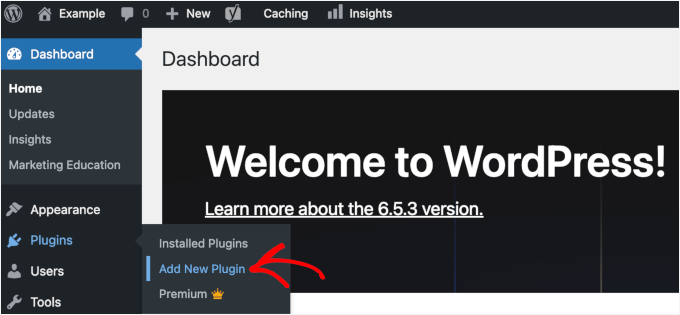
From your WordPress admin dashboard, go to Plugins » Add New Plugin.
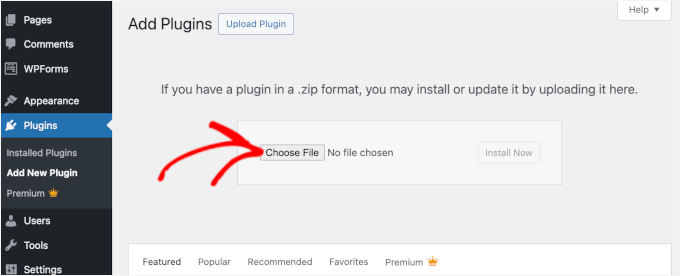
Click the ‘Upload Plugin’ button at the top of the page.
Choose the WPForms plugin file you just downloaded (a .zip file) and install it.
After installation finishes, click the ‘Activate Plugin’ button. WPForms will now appear in your admin dashboard.
You can then go to WPForms » Settings to activate your license key. Go ahead and paste the key into the box and click ‘Verify Key.’
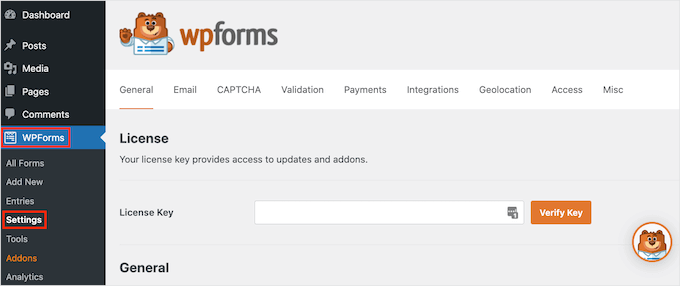
This activation step is important because it unlocks all the Pro features, including the PDF Addon we’ll be using. Once your key is verified, you’re ready to start creating WordPress forms that generate PDFs automatically.
If you need help, check out our guide on how to install a WordPress plugin.
After that, you can navigate to WPForms » Addons to install the PDF Addon.
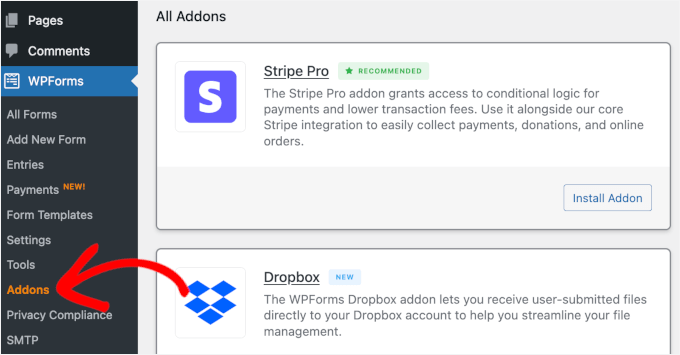
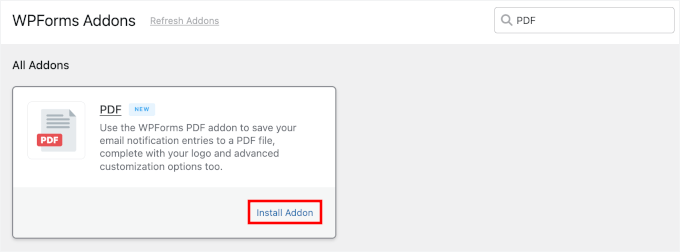
Inside the Addons panel, you can use the search bar to quickly find the PDF Addon.
In the search result, simply click the ‘Install Addon’ button to enable it.
Step 2: Create Your Form or Select an Existing One
Now that WPForms and PDF Addon are installed and activated, it’s time to create the form you’ll use for PDF generation.
In this tutorial, I’m going to create a simple terms of service form and set up an automated PDF for demonstration.
From your WordPress dashboard, go to WPForms » Add New.
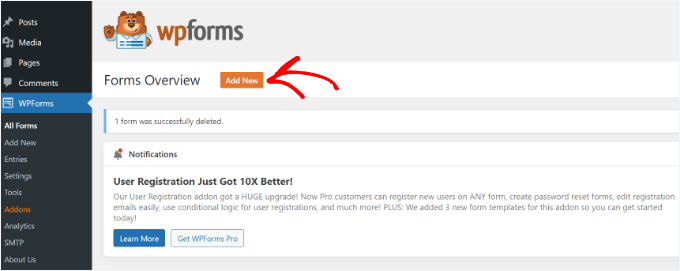
💡 Note: You can either build a new form from scratch or use one of your existing forms. If you want to edit a form, you can go to the ‘All Forms’ tab in WPFForms and click the ‘Edit’ button for the form you want to add automated PDF generation.
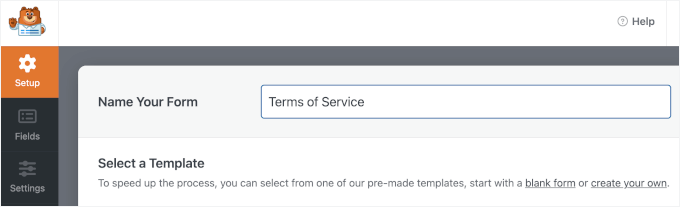
This opens the Setup page, where you can name your form.
This is for your reference only, but I recommend using a clear name for easier organization.
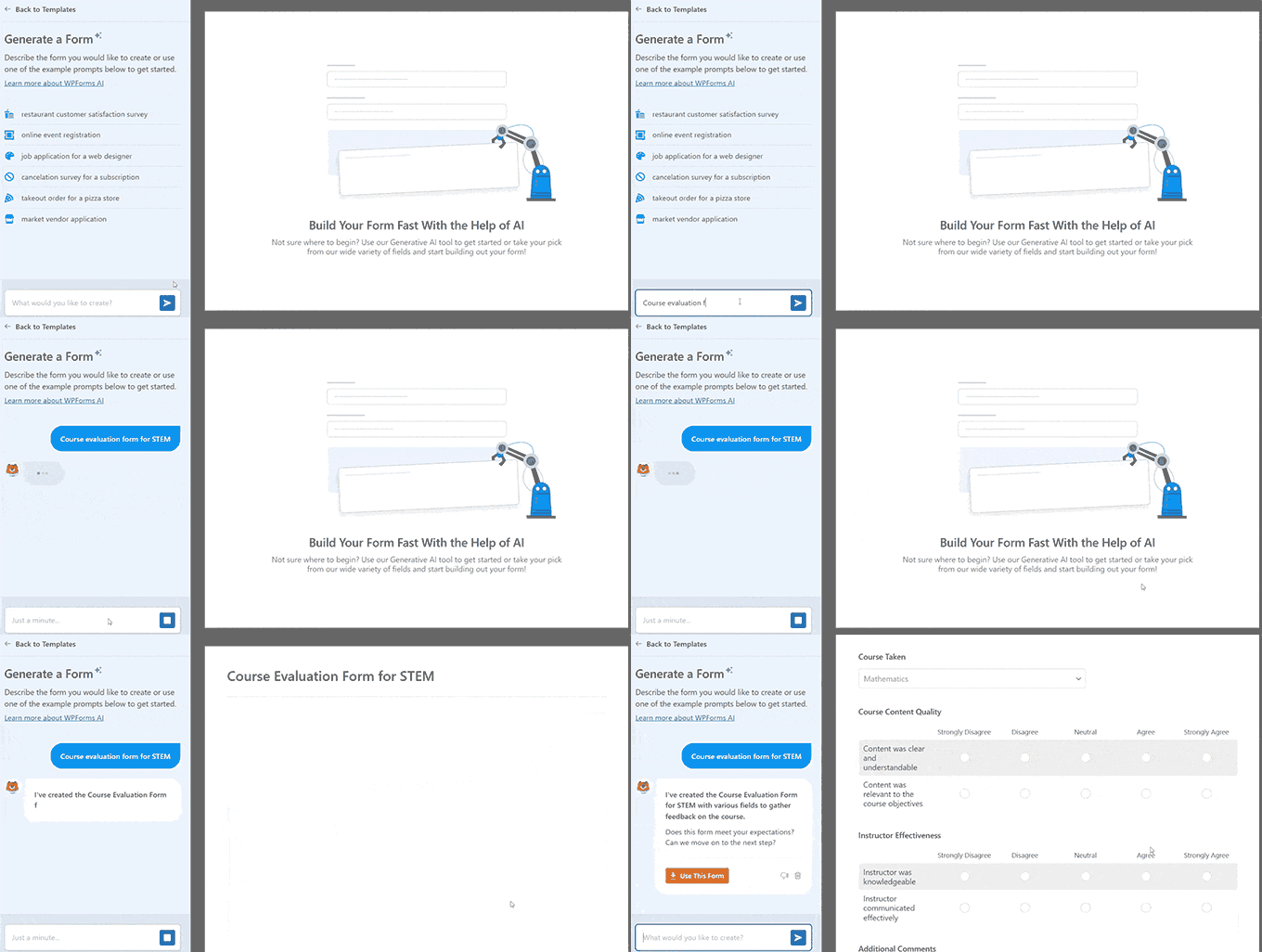
Next, choose how to build your form.
You can start from scratch, use the AI form builder, or pick a template.
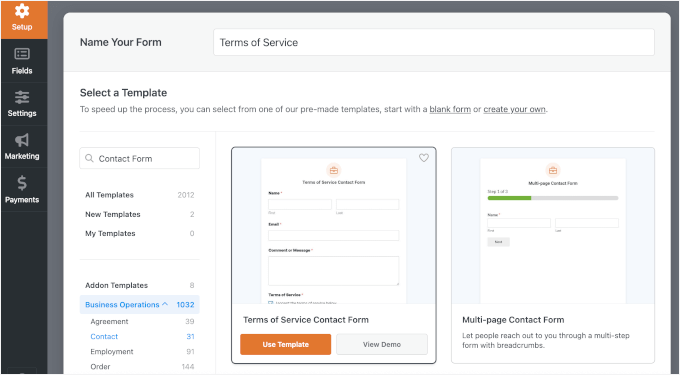
For demonstration, I’ll show you how to do it using a pre-made form template.
In the search bar, you can type in keywords, such as “Contact Form,” “Receipt,” “Agreement,” or anything that fits your needs, to quickly find the perfect template.
When you find the form template you like, hover over it and click the ‘Use Template’ button. For demonstration, I’m going to choose the Terms of Service Form template.
WPForms will then open the form builder interface.
The Terms of Service form template comes preloaded with fields such as date, receipt number, order details, payer name, and payment information.
You can take a moment to look at the form builder interface. On the left side, you’ll see all the available form fields you can add. The right panel shows the actual fields in your form.
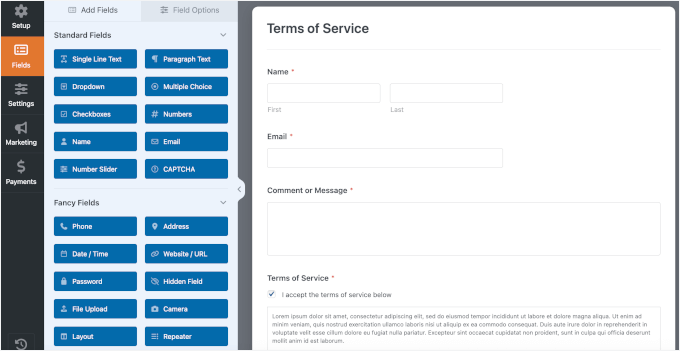
To customize this form, click on any field in the right panel to edit it.
For example, if you want to change the Email label to Email Address, just click that field and type the new label in the settings panel on the right. You can also make fields required or optional, add a short description, and change their order by dragging them up or down.
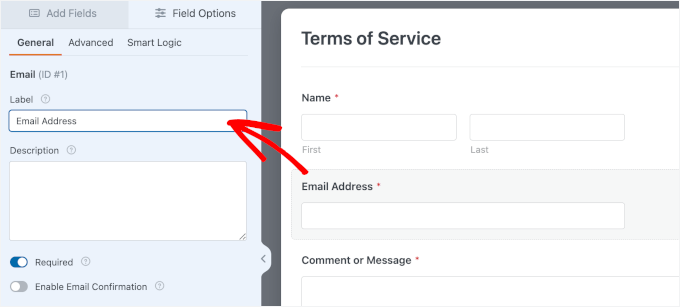
If you need to add more fields, like a dropdown for additional options or a file upload field for supporting documents, simply drag them from the left panel into your form.
Since we want this to be a signed legal document, make sure to drag the Signature field into your form as well.
From here, you can continue tweaking this form template to fit your needs.
One thing that you want to do for sure is to edit the sample text for your Terms of Service checkbox. Simply click on the field and rewrite the text in ‘Description.’
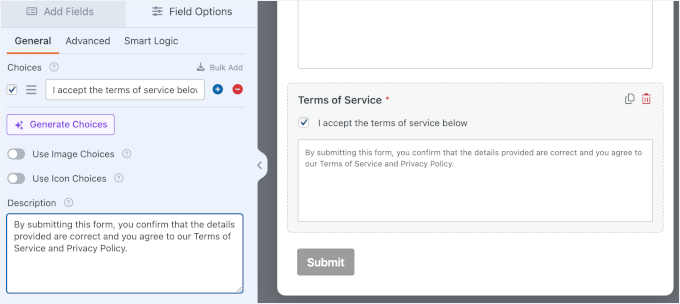
Once your form looks exactly how you want it, you’re ready to configure your form settings.
Step 3: Set Up Form Notifications and Confirmations (Optional)
Before we set up the automated PDF generation, it’s a good idea to quickly check the Notifications and Confirmations settings. Do note that this step is optional, but it ensures that both you and your users receive the right follow-up after form submission.
By default, form notifications are sent to the site admin. If you also want to send a copy of the PDF to the user, you can add another notification for that.
To do this, open Settings » Notifications, and click ‘Add New Notification.’
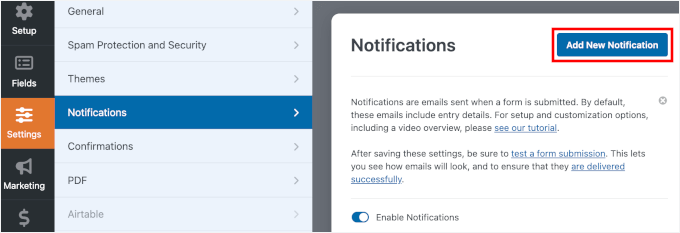
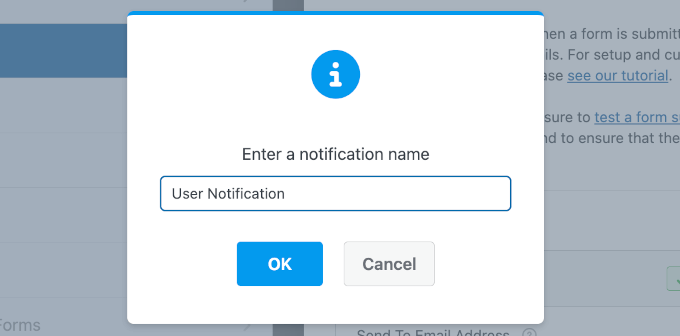
In the popup, give your notification a name.
For example, “Send PDF to User” or “User Notification,” and click ‘OK.’
In the Send To Email Address field, you’ll want to use a Smart Tag so the email is sent to the person who submitted the form. Click the Smart Tag icon at the end of the field and select the Email field from your form.
If your form needs to notify multiple people, you can go ahead and add multiple email addresses, separated by commas.
Next, you can fill in the Email Subject, From Name, and From Email fields. You can use Smart Tags here, too, if you want to automatically personalize the message or include form details.
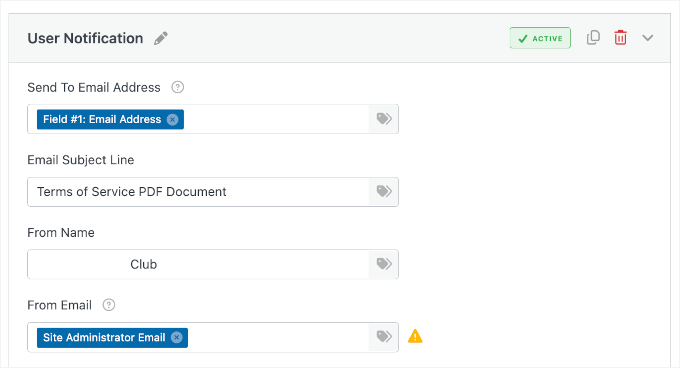
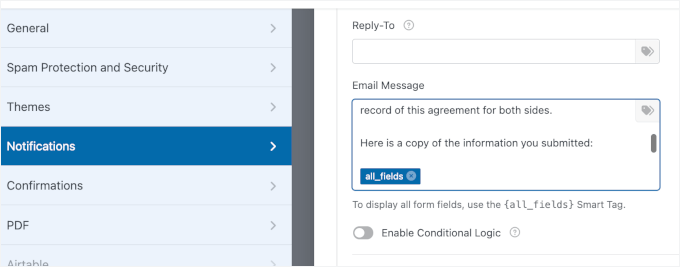
After that, you can scroll down to the ‘Email Message’ field.
By default, WPForms has included the {all_fields} smart tag, but you can add more content to make sure your notification email looks good.
While you’re here, click over to the Settings » Confirmations tab as well.
WPForms offers three types of confirmations: a message, a redirect, or sending users to a specific URL.
In this tutorial, I’m using the ‘Message’ confirmation because I want to keep users on the same page after they submit the form. Once that’s set, you’re done with this step.
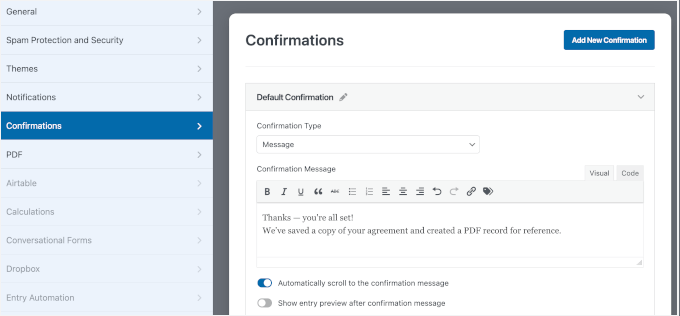
Other than a confirmation message, you can redirect users to another web page or a completely different site.
For more information, you can see our guide on how to redirect users after form submission.
Step 4: Configure the PDF Settings
With your form built, it’s time to set up the PDF generation. In this step, you’ll configure WPForms to automatically create a professional PDF every time someone submits your form.
To start, look at the left sidebar under ‘Settings’ in the form builder and switch to the ‘PDF’ tab. Then, click the ‘Add New PDF’ button.
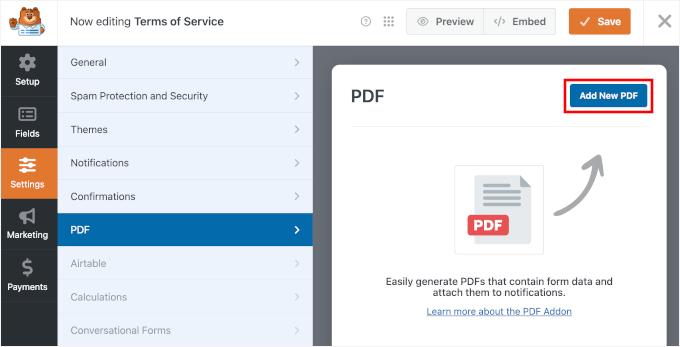
A popup window will appear asking you to name your PDF.
Go ahead and add a descriptive name that makes sense for your records. You can always change this later if needed, so don’t stress too much about getting it perfect right now.
Click ‘OK’ to continue.
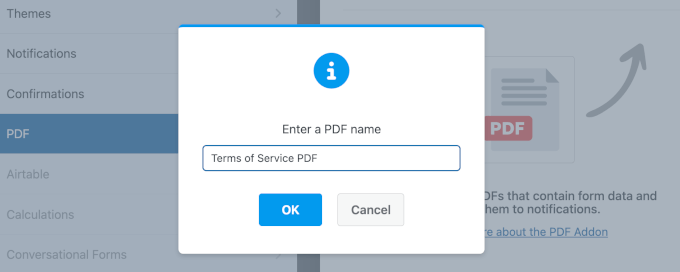
With your PDF configuration enabled, WPForms will show you several important settings.
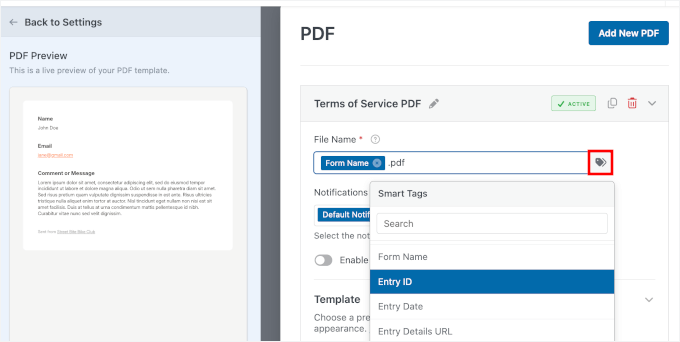
The first thing you’ll see is the ‘File Name’ field. By default, WPForms uses the “Entry for {form-name}” format as the PDF filename, but you can customize this.
I personally like to include smart tags here to make each PDF unique. For example, you could use something like {form_name}-{entry_id}, which would create files named “Terms-of-Service-123.pdf.”
Using the Entry ID is highly recommended for record-keeping. It ensures every file has a unique name, making it much easier to organize your folders and find specific agreements later without opening every single file.
To use a smart tag, you can click the ‘Smart Tags’ icon to the right of the field and choose from the available options in the dropdown.
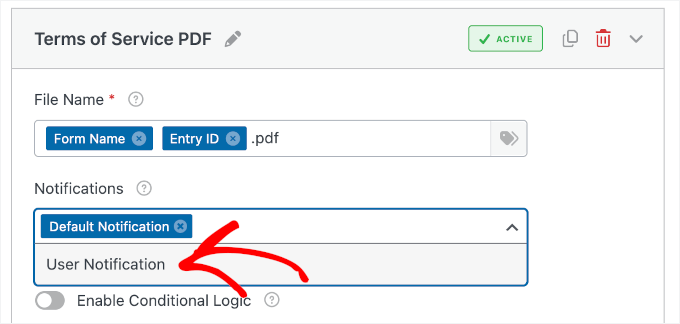
Right below that, you’ll see the Email Notifications dropdown. This is where you decide which email notifications should include the PDF as an attachment.
If you want to send the PDF to yourself, select ‘Default Notification.’ If you want users to receive a copy, select ‘User Notification.’ You can even select both options if you want everyone to get a copy.
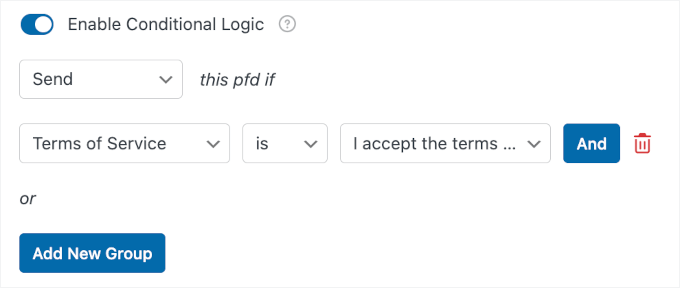
Right below that, you’ll see a conditional logic option. This powerful feature lets you control when PDFs are generated.
For example, maybe you only want to create a PDF if someone checks the “I agree to terms” checkbox.
Next, you’ll choose your PDF template. WPForms offers dozens of professionally designed templates organized into categories.
You’ll see options for Notifications, Documents, Financial forms, and Certificates. Since we’re working with a legal document, click the ‘Documents’ category.
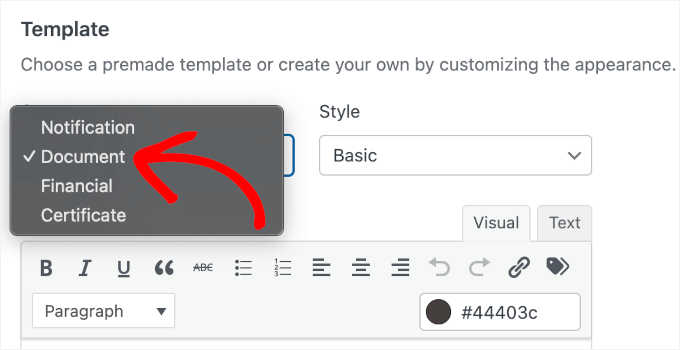
🧑💻 Pro Tip: Choose the category that best fits your use case. For example, use ‘Financial Forms’ for invoices or payment records, and ‘Certificates’ for things like online course completion or attendance certificates.
You can then browse through the available templates by clicking on each one. You’ll see a live preview appear on the left side of your screen showing exactly how your PDF will look.
For my form, I’m selecting the ‘Legal’ style.
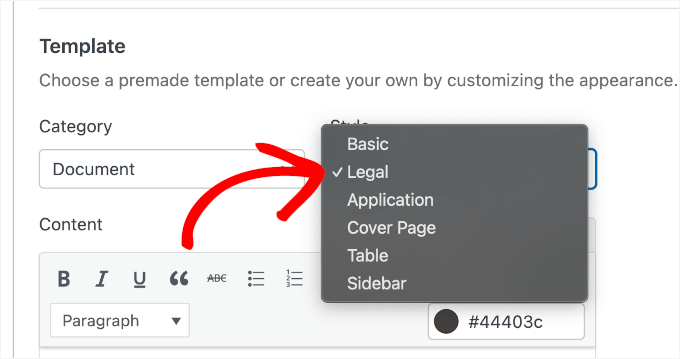
Once you’ve chosen a template and style, it’s automatically applied to your PDF. You’ll notice the preview updates immediately to show your form fields populated in the template layout.
It has a clean, professional look with a formal layout that’s perfect for contracts. The template features a header section for your logo, clearly organized content sections, and a footer with page numbers.
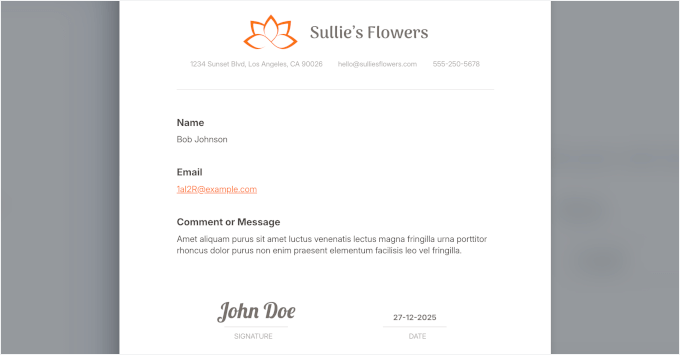
At this point, your basic PDF settings are configured. In the next step, we’ll customize the content and design to make sure it looks exactly what you want in the final PDF.
Step 5: Customize and Style Your PDF
Now that you’ve selected a template, it’s time to customize the PDF. This is where you’ll replace placeholder text, adjust your form fields, and add any extra content you want to include in the final document.
Then, I’ll show you how to make your PDF more on-brand with a custom design.
Step 5.1: Personalize the PDF Content
On the left side of the screen, you’ll see a live PDF preview. The Legal template includes editable placeholders like “Business Address,” “Signature Type,” and “Date.” You can click directly on any of this text in the preview to edit it.
Let’s start with the Content section.
The template already includes all the form fields, but you can add a short explanation to provide context.
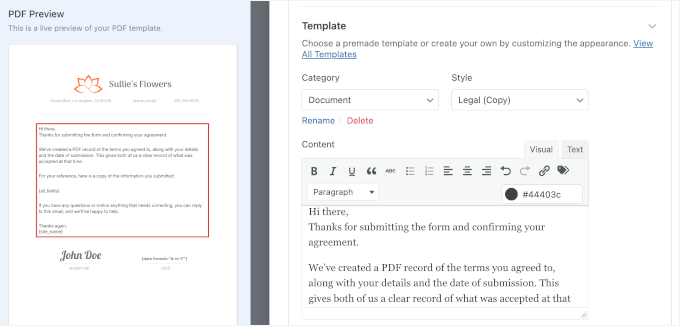
The editor works like a simple word processor. You can format text, add bullet points, insert headings, and include links to make everything clear and easy to read.
Also, you can paste in your actual legal text, such as your full terms of service or contract language.
Plus, you can use Smart Tags to pull the information dynamically from your form submissions. Using Smart Tags means every PDF will be personalized with the correct information without you doing anything manually.
🧑💻 Pro Tip: You might want to add any disclaimers or additional information your users might need. For legal documents, you could include contact information, effective dates, and instructions for next steps.
Next, you can work on the placeholders with your business contact details, such as your address, email, and phone number. You can also use Smart Tags here.
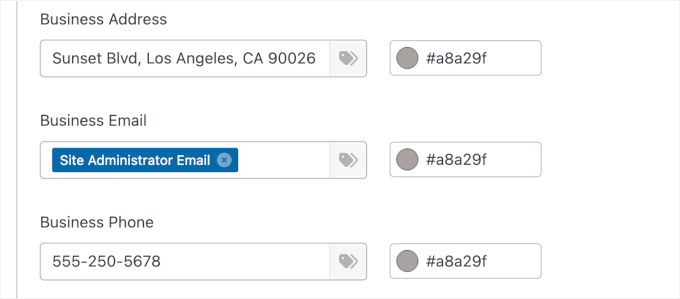
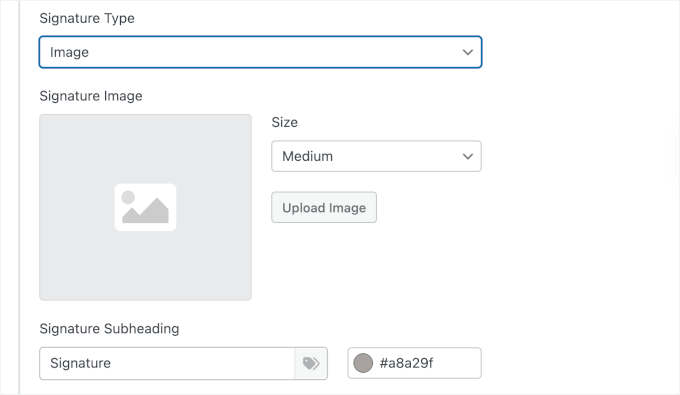
Now, scroll down to find the signature settings.
Here, you can configure how the signature appears. Since we added a Signature field to the form in Step 2, WPForms will automatically pull the form user’s eSignature into this area. You can adjust the size and the heading to ensure it looks official.
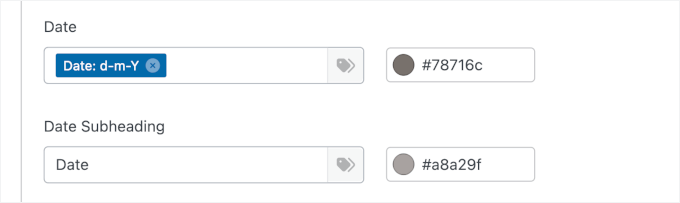
Next, there are the Date fields.
Go ahead and choose your date format, as well as write the subheading.
From here, take some time to review each section.
Make sure all your form fields are included and that they’re arranged in a logical order. You want the final PDF to be easy to read and understand.
Step 5.2: Customize the PDF Design
With your content in place, it’s time to make your PDF look on-brand. In this step, you’ll customize colors, add your logo, and adjust the overall design to match your business identity.
Let’s scroll down to ‘Appearance’ in the PDF settings panel to choose a pre-designed theme. Each theme has its own color scheme and styling. Alternatively, you can edit the theme colors.
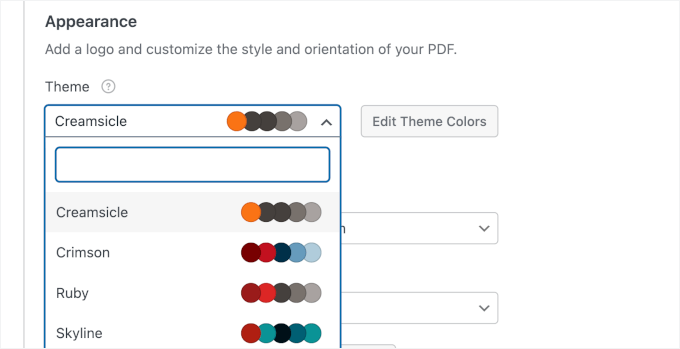
I like to scroll through a few options to find the one that best matches my brand. The preview on the left updates instantly, so you can see how these themes affect your PDF design.
Once you’ve picked a theme, it’s time to add your custom logo.
If you don’t see the ‘Upload’ button, click the ‘Remove Image’ button to remove the current logo placeholder.
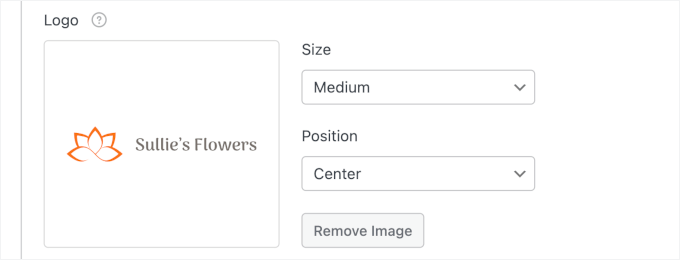
After that, you can choose your logo file from your computer. WPForms accepts popular image formats like PNG and JPG. Your logo will then appear in the PDF preview.
You can then adjust the logo size – small, medium, or large. You can also position your logo on the left or center. I usually center mine for legal documents because it creates a more formal, balanced appearance.
All these small design touches add up to create a document that looks professionally designed. Your colors match your brand, your logo is prominently displayed, and the overall layout looks clean and organized.
Step 6: Adjust Advanced PDF Settings
Before we test your PDF, there are a few technical settings you should configure. These advanced options give you control over the document format, security, and who can access your PDFs.
Click to expand the ‘Advanced’ tab by the end of the PDF settings panel.
The first setting you’ll see is Paper Size. Available sizes include Letter (8.5″ x 11″), A4, Legal, and more. The default is Letter, which works great for most business documents in the United States.
If you’re working with international clients or have formatting requirements, you can select A4 or another size from the dropdown.
Right next to that, you’ll find the ‘Orientation’ setting. You can choose between Portrait (vertical) and Landscape (horizontal) layouts.
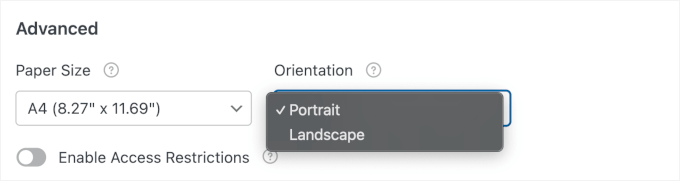
Portrait is the format for most documents, and that’s what I’m using here. Landscape orientation works better if you have wide tables or charts that need more horizontal space.
Now let’s talk about security. You can click to turn on ‘Access Restrictions.’
This is one of my favorite features because it lets you control exactly who can view and download your PDFs. By default, PDFs are accessible to any visitor, but you can lock them down using several options.
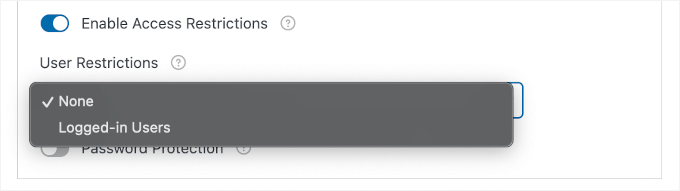
If you choose the “Logged-in Users” option, only logged-in WordPress users will be able to access the PDF. This is useful if you’re creating documents for members of your website or employees in your organization.
For extra security, WPForms also lets you password-protect your PDFs.
You can use this feature by enabling the ‘Password Protection option.’ Then simply enter a password that users need to open the document, and re-enter it to confirm.
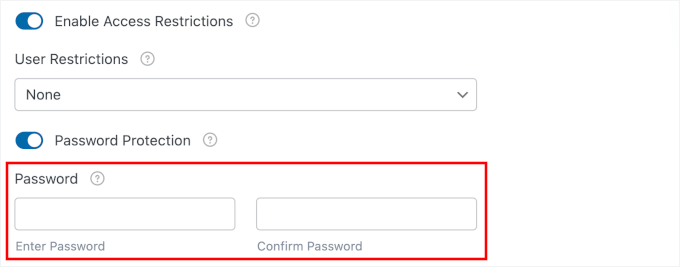
This is perfect for sensitive legal agreements or financial documents.
🧑💻 Pro Tip: One thing to keep in mind with password protection – you’ll need to communicate the password to your users somehow. I usually include it in a follow-up email to keep things secure.
Once you’ve configured everything to match your requirements, it’s time to test your PDF generator form.
Step 7: Test Your PDF Generation
Before you publish your form and start collecting real submissions, you need to make sure everything works correctly. Testing your PDF generation is a critical step that I never skip, and you shouldn’t either.
The good news is that WPForms makes testing easy with its built-in preview feature. Look at the top right corner of the form builder and click the ‘Preview’ button.
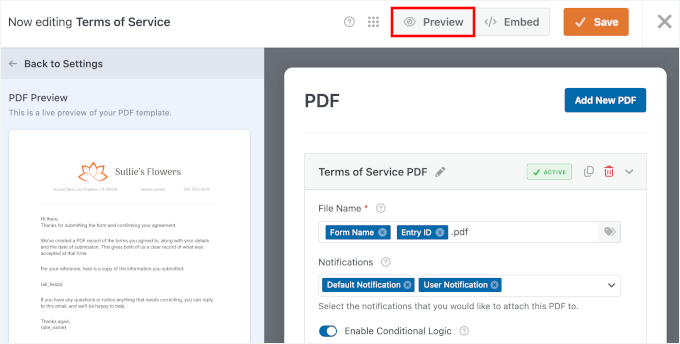
This opens your form in a new tab exactly as your users will see it. Now you can fill it out just like a real submission and see if the PDF generates correctly.
Go ahead and fill in all the form fields with test information. For the Legal Documents form, I skipped the name field and wrote a typo in the email field to check validation.
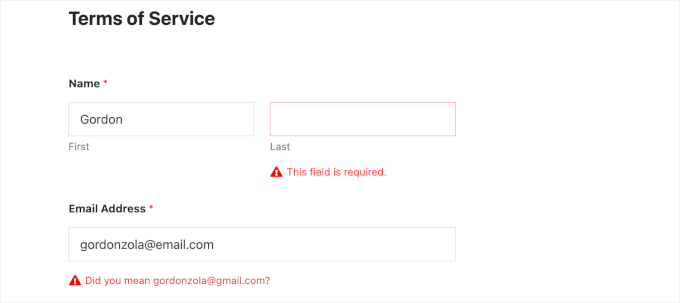
Now, let’s make sure to check the ‘I agree to terms’ checkbox and click the ‘Submit’ button at the bottom of the form.
After submitting, you’ll see a confirmation message for your form.

Now let’s check if the PDF was created properly.
Go back to your WordPress dashboard and navigate to WPForms » Entries.
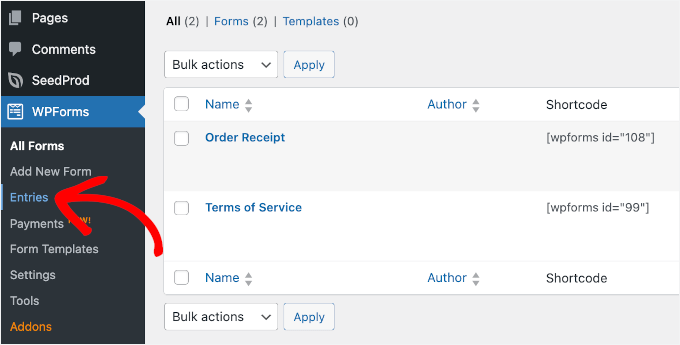
You should see your test submission listed on the next screen.
Click on the ‘View’ button in the ‘Actions’ column to see all the details.
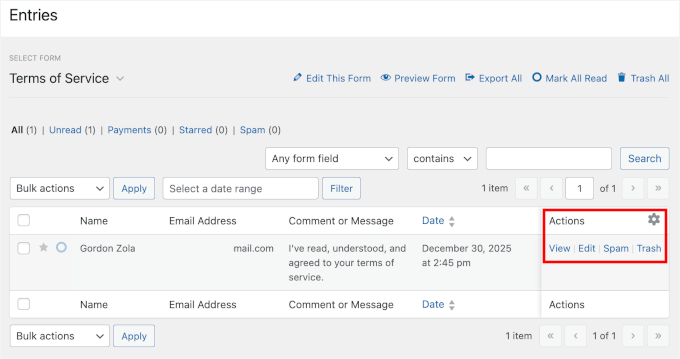
On the entry details page, look for the PDF section – it should display your configured PDF link.
You can simply click on that link to open your generated PDF.
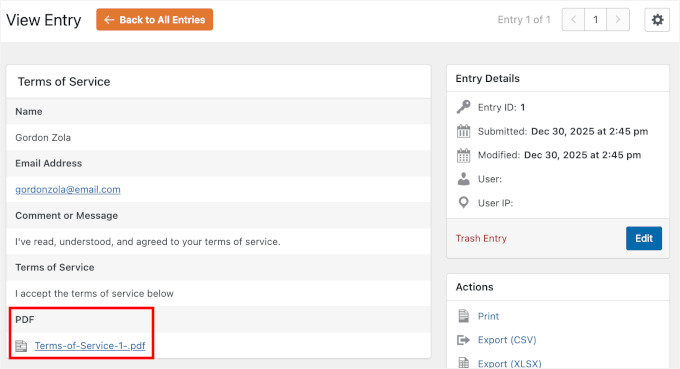
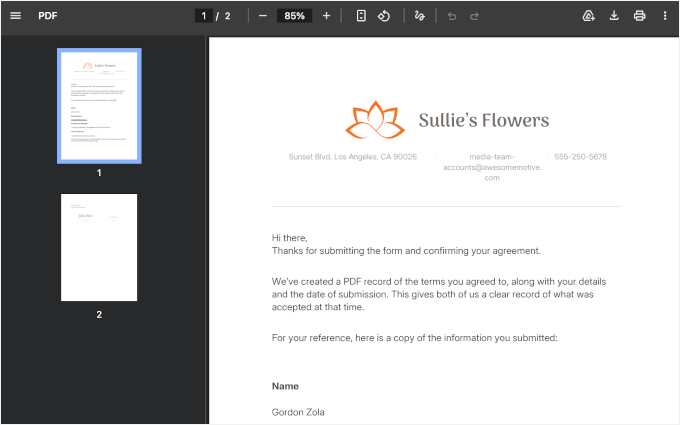
The PDF will open in a new browser tab or download to your computer, depending on your browser settings.
Take a good look at it and check everything carefully:
- Make sure all your form information appears correctly in the PDF. Your test name, email address, and company details should be exactly where you placed them in the template.
- Check that the smart tags pulled in the right information. Scroll through the entire document and verify that nothing is cut off or formatting looks weird.
- Pay attention to your logo – does it appear at the right size and in the right position? Are your brand colors showing up correctly?
- Is the text readable and properly formatted with the headings, bullet points, and styling you added?
This step matters because it affects how professional your document looks.
Now, let’s test delivery if you configured notifications to include the PDF.
You should have received an email with the PDF attached. Open that email and verify that the PDF attachment is there and opens correctly.
If you don’t see the email immediately, be sure to check your spam or junk folder, as emails with attachments can sometimes trigger spam filters.
💡Note: If you’re not receiving test emails, your website may have email delivery issues. I recommend using WP Mail SMTP to fix it. This plugin ensures your form notifications and PDF attachments actually reach their destination.
Step 8: Embed Your Form in WordPress
Now, it’s time to publish your form and add it to your WordPress website so people can actually use it.
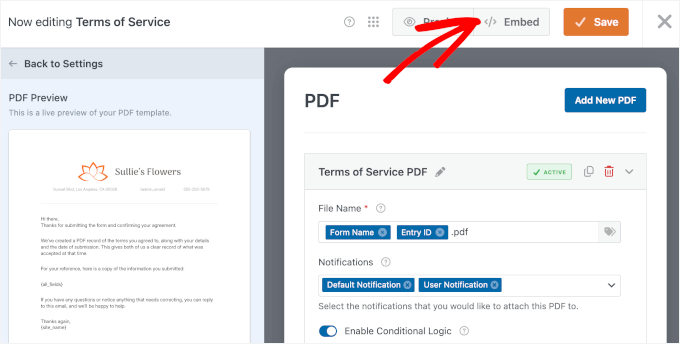
In the form builder, click the ‘Save’ button first to ensure all your changes are saved. This is important because you don’t want to lose any of the customizations you just made.
Once your form is saved, click the ‘Embed’ button right next to it.
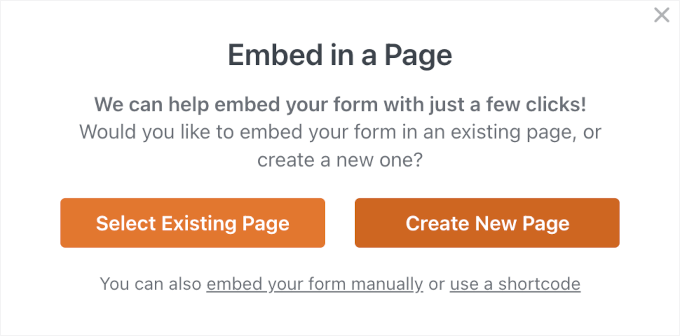
WPForms will show you a popup with a few options for adding your form to your post or page.
The easiest method is to embed it on a new page, so feel free to click the ‘Create New Page’ option in the popup window.
In the next popup, go ahead and name your new page.
For my form, I’m calling it “Legal Agreement Form” – you can name yours whatever makes sense for your website.
After entering the page name, click the ‘Let’s Go!’ button.
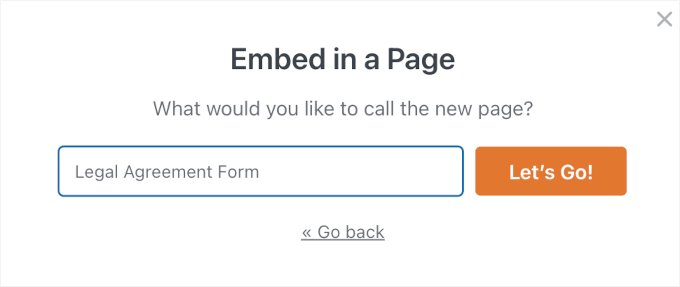
WPForms automatically creates a new WordPress page and embeds your form on it.
The page opens in the WordPress block editor so you can see exactly how it looks. Your form is already there, ready to go.
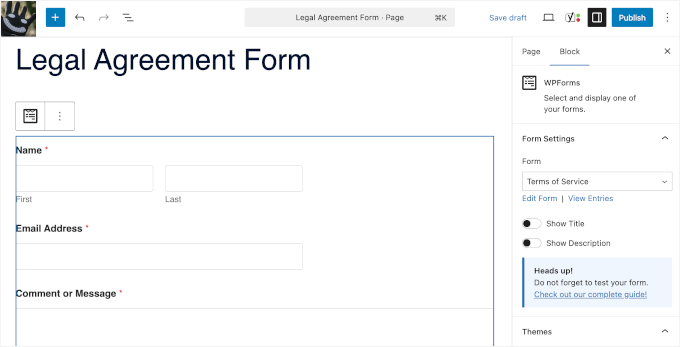
You can add additional content around the form if you want.
Maybe you need to include instructions above the form explaining how to fill it out. Or perhaps you want to add some introductory text about what the legal document covers. Just click above or below the form block and start typing.
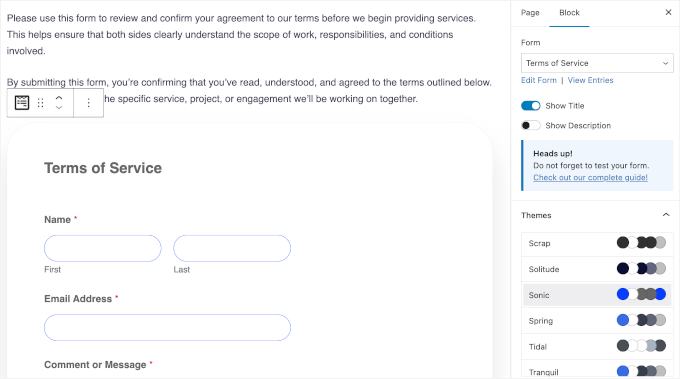
You can also choose a theme in the ‘Form Settings’ on the right to style your form.
If you prefer to add the form to an existing page instead, that’s easy too. Navigate to any page on your site and open it in the editor.
You can also use the shortcode method if you’re more comfortable with that. Every WPForms form has a unique shortcode that you can copy and paste anywhere.
For more information, see our guide on how to embed WordPress forms.
Before you publish the page, click the ‘Preview’ button to see how everything looks on the front end of your website. Make sure the form displays correctly and fits well with your page layout.
Check that it’s mobile-friendly too – click the mobile preview icon to see how it looks on phones and tablets. WPForms automatically optimizes forms for mobile devices, but it’s always good to double-check.
If everything looks perfect, go ahead and click the ‘Publish’ button. Your form is now live on your WordPress website!
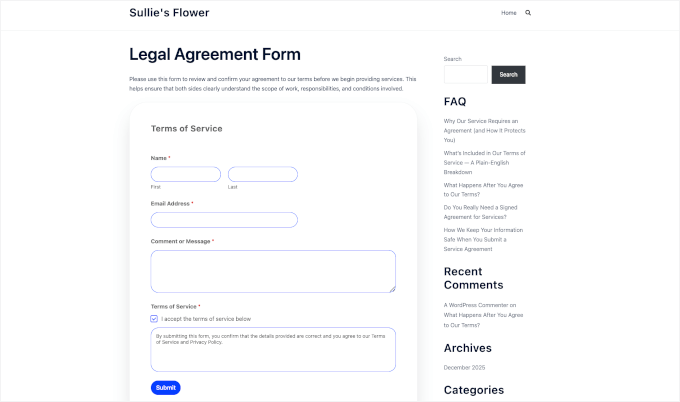
From now on, whenever someone submits your form, WPForms will automatically generate a professional PDF. Then, it will handle it according to the settings you configured.
You can always go back and make changes to your form or PDF settings later. Just navigate to WPForms » All Forms, find your form, and click ‘Edit.’ Any changes you make will apply to all future submissions.
FAQs About PDFs and Forms in WordPress
Here are some of the most common questions we get about generating PDFs from WordPress forms:
How do I export form entries in WordPress?
If you’re using WPForms, go to WPForms » Entries in your WordPress dashboard and select the form you want to export. You can download all submissions as a CSV or Excel file. You can then open that file in Excel, Google Sheets, or any spreadsheet program.
Which WordPress form plugin can generate PDF files?
WPForms is the best WordPress form plugin for generating PDF files. Its PDF Addon includes 40+ professionally designed templates, design customization options, and the ability to automatically email PDFs to users and site admins.
How can I create a downloadable PDF in WordPress?
You can create a PDF on your computer, upload it to your WordPress Media Library, and embed it into your site so visitors can download it. You can even sell your PDF downloads by setting them up as digital products using Easy Digital Downloads.
How do I embed a PDF in WordPress?
The easiest way is to use WordPress’s built-in File block. Add the block to your page, upload your PDF, and WordPress will display it inline with a download option. If you need extra features like zoom, page navigation, or a better reading experience, use a PDF viewer plugin.
Additional Resources for Using Forms in WordPress
I hope this article has helped you learn how to automatically generate PDFs from form entries in WordPress.
Next, you might want to check out our other WordPress guides on:
- How to limit the number of WordPress form entries
- How to connect any WordPress forms to Google Sheets
- Tips for creating more interactive forms
- How to block contact form spam in WordPress
- Ultimate guide to using WordPress forms
If you liked this article, then please subscribe to our YouTube Channel for WordPress video tutorials. You can also find us on Twitter and Facebook.
The post How I Automatically Turn WordPress Form Entries Into PDFs (No Manual Work) first appeared on WPBeginner.
Matt: Find My Update
The best part about blogging is the comments, and after I posted “I wish that when you use Find My to find your iPhone, it would also flash the flashlight, which would be great for finding it in a bag or a dark room.” Michael Wender and David Artiss jumped in that it’s already there!
Apple support says if you touch and hold it will flash the light! Now I haven’t been able to get this to work yet, perhaps because when I did, I got a notice that Precision Finding, which uses ultra-wideband (UWB) frequencies to help you find your phone or Airtag, which is magical, isn’t available in all regions. I’m currently stranded in St. Martin because of airspace issues with Venezuela, and apparently, this is one of the countries, like Indonesia, where UWB doesn’t work.
Update: Hours later, the press-and-hold thing now flashes the light, so it must have been a heisenbug.