#202 – Charly Leetham on Using WordPress to Enable a Digital Nomad Life
Transcript
[00:00:19] Nathan Wrigley: Welcome to the Jukebox Podcast from WP Tavern. My name is Nathan Wrigley.
Jukebox is a podcast which is dedicated to all things WordPress. The people, the events, the plugins, the blocks, the themes, and in this case, using WordPress to enable a digital nomad life.
If you’d like to subscribe to the podcast, you can do that by searching for WP Tavern in your podcast player of choice, or by going to wptavern.com/feed/podcast, and you can copy that URL into most podcast players.
If you have a topic that you’d like us to feature on the podcast, I’m keen to hear from you and hopefully get you or your idea featured on the show. Head to wptavern.com/contact/jukebox, and use the form there.
So on the podcast today we have Charly Leetham. Charly’s journey with technology spans over four decades, from tinkering with amateur radio as a teenager in Australia, to working in electronic engineering and eventually building a career in WordPress and small business tech support. With a background in field service, sales, and running retail businesses, Charly pivoted to helping people with their websites and tech needs right around the time WordPress was in its infancy. Today, nearly 20 years later, she’s still involved in the WordPress ecosystem, providing troubleshooting, support, and plain English tech translations for business owners who need their digital lives demystified.
But in this episode, we are focusing less on her technical skills and more on her unique lifestyle. Charly is a true digital nomad. Someone who’s not bound to a fixed address, but instead lives and works from a camper van fitted with a Starlink system traveling and working all over Australia.
We talk about what it was like to embrace remote working long before it was commonplace, and how she built a business that supports complete flexibility. We explore both the upsides of the digital nomad life, the freedom to travel, spend quality time with family, and work from beautiful locations, as well as the trade-offs such as limited space, and having to ruthlessly prioritize her longings.
Charlie discusses the essential tech setup that empowers her nomadism. From laptops and microphones to how Starlink satellite internet lets her work reliably from almost anywhere, even in places with little or no mobile signal.
There’s practical advice on working with clients, so support can happen on her schedule, and reflections on building a business that matches her values, even if it sometimes means saying goodbye to clients who aren’t the right fit.
If you’ve ever imagined trading your desk for the open road, or wondered what’s technologically, and personally possible, as a remote WordPress worker this episode is for you.
If you’re interested in finding out more, you can find all of the links in the show notes by heading to wptavern.com/podcast, where you’ll find all the other episodes as well.
And so without further delay, I bring you Charly Leetham.
I am joined on the podcast by Charly Leetham. Hello Charly.
[00:03:29] Charly Leetham: Hi Nathan. It’s really good to be here, and we are literally on other side of the world from each other.
[00:03:35] Nathan Wrigley: We could probably not be further apart. You are in Australia, and we’ve never met. We spent probably the last 20 minutes or so having a good old natter. It’s been really interesting. And actually, the way that this podcast was going to go, I think has been upended by the conversation that we just had. Because you talked to me about your digital nomadism, I’m going to say, and I want to lean into that.
But before we get into all of that story about how you’ve ended up working remotely and things, do you just want to give us a little bit of background about how you’ve come to work, be on a WordPress podcast? What’s your background with tech, your life in general? Whatever you wish.
[00:04:09] Charly Leetham: Okay, well, look, I’ll try and keep it short. There is like 40 years to sort of condense into three or four minutes here.
Look, I have always been interested in tech from a very, very, very young age. My dad kind of encouraged me, if I was showed interest in anything, he’d say, well, go and find out about and let’s do this and let’s do that. The age of 13, I had my amateur radio license. By the time I was 16, I’d just left year 10, grade 10, and I went and did an associate diploma, electronic engineering. I worked full-time as a junior laboratory technician in an electronics lab at the Australian University while I was doing that.
And from there I went to be a field service tech with a private company. I’ve done field service, I’ve done pre-sales, I’ve done sales, I’ve done contract management. I’ve done customer service management. Done bid management.
And then I had a need after I decided, I was really, really sick and tired of doing all of this, so I went and bought myself a business with a franchise. We ran retail businesses for four years. They failed spectacularly. And I had a need that I had to actually get some money through the door so that I could feed the kids, pay the bills, eventually feed myself, and the husband is part of it.
So this was born. And this was, people need help with their technology. People need help with their websites, people need help with their emails, people need help with all of this. And at that point in time, that was 2007 and WordPress was just in its infancy. I think it was, maybe three or four generations in at that point, but it was still in its infancy. And I learned, WordPress from that.
Someone said, I’ve got a WordPress website, it’s not working. Can you look at it? Sure. I can look at it. I know C++, I know Pascal, I know Basic. Oh, this is PHP. What’s that? I learned PHP, I learned themes, I learned plugins, I learned how to troubleshoot things. And here we are nearly 20 years later, doing the thing that I love the most.
[00:06:16] Nathan Wrigley: There’s a lot in there, Charly. Genuinely, there is a lot in there. But what I’ve taken from that is that you have always been a bit of a tinkerer. You’ve always been somebody that’s fascinated by the technology side of things. Not just the software, but also, you know, the engineering side of things. And so, gosh, what a history you’ve got.
We’ll get onto all the WordPress stuff a little bit later. Obviously that’s a big part of why you’re on this particular podcast because we are a WordPress focussed podcast. But it was the conversation that we had about half an hour ago that captured my attention and is just going to divert us for a little while.
And that is, you got on the call, we started talking about where we are in the world and the fact that you are over there and I’m over here, and isn’t it amazing that we can talk to each other? And the fact that this technology is here and, you know, when we were both children, this was the realm of science fiction. Being able to speak to somebody on the other side of the planet without prearranging it, and organising it with a telephone network and a great expense and all that.
And then we started talking about literally where you are. And I was kind of curious about your location. It turns out you are a digital nomad. Now, for those people tuning in who don’t know what this is, a digital nomad, I guess is somebody who is not bound to a specific location. I live in the UK. I have a house and a mortgage and all those kind of things. So I’ve kind of saddled myself to that, and I’ve got this definite spot in the world where I call home. You’ve decided to kind of get rid of all of that. And so just tell us about your life and what it is that you do, and how you move around and how you empower that with technology, and what technology you use to make that even possible.
[00:07:53] Charly Leetham: Okay. Let’s start by telling you a story. When my kids were all, all my kids are now in their early thirties, late twenties, so they’re adults. They’re gone, they’re out doing their own thing. But when my kids were born in the mid nineties, I wanted nothing more than to be able to stay home with them. But because of my experience, because of what I was doing, I was the breadwinner. I was the one that had the money coming in, so I had to go back to work. Went back to it when my kids were really young.
And as much as I loved my job and I loved what I was doing, I really hated not being able to be with him. And what I wanted to do was what I’m doing now, then. The ability to help people with their tech. The technology didn’t exist. We couldn’t remote into computers, we couldn’t do video conferencing. We couldn’t even do audio calls like phone networks for what we had. So if you just think about, you know, a young 20-year-old woman with two kids, working in IT, wanting to do this.
Now we come forward nearly 20 years, or nearly 30 years because my kids are 30. I can do exactly what I wanted to do 30 years ago today. I can sit wherever I am, I can run up my computer, I can get an internet connection, I can talk to you. Someone says to me, my computer’s not working, or my email’s not sending, I can’t do this. I can remote into their computer. I can do a face-to-face call with them. I can remote into their computer. I can give them that support. I don’t have to be on site to do that.
That is what a digital nomad is. That’s what me as a digital nomad does. I provide tech support to people wherever I am, literally in the world. I said to you, I traveled in the US for a couple of years. Well, I got stuck in the US for a couple of years. And I didn’t work over there. I want to be really, really clear because you’re allowed to work in the US when you’re over there on a visitor visa. But I was helping people. People would say to me, my computer’s broken, well, let me remote in. I’ll have a look. Let me go and do this, I’ll help you. My dad would ring me from Australia and say, my email’s broken. What can I do? I’d fix it for him.
So that’s what I do. So how does that work for me today? There is a housing crisis. That’s the first thing that we really need to recognise is there is a housing crisis. Finding a house is really, really difficult. Finding a house that is affordable is even more difficult. Rather than stressing on the fact that I can’t find a house, or I can’t afford the rent for a house, or I don’t want to have that stress of having a rent for a house. I fitted out a vehicle, I got a Starlink system. My brother fitted the vehicle out for me. My son, who is the electrician, put the electrical into it. And I literally live on the road. I go from place to place. I find somewhere I can hook into power for a couple of days. I throw my Starlink out the site, and I work. I support people.
You could talk to me tomorrow, well, not tomorrow. Talk to me in a month, and I’m going to be in far North Queensland. A month from today, I will be in far North Queensland doing things up in far North Queensland because I’ve got to be up there for something. That’s what my life is like.
[00:10:55] Nathan Wrigley: If we rewind the clock, I don’t know, 10 years, did you desire something like that? From what you said, it sounds like you did. You always had some sort of intuition that if the technology allowed, you would wish for something like that. But obviously, kids and bills and all of that kind of got in the way. Has this been something which, if you sort of look back on your life, you think instinctively this was something that you wished to do?
[00:11:17] Charly Leetham: Not on the road. Not mobile like I am. Being able to do it from home, being able to be a work from home mum, absolutely. Being on the road and moving around, no, not even my wildest dreams would I have even imagined it. I didn’t even know that was available to us. I had no idea.
Look, I’ve met people, just to sort of segue very quickly. I have met people while I’m doing this, and they are young families. They are mum and dad and the kids, and they’re living on the road. They’ve got homeschooling curriculums for the kids. The kids do all their schooling. They get all these extra education of the places they’re in, all the things that they’re doing. Mum and dad will arrange to take the kids out on a bushwalk, and go and see a place that very few people in Australia will ever get to see. And these kids are living this life. I didn’t know that was available. If I had known that was available, I might have done that with my kids.
[00:12:08] Nathan Wrigley: I think one of the curious things is that, if you are working in the tech space, and obviously we’ll talk more about WordPress in a moment, there is a significant chance that this is available to you. I mean obviously you may have a job which is office bound. We understand that that means that you’ve got to show up to the office and what have you. But I’m imagining that there’s quite a few people listening to this podcast who, if they were to really examine it, these possibilities are open to them.
But it may not be something that they, A, wish to do, or B, they’ve not really thought about it too much. You know, they’ve decided that, okay, life is fine, I like my local environment or what have you.
What are like the key benefits, if you know what I mean? If you were to advertise this lifestyle to our audience, so we’ll do this in two parts. Let’s do the benefits first and then we’ll do the drawbacks later. What are the key things which you look at in your life at the moment and think, I’m so grateful for that? What are they?
[00:12:57] Charly Leetham: Freedom. Absolutely the freedom. I mean, we’re going to talk about drawbacks in a minute, so that’s going to get balanced out. But it is the freedom. It’s the ability to say, it’s getting cold in the south of Australia, remembering we’re in the southern hemisphere. So, I actually have to say that because people like, it’s hot in the south. No, it’s cold in the south. So as the winter months come and it gets colder, we migrate north. So I can literally say, no, it’s too cold here, I’m going to go north. Going to go to Queensland and spend winter in Queensland. It still gets cold, but not as cold as it does in the south. So you’ve got that ability.
I guess one of the biggest benefits is my dad is, he’s in his late seventies and I get to travel with dad. Dad’s traveled for many, many years and he still is. But I get to travel with dad. I get to spend these years with my dad. There’s not many people that can say they get to spend this sort of time, and this quality time, with their parents at this stage of life, because life gets in our way. But we make it work.
We will, once a week, arrange to go and do something. He’ll come and knock on the door and say, you are working too hard. I’m like, I’m working, go away, leave me alone. But then it’ll be, okay, yes, you’re right. I’m working too hard, so why don’t I take this morning off and we go and visit this place where we are staying. Go and find a touristy place or a bush walk to do, or go for a swim in the sea, or go and do something together so I can spend time with my dad. If the family needs me to be somewhere, I can be there, generally.
I also just to sort of pad this out a little, I also house sit while I’m doing it. So sometimes I’ll get to a place, someone will be advertising, we need a house sitter. We need someone to come and live in the house, or live at the house, for a couple of weeks while we’re away. So I’ll go and house sit for them, and I get another experience in all of that. So that’s the benefits. It’s just that flexibility. I would be doing exactly what I’m doing, but I would be stuck in a house. I’d be stuck in a room, in a house, grinding. I can grind and be in some of the most beautiful places in the country.
[00:15:02] Nathan Wrigley: Do you know, it’s so curious because I’m imagining there’s a proportion of the people listening to this who are just so in awe of that description. You know, oh gosh, you can really spend the time in the locations that you wish. I’m imagining there’ll also be other people who think, no, that’s not what I want at all. But I’ve got to say, I’m really drawn to what you’re saying. The idea of being able to go and, I don’t know, work with a spectacular view. Or work in a particular city for a period of time, and then go somewhere slightly more rural. In other words, it’s not the same view that you get every day when you wake up. There’s that variety in life which, certainly for me, there’s a lot of appeal there. Okay, let’s do the drawbacks. What are the downsides?
[00:15:44] Charly Leetham: The downsize is I live in a car. Literally, I live in a little camper van. My workspace is probably, because I fitted out a little commercial vehicle, a little commercial van as my van and as, you know, as my income improves, my savings improve, I will probably upgrade it. But my workspace is probably a metre by a metre. It’s not very big. And when I finish up for the day, I’ve got to pack everything up so I’ve got room for relaxation. I can’t sort of just walk out of a room, shut the door and say, well, that’s work done.
Now, work’s done for me, I’ve got to pack everything up, I’ve got to put everything away. You are living on the road, so you don’t have all of your stuff. And I’m going to put stuff in double quotes, they’re in inverted commas. You learn very quickly what is important to you, and what is necessary, and you have what is necessary. And then you have a few of those things that you go, these are really important to me and I’m not going to give them up.
So it is not like you can say, oh, I’ve got that plate that is really good for this entertaining thing, and go to a cupboard and pull that plate out that you use maybe once a year. No, you don’t have that. You’ve got the plates that you use every day.
[00:16:50] Nathan Wrigley: Yeah. The plates.
[00:16:52] Charly Leetham: Yeah, well, I travel on my own. I could literally live with one plate, one cup, one bowl, knife and fork. You are trading off that flexibility of having a house where you can have things stored, and all of storage space. You really have to think about what it is you want. I have a rule. I literally have a rule and I think everyone should live with this rule anyway. I have to have needed it four times before I go and buy it. If I haven’t needed it four times, then I’m not going to buy it. If I look at something, I go, oh, that’d be really cool and it’d be really convenient. Then I go, but would I use it? Have I needed it four times? Have I needed the functionality that gives me four times? No, don’t buy it. Because where the hell am I going to put it?
[00:17:37] Nathan Wrigley: Yeah, and I guess whatever you’re buying, you have to buy the tiny version of it as well. You can’t get the sort of jumbo version of whatever it is.
[00:17:44] Charly Leetham: There’s your other trade off is you can’t buy food in bulk. Like, I used to go and buy several cans of food and put them in the cupboard. Whether I used them or not immediately, there would be several cans of the same thing in the cupboard just in case I needed it. And if it was sort of, oh, I’m down to the last can, I’ll go and buy a few more. Well, now I’m down to buying two or three cans at a time. And once I’ve run those out, I’ve got to go and find the nearest shop and go and buy another one just to sort of keep it topped up.
You’re not buying in bulk, you’re not buying your meat, you’re not buying your fruit veg in bulk. Does that matter? No, because when you get to certain places, you normally find the local providers, you normally find the local fruit seller or the local fruit and veg shop, and go and buy there. You go and support the local community, and you pick up a few things there and, yep, that’s what you’re going to use. That’s what we do.
[00:18:31] Nathan Wrigley: Just to interrupt there, Charly, do you try to spend a significant portion of time in a particular place so that rather than just sort of driving through it, I guess, and spending a couple of days here and a couple of days there, do you spend significant amounts of time there, and therefore begin to have some feeling of what that community is like?
I guess the underpinnings of that question really is, how do you get that sort of human interaction that so many people think is important? Because clearly you are meeting fresh people every day, and you probably don’t get the chance to form those roots and what have you. So there’s a lot there. But do you know what I mean? Do you try to sort of spend a bit of time so that you gather some of those human connections along the way?
[00:19:12] Charly Leetham: Okay, so there’s a couple of things there that you’ve touched on. On my way to a location, I may only spend a day in a location, as I’m heading to a final destination or the next stop along the way. When I get to that next stop along the way, I do try to spend a bit of time, because I like to put my roots down. I like to be able to just settle on in, be able to work for really long periods and not have to worry about, oh, I’ve got to pack everything up and be on the road again. I’ve worked for three days, now I’ve got to spend the next two or three hours packing everything up so I can get on the road and drive for another couple of hours. Yes, I know English people are going to say, couple of hours driving, you’d be across the country.
We’d spend a couple of hours driving and then you get to the other end and you’ve got to set it up. So you’re losing a day when you’re doing that. So my preference is when I get to where I want to be, getting my feet down and staying there for a couple of weeks if I can. And then from there, I use that as a base of, okay, what is within a hundred kilometers that I can go and visit, and do the site seeing, and do the local colour, and make that a hub for my activities.
You then asked about human interaction and honestly, I think I’m a little different to people. I don’t need it as much as others. I am really, really quite happy to just be in my sphere. I’ve got my online connections. If I need to speak to someone, I’ve normally got someone on the other, on Discord, or one of the chat programs that I can chat to. And then if I feel like I’m getting to that stir crazy point, you go to the local pub or you go to the local cafe and you sort of sit around and you have a chat to the locals.
That fills that need for me. I’m not a person who is, it sounds terrible, I’m actually really good in a public environment, but it drains me. So I really, once that’s done, I’m done for a couple of days and I can just go sit in nature and not worry about it.
[00:20:58] Nathan Wrigley: Yeah, I think everybody can totally see that. There’s just so many different personality types, isn’t there? I can identify exactly with what you’re saying. I can go for extended periods of time, and not really require that human interaction. And then occasionally I sort of crave it, and so I satisfy it and go and meet people and hang out with all sorts of different people.
And so I guess really that is the piece that you would need to examine in your own life. Because if you were going to go nomadic, for want of a better word, you’ve got to really understand that bit. What is your need? On what level do you need to be with other people and interact with other people? Because that’s really the fulcrum around what makes this whole thing possible.
Speaking of what makes the whole thing possible, I’m interested to delve into the tech a little bit. Because you mentioned this sort of one metre square, and the fact that you’ve got to pack things away and what have you. I’m curious as to what technology do you have which enables this? Ignoring the vehicle and all that, I’m just trying to imagine what you might put in your shopping cart. If you were telling somebody this digital nomad life was available, what would be the requirements to make that happen?
[00:22:01] Charly Leetham: So I’m doing this with my laptop computer. Now, I buy as top of the range as I can when I buy, and it lasts me for years. So I’ve got, I don’t know if you’re familiar with them, I have an MSI gaming computer, because it’s got the extra fans in it. So it really, really works well when you’re doing a lot of processor intensive stuff. So it’s not just for gaming, because I do a bit of graphic design and I do a bit of this and I do a bit of that. So the extra fans make the world a difference.
So I’ve got an MSI gaming computer, or an MSI computer. I have an external microphone. I’ve actually just recently bought an external webcam. I was using the webcam on the computer. It was perfectly fine. I’ve changed my setup to where I now have an external monitor mounted on the wall in my van. So when I settle in, I pull my 21 inch monitor out and I plug my computer into it and I’ve got this beautiful big monitor. I’ve got my external keyboard, and I’ve got my mouse.
[00:22:56] Nathan Wrigley: Okay. I mean it’s the bare essentials, isn’t it? I think we can all understand that. And then I think you mentioned the internet connectivity bit, which I suppose is also a crucial part of the tech. Because where I am, it’s a landline. I obviously have, you know, I’ve got a mobile phone, so there’s the cell signal, which will allow me to roam within Europe and North America and what have you, but there’s all the cost and everything associated with that. Where you go, I think it’s fair to say that you would quickly lose all manner of possibilities because the reception in Australia, you said is not that great in terms of the internet. So how do you overcome that? I think you said Starlink.
[00:23:30] Charly Leetham: Yes, Starlink. I kind of looked into it for a very long time. I was relying on our mobile data and using my phone as a hot link. But in Australia, I was joking with you about it when we started this call, I’m on the NBN here. And if anyone knows anything about the NBN, you’ll know that most Australians hate the NBN. It’s terrible. If it works, you’ve got to consider yourself lucky.
It’s great if you are in a capital city, but you go a hundred kilometers, and I’m being a little flippant when I say that, but I’m not too far wrong. Go a hundred kilometers away from a regional center and you’ve got nothing. There’s no radio signal. By radio signal, I mean mobile signal. You can’t make phone calls. You’ve got that little, there is no signal icon on your phone. You can’t actually get a connection. I say a hundred kilometers, maybe it’s 200, maybe it’s 250, but that’s not a very long way in Australia. It really isn’t.
So I bought Starlink. I spoke to someone who was traveling along the way. And I actually want to come back to just the nomadic lifestyle when we’re done here, Nathan. And I met someone while they were traveling. They said, oh, Starlink, it’s wonderful. And it was still relatively new at the time. I’m like, oh, really? Are you sure? And he explained it to me like, oh. So when I got the car, I went and bought myself the Starlink and it’s fantastic.
Oh my goodness, it’s so good. You’ve got to have power because the routers take power. You can just get, you know, one of the, I don’t know if you’ve got them there, the power stations, the USB power station that you charge up and you can run all your devices off it for a couple of hours. You could do that. I’ve seen people run them off of just car batteries with the clamps on the battery terminals. I’m an Australian, this is pretty normal.
So you’ve got to have the power for the router, to run the router. That then powers the dish and you’ve basically got, in inverted commas, uninterruptable internet for as long as your power lasts. For as long as you’ve got power, you’ve got uninterruptable internet. I have found where I’ve been, I house sat for my sister-in-law during winter, and her internet was terrible. So I went and got my Starlink out and threw it up and connected to it, and I had better internet. The connection speed on the internet on the Starlink versus her landline connection was like 10 times. I had 10 times better internet connection using Starlink than I did on a landline.
[00:25:50] Nathan Wrigley: With the Starlink technology, do you have to, so I really am ignorant of this. I mean I know it’s to do with satellites, and I know that you can have it bolted onto the side of your house, I guess if you live in a rural area where there is no regular landline. But yours is this sort of peripatetic, mobile version of that.
Firstly, do you have to point it at a particular part of the sky? Do you have to spend time lining it up or do you just have to, just plonk it in daylight? So you know, outside basically? And is it bulky, or is it the kind of stuff that you could throw in a backpack if you were nomadic in that sense? You know, you didn’t have wheels, you didn’t have a vehicle, you were just sort of backpacking around. So two things. Where do you have to point it and is it big?
[00:26:27] Charly Leetham: Okay. You asked some really great questions. I’m just going to say they are really, really inspired questions. The first thing I want to say is that the stuff that you see bolted onto the side of a house is typically the stuff that we would use when we’re out mobile. It’s the same hardware. They’ve just got mounting technology, or mounting systems, that will allow you to mount it to the house.
Quick story before I answer the second question about how big is it and all the rest of it. I had a version 2 Starlink, which, it would now be five or six years old, and it’s got a pole and it’s got the dish on it. And the dish is, I say dish, it’s a rectangular panel and you’ve got put it on a base so that it’s stable. That’s heavier than the version three. I had that last week, the week before I had a problem with it and I was a bit concerned. So I contacted Starlink and I said, listen, it’s doing this, here’s all my, being a tech I had all the diagnostics and stuff I’d done and I laid it all out and I said, and I just really want to say that I’m a little concerned. Because I’m traveling and I’m often outside of mobile range, I don’t want to get outside of mobile range, put my Starlink on and have it fail. I’m concerned that I’ve got an intermittent fault that is going to be a problem.
And they said, no worries, we’ll send you a version 3, no charge. Because I’ve been with Starlink now, probably two, two and a half, no, two years now. And they just sent me the new hardware. So I’ve just upgraded to the version 3. So I can actually talk about both. So the version two is a little bigger. You’re probably talking, I’m just holding my hands up. It’s probably about 40 centimeters wide and 70 centimeters tall, the panel. It’s only 10 mil, five centimeters deep, I guess.
[00:28:06] Nathan Wrigley: It’s like the sort of size of a modestly big laptop screen. Something along those lines.
[00:28:13] Charly Leetham: Actually, it would be about the same size as my, I’m just looking at, it would be a little larger than my computer here. And I’ve got a 21, is this the 15? No, this is a 17 inch. This is a 17 inch monitor. So I’ve got a 17 inch laptop.
[00:28:24] Nathan Wrigley: Yeah, so we’re in the order of, got my hands out and I’m imagining how big that is. It certainly answers my backpacking question anyway.
[00:28:32] Charly Leetham: Well, let me answer that question for you in a different way. There is now actually what they call a Starlink Mini, which is designed for backpacks. It’s designed to fit inside a backpack. It’s got a portable power supply so that you can go hiking, you can go backpacking and take your Starlink with you. I don’t know a lot about it. I do know that the plan that you put it on is a little different to what you would put our plans on, the plans you would use for ours, because it’s designed for you to be really, really mobile, not just mobile like we are. And it’s really light. It’s designed for a backpack.
So that answers that question as well as like, you’ve got the technology. The version 3, and I wanted you to say this, the version 3 would probably be half as light as the version 2. So it’s much lighter. And one of the things that I really liked about the way this all works is that they’ve got ground mounts, right? So you just put them down on the ground, which is going to answer your next question. Do you need to position it? No. You just put it out. You’ve got to make sure it’s got a clear view of the sky. You’ve got to make sure that there’s no real obstructions, and that means no trees, no buildings. So nothing that’s going to sort of overshadow it as the satellites go over. And it will find the satellites for you. You don’t have to do anything. You just hit the button and it just works.
[00:29:45] Nathan Wrigley: Miraculous really when you think about it. I mean, actually think about it. You’ve got this box that you just plonk out under the stars somewhere, and a bunch of, I mean, I’m just actually thinking about what I’m about to say, and it is ridiculous. There’s a bunch of satellites, so they had to go into space, moving around the planet. And they connect to the little box somehow send TCP IP packets all over the place, literally off the planet, which then get bounced down somewhere and, you know, end up in this case talking to me. Insane that any of that works.
[00:30:19] Charly Leetham: So let me just add to that, at faster speeds than your standard internet will give you in Australia. I don’t know what it’s like in the US, I don’t know what it’s like in Britain, the UK, but it’s faster and more stable speeds than you get in Australia in general.
[00:30:36] Nathan Wrigley: Yeah, I actually, so it’s probably about six months ago I looked at Starlink. I’ve never seriously looked at it. I’m always just curious about it so I’ve ended up on the Starlink website. In terms of the speeds that you can get, they’re not comparable to what you can get through a landline. You can get significantly faster. But they are still impressive. And there’s nothing that day-to-day use wouldn’t be afforded by a Starlink package. I mean, maybe if you were sort of streaming 4K video left, right and center, maybe it would struggle in that scenario. But for any normal, and I’m doing air quotes, any normal use of the internet, more than enough. Absolutely incredible.
Okay, so all of that stuff, absolutely amazing. I’m so impressed with everything that you’ve just said. It really, it speaks to me. I think there’s an awful lot in your life that I think, oh gosh, wish I was Charly. But I’m kind of curious then as to the kind of work that you do actually do, because you painted this picture of all these infinite possibilities and what have you. And now I’m turning the attention really to what is it that you do do? What are the kind of things that you’ve been able to create in your life in this nomadic way? What kind of work are you able to pull off?
[00:31:43] Charly Leetham: So what I do, what my business is, is I help businesses manage their tech. I like to sit between a business and they’re tech. Some people might call me their CTO, some people might just call me their technical team. I try to translate tech into plain English for business owners so that it takes all of that stress out of it.
When your business owner says, I need an email address, or I need a new email account, or whatever it is, and they’re talking to a provider, and the provider’s giving them all of the marketing guff, and all of the sales thing, and then it’s not working. So then they’re speaking to the technical people and the technical people are talking their jargon to them. It’s overwhelming for them, and they’re not spending time running their businesses when they’re dealing with that.
They need someone who can sit between them and that morass, if you like, and then say, okay, what is it you want? Oh, right, cool. Let me go and talk to people. Let me get you some answers and I’ll come back to you. So I often say, I don’t walk into a business and say, the answer is this, now what was the question? Which is what a lot of product salespeople would do. And I don’t want to, I’m not trying to bag salespeople here, because they’re needed. But I don’t go in and say, the answer is this, now what was the question? I go in and I say, okay, what is it you’re trying to do?
I don’t want to know about the technology you want to use. I want to know about what your business application is. I want to know, what is your input and what is your output? What are you trying to do here? Cool. Now, what systems do you already have? Let me go and investigate those systems. Let me see what they can do for you. Let me see if we can make those systems work to do what you want them to do. They can’t do it, okay, let me go and find some technology that we can plug in and we’ll work with what you’ve got.
The big thing I find with a lot of small businesses is, two things. They get caught with the bright shiny object syndrome. Oh, this new technology’s coming out. It’s going to make my business run well, it’s going to make me money. Technology never makes you money, by the way. Technology only ever helps you make money if you use it right. So they get caught with the bright shiny object syndrome. Or they get caught with the sales person said it would work. I didn’t understand what it did, and I bought this system and now it doesn’t interact with the rest of my systems and I’ve now got to put all these other processes and all these other things in places to make it work.
That’s kind of where I sit. But I’m a tech as well, so I can make it work, I can troubleshoot it. I build websites, which is how I got into WordPress. I build websites. I fix websites. Like I actually also troubleshoot plugins. You know when we upgrade something or something’s not working and you’re getting all the error message? I’ll go and actually troubleshoot a plugin and say, oh, that plugin’s doing this. Can I fix it? No. Okay, I’ll send a support response off to the plugin provider and say, here’s all the logs, here’s what I’ve done, here’s what I’ve found. Can you get this fixed up for me? Or can you get it fixed up for us? Or, I’m really stuck because I’m getting to this point and it’s just not working and I don’t know where it’s going wrong, but I’m pretty certain it’s between here and here.
The other thing I do in all of that is, when you get the two suppliers going, it’s them with the fingers going both ways. I tend to be the one that sits between it and mediates to try and get that sorted out. So that’s what I do, and I do that all remotely.
[00:34:54] Nathan Wrigley: I’ve totally understood all of that. You know, you’ve got this, you’re sort of sitting in between, and being that kind of agent that helps people with the tech because they’re busy and they’re doing all the things and they haven’t got the time to gain that expertise in all of that.
So the follow up question, I guess from that, and it’s kind of leaning into your nomadic thing a little bit as well, is I guess that kind of work, the kind of work that you’ve got for yourself there, you can do it because, and I’m going to say this like it’s true and then you can correct me if I’m false, because you can do that when you have time available.
And what I mean by that is, it’s not like if you were working in an office and you need to be there from nine o’clock in the morning until five o’clock at night, because the telephone lines open up and you’ve got to field all this support. I’m guessing you’ve built a business where the channels of communication are a little bit more async than that. I don’t know, like an email exchange, or Discord, or Slack or whatever it may be. In other words, you can be in the car driving at 7:30 in the morning or 5:30 in the afternoon, or 3 or whatever it may be, because you are not needed at that exact moment by, I’m going to say your employer, but in this case, your clients. It’s more async than that. So I’ve said that like it’s true. Is that true?
[00:36:07] Charly Leetham: It is true for me. You are entirely correct. I’m sort of laughing because you’re like, oh, you can be driving in the car. The amount of times where I’ve been traveling with dad and my phone’s buzzed at me and I’ve gone, oh. And he goes, okay, hang on, I’ll pull over. Because we’ve got radio signal, we’ve got mobile signal. And he pulls over and I’ll fix the problem. Like, it might be a five minute fix and I will actually fix the problem then and we’ll keep moving. I’m sitting having a cup of coffee somewhere and one of my clients messages. And they message. I rarely spend time on the phone, or on video conferences with them. They know that the best way to get me is to book a time. I’ve trained my clients.
[00:36:44] Nathan Wrigley: That’s fascinating. So to you, that piece of the jigsaw puzzle is entirely obvious. And so it kind of just gets glossed over in your head. But you have created a business where that bit is the kind of foundational piece. If you had clients that wanted you on call 24/7, that really wouldn’t work because you’ve carved out a life for yourself where you don’t want to be on call 24/7. You want be able to do what you want to do when you want to do it, with the understanding that the clients are important, but the async nature of it is, they’ll message you. As soon as you can get to it, you’ll get to it.
And I’m guessing that when you onboard these clients, there’s that whole education piece. This is what I do, this is the way we respond to support. You’ll get an answer with, I don’t know, 12 hours, 24 hours, whatever it may be. And it may be that somebody listening to this podcast is firefighting all the time and they kind of haven’t figured that piece out. So I think that’s really interesting that you’ve got that, but yet it’s self-evident to you.
[00:37:39] Charly Leetham: I think I want to also add to that is that my clients trust me. So there might be point in time where I am always on for that client for a while at least. And when, I’m always on for them. If they message me, I will, and I do this for all of my clients actually. If they message me and say, hey, this is a problem, and I’ve got access, I actually have the ability to respond to them. I will normally respond to them and say, I’m letting you know, I’ve seen this on the road today, or I’ve got meetings all day. I’ve got this, you are in my queue, I’ll get to you as soon as I can. And they know that actually means not tomorrow, not the next day, not, whenever it is. I really do mean as soon as I get a space available, they’re going to get my attention. We’ve built that trust relationship.
[00:38:26] Nathan Wrigley: I think probably that is another foundational piece of your business. Without that trust, that’s going to be difficult to onboard clients. Do you tend to gather clients by word of mouth more, or do you have a marketing website where people onboard to you and you have to build that trust up over time? Or is it more a case of your clients recommend your services to other clients who then bring in that trust with them, if you know what I mean?
[00:38:49] Charly Leetham: Mostly column A, little bit of column B and more of column C. So yeah, it’s a bit of everything. I am actually just starting to ramp up my marketing as I start to get more comfortable with what I’m doing. And it sounds strange, right? Because I’ve been doing it for a while, but I’m starting to get more comfortable.
So now I’m starting to ramp up my marketing, because I can talk to people about how it works and what it does. And I have very frank conversations. It’s one of my things is to be, make sure that I am upfront, I am frank, I am honest about what goes on. I don’t like. I can talk salesy. I prefer not to. I prefer to be plain English and real world with people.
I think the other thing because, if we are talking to your audience, the other thing that I really wanted to highlight there is that I have had clients sack me because they don’t like the way I work. That’s not a reflection on me. That’s not a reflection on the surface I provide. It was a reflection on the relationship that was developed, and that relationship didn’t work for them. I’m good with that. I hope I found someone that can actually work with them the way they need them to work.
The other side of that is I have actually suggested to some clients that they would be better off with another provider. And as a service provider, that’s something that we have to be utterly comfortable with. Being able to say this client is not the client that works for us. We are going to spend too much time, too much energy, too much money supporting them, than we are going to get out of that relationship. It is commercial, and it sounds mercantile, and it sounds cutthroat, and it is. But by doing that, what you’re also doing is making space for another client to come in that is actually going to fit your ideals better, it’s going to fit the way you work better. You’re also allowing that client to find a provider that works better for them.
[00:40:39] Nathan Wrigley: This has been such an interesting conversation Charly. This is your life, right? So it’s just oh, this is the way I wake up and I do these things and what have you. But it’s in such contrast to my life at the moment, and yet there’s so many bits of the jigsaw puzzle that you’ve just described that are really fascinating to me.
I would imagine there’s going to be quite a lot of people listening to this who have intuitions that, I got into tech and I got into building WordPress websites so that I too could have a little bit more of that freedom. Maybe even going as far as you’ve done to make it more nomadic. So they own their own vehicle and potter about all over the place. Or they backpack for three months of the year. It’s just fascinating. And because it’s your life, it probably doesn’t seem that extraordinary, but from where I’m sitting, totally remarkable.
[00:41:24] Charly Leetham: No, it doesn’t seem like it’s every day to me. I will say that I think I have a concept of how blessed I am being able to do it. I try not to become so blase about, oh, this is just the way my life is. It’s yeah, I worked hard to get it to this point. So I’ve got to accept that I’ve put in a lot of work to get there, but I’ve also got to accept that there is a lot of blessings that have come from it. And I thank the Lord every day for the life that I have.
[00:41:50] Nathan Wrigley: Well Charly, we’ve reached the 45 minute mark, and although we had a whole range of different things that we could talk about, I hope that you are happy that’s where we ended up. We talked mostly about digital nomadism. We didn’t really stray into WordPress too much, but what a fascinating conversation.
Maybe we’ll have a conversation another day, and lean in heavily to the WordPress side of things, but digital nomadism it was.
Charly, where can people reach you? And I don’t mean that in a physical sense because obviously we have no idea where you’re going to be, but if they were to reach out online, or try and find you on a social network, or a website or whatever it may be, where would be some of the places where we could find you?
[00:42:27] Charly Leetham: The best place to find me is on my website. If you go to askcharlyleetham.com, and then at the end of it put /connect-me. So connect to me with the dashes between it, you will get wherever you can find me. All the networks I’m on. You can book a free 30 minute breakthrough session. And guys, if you just want to come and talk to me about how you can set up your business, or the things that you’re doing and the things that you need to consider, I’d happily talk to you for 30 minutes about that. That’s not a problem at all. And just so you know, I’m on Facebook, I’m on X, I’m on LinkedIn. I’ve got a YouTube channel.
I do a podcast every other day. I do a podcast, Making Tech Easy for Small Business Owners. It’s a 10 to 15, or 15 to 20 minute episode about something tech, and tries to try to simplify it out. I do interviews every now and again, much like this that I put up on there. I’m on Rumble, I’m on Odyssey.
[00:43:22] Nathan Wrigley: I will link to all of those different bits and pieces. Anything that we’ve mentioned just then I will put into the show notes. So if you head to wptavern.com. Search for the episode with Charly in it. And Charly, I should have said at the beginning is not a typical spelling, it’s c h a r l y. So if you search for that this episode will surface.
So absolutely fascinating, Charly. Thank you so much for chatting to me today and good luck. I hope that you managed to get wherever it is that you are going in the days, weeks, months, and years to come. Thank you so much.
[00:43:52] Charly Leetham: Thank you Nathan. I have had an absolute ball. I’ve really enjoyed this conversation, and I love talking about the life I’ve built, so thank you.
On the podcast today we have Charly Leetham.
Charly’s journey with technology spans over four decades, from tinkering with amateur radio as a teenager in Australia, to working in electronic engineering, and eventually building a career in WordPress and small business tech support. With a background in field service, sales, and running retail businesses, Charly pivoted to helping people with their websites and tech needs right around the time WordPress was in its infancy. Today, nearly 20 years later, she’s still involved in the WordPress ecosystem, providing troubleshooting, support, and plain-English tech translations for business owners who need their digital lives demystified.
But in this episode, we’re focusing less on her technical skills and more on her unique lifestyle. Charly is a true digital nomad, someone who’s not bound to a fixed address, but instead lives and works from a camper van fitted with a Starlink system, traveling, and working, all over Australia.
We talk about what it was like to embrace remote working long before it was commonplace, and how she built a business that supports complete flexibility. We explore both the upsides of the digital nomad life, the freedom to travel, spend quality time with family, and work from beautiful locations, as well as the tradeoffs, such as limited space and having to ruthlessly prioritise her belongings.
Charly discusses the essential tech setup that empowers her nomadism: from laptops and microphones to how Starlink satellite internet lets her work reliably from almost anywhere, even in places with little or no mobile signal. There’s practical advice on working with clients, so support can happen on her schedule, and reflections on building a business that matches her values, even if it sometimes means saying goodbye to clients who aren’t the right fit.
If you’ve ever imagined trading your desk for the open road, or wondered what’s technologically and personally possible as a remote WordPress worker, this episode is for you.
Useful links
Charly can be found on the following platforms:
HeroPress: How Art School Led Me To Web Design

There are two, possibly conflicting, values inherent to my work and general enjoyment of life – collaboration and autonomy.
My background is in fine art. I studied painting in Chicago and New York in the mid-90s. I very much saw the web as another pliant artistic medium to work with, as well as a non-traditional way to show my artwork (since I didn’t have gallery representation). I created fun websites for myself, cropping my photographs for backgrounds and custom buttons, assembling content within tables, interviewing inanimate objects and making animated GIFs. And, yes, I did display an animated hit-counter and a “Built for Netscape Navigator” badge – if that helps you visualize this cacophony.
Living in capitalism, I was also governed by self-interest. I thought I might apply my creative abilities to the earning of a living wage since being a “professional artist” seemed to involve more social skills and luck than I could depend on.
Checking Out The Web
Aside from one class I took in college that covered HTML5 and Macromedia Director, I mostly taught myself by reading books by Lynda Weinman and Peachpit Press and building things. Learning HTML then, and later CSS, was powerful and a much more accessible entry point for a person like me – not especially technical but able to endure lots of trial and error to figure out how to make things work (eventually).
After graduating, I did not get a job at a prestigious design firm.
I was a terrible designer and I didn’t know how to dress or behave in a corporate environment. I probably still don’t. Instead, I waited tables and made websites for friends and fellow artists. After a few years of this, I started to wonder what I was doing with my life and whether I would ever be an artist myself. I volunteered to work with a small neighborhood arts group. I knew they needed a website, so I made one and later worked with a local web development company to migrate it to their proprietary CMS for our volunteer group. Finding I had an aptitude for coordinating people, creating content, and assembling something from nothing – being a web designer began to glimmer as a possibility in the back of my mind. I thought about pursuing arts administration but while at a nonprofit bootcamp had the epiphany that I needed to do my own art and not just support other artists. (Aside: This was to become the underlying struggle of my adult life, #WIP.)
Moving On
Back to waiting tables, I built a few more sites for friends who had started their own businesses. These early sites were all made with HTML, CSS, and a sprinkle of JavaScript. After a few projects, I began to realize that if I had to be the master of all content, I would quickly max out my capacity to take on new work. This was around 2010. I had recently met another web designer who lived near me in Chicago – Becky Davis. Becky also ran the Chicago WordPress MeetUp and, through her, I started my journey into WordPress theme development. I purchased “Digging into WordPress,” the non-official WordPress manual created by Chris Coyier and Jeff Starr. What could go wrong?
Learning a new technology came with its own challenges.
I landed my first non-friend client, hosted them on GoDaddy, and was almost immediately felled by some nefarious exploit. So, I figured out how to resuscitate a hacked site, I learned from bitter experience that I must always (always) have a backup, and I experimented with various commercial themes as I tried to figure out how to build a child theme in this new frontier of PHP code. It’s not as perilous for newbies now; hosts understand how to manage WordPress better and there is a ton of excellent documentation on how to do things (necessary for developing for the complexity and popularity of WordPress today).
Getting A “Real” Job
I worked on my own, slowly building up a business that supported me, but I felt that I was hitting a capacity ceiling again. This time, PHP programming was the biggest challenge. In 2015, I decided I was going to get a “real” job. My hope was that within a company, I would work directly with “real” programmers and develop my skills. I put “real” in quote marks because – people are just people, with flaws and failures like anyone else. Being a freelancer isn’t a “not real” job. There’s just pros and cons to each situation.
Also, even real programmers don’t understand semantic HTML or CSS.
The only designer on a very small team with remote developers, I was still working with clients and building websites with little direction. My work hadn’t really changed; I just had more pressure and no capacity to choose what projects I wanted to work on. I listened to lots of podcasts during this time – mainly Jeffrey Zeldman’s The Big Web Show, Jen Simmons’ The Web Ahead, Jason Ogle’s User Defenders – these inspired me with what was possible and what was important. I wasn’t finding this meaning in my day to day work however and that was a problem for me.
Back To My Roots
One day, walking back from the neighborhood grocery store, I saw a storefront for rent. It had high ceilings, big front windows and lots of wall space. Sure, the main view was a giant empty lot but this felt like an opportunity to reclaim some of that autonomy I was missing and maybe pursue my artwork again. I gave notice at my job and invested some of my savings into renting the commercial space.
From 2018 to 2022 I ran the storefront as a gallery showing emerging artists as well as my own work. I hosted artist talks, local musicians, and generally interfaced with the public. I also rebuilt my web design business in order to support this financially unprofitable venture. Though enjoyable, especially curating, I learned that running a gallery is also marketing, sales, writing, public speaking, and lots of people management.
So, I had effectively given myself two challenging jobs for the price of one with still less time to make my own art.
Although I wasn’t painting as much as I wanted to, in my web development work, I found that I had learned something working at a design firm with other developers after all. I no longer relied on commercial builder themes. I was coding custom themes with Underscores – albeit haltingly, with many Google searches. I started to follow more WordPress folks on the now extant Twitter, people like Aurooba Ahmed, Fränk Klein, Carolina Nymark, Nick Diego, Brian Coords, Birgit Pauli-Haack and many others. I was staying current on WordPress news and through the conversations online, felt more a part of a community than I ever had at my former job.
Refocusing
By March 2020, the pandemic mostly meant the gallery was closed. I couldn’t host public events. Without openings, there weren’t as many sales. Lots of neighborhood businesses closed. The vacant lot across the street that had promised to be a new apartment building remained a weedy lot with half-finished cement foundations and an increasingly elaborate display of graffiti. In 2022, the building I was renting space in was sold. I decided it was time to retrench. I went back to my home office and focused on web development work.
When Jonathan Bossenger tweeted that he was looking for a designer to provide a block theme that he could code up in a tutorial, I eagerly volunteered. It was still early days for block themes and they required a big mental shift from PHP development. A lot of traditional developers were unhappy and vocal about it. Although we didn’t complete the block theme project, it was exciting to connect with people in WordPress in other parts of the world and to feel that we were all invested in learning together. I’d like to try to build that theme at some point – I mean, I got the domain so I have to, right?
For a few years, I kept to a hybrid theme approach, adding theme.json to a custom Underscore theme.
I teetered on the edge of going for a pure block theme up until last year. Now, I believe it’s absolutely doable even for complex websites.
With block themes, I can now set aside the several, weighty PHP books I had intended to study, and remain a generalist. If my development / Googling time is reduced, I can explore other aspects of web design that are interesting and fulfilling to me – like content strategy and web accessibility.
Where I Go From Here
WordPress has enabled me to build a career for myself and to wholly determine my own path. It’s also, as self-employment options go, relatively profitable. The overhead is low, there’s a lot of avenues to follow a specific interest or stay broad, collaboration opportunities, and above all to keep learning (if you’re into that).
Web design and development in 2009 was different then it is in 2026.
I’m not sure I could do today what I was able to do 20 years ago as a mostly non-technical person.
Node, build processes, GitHub, tech bros, (not that those things are synonymous) are a little off-putting. The best way to learn is to do and, if there are too many prerequisites, you don’t.
But, WordPress is large and contains multitudes. The majority of people I’ve met through WordPress genuinely care about what they are building, why, and for whom. The open web is about inclusion, connection, and community – so, whether you are writing a blog post, contributing to a theme or plugin, or volunteering for WordPress in some way, everything we do matters. That cumulative effort is tangible and it’s a unique element of what WordPress is at its essence.
Emily’s Work Environment
We asked Emily for a view into her development life and this is what she sent!

HeroPress would like to thank Draw Attention for their donation of the plugin to make this interactive image!
The post How Art School Led Me To Web Design appeared first on HeroPress.
How I Setup Recurring Square Payments in WordPress Without WooCommerce
Square makes it easy to accept recurring payments on your WordPress site, even without setting up a full online store.
If you’ve ever wanted to add subscriptions, memberships, or donation forms but felt overwhelmed by WooCommerce, then you’re in the right place.
In this guide, I’ll show you exactly how I set up recurring Square payments on WordPress, step by step.
By the end, you’ll be able to create your first subscription form, connect it to Square, and start collecting recurring payments without touching any code—even if you’ve never done this before.
💡Quick Answer: How to Accept Recurring Square Payments Without WooCommerce
You can easily accept recurring Square payments in WordPress by using the right plugin:
- Choose WPForms if: You want to accept recurring payments and build other forms on your site, like contact forms, surveys, event registrations, or membership signups.
- Choose MyPayKit if: You only need a simple payment or subscription form connected to Square. It’s a good choice if you want the fastest setup.
- Choose Charitable if: You run a nonprofit or fundraising website and need to accept recurring donations through Square. It’s built specifically for donation campaigns.
Why Accept Recurring Payments on Your WordPress Site?
Recurring payments turn one-time customers into steady, predictable income. There’s no need to send invoices or chase payments each month, and automatic billing helps maintain long-term relationships through consistent engagement.
This works especially well for these kinds of websites:
| Type of subscription | Example |
|---|---|
| Memberships or Subscriptions | Premium content, online communities, or courses |
| Service Retainers | Monthly web services, consulting, or maintenance plans |
| Subscription Products | Recurring product boxes or digital downloads |
| Donations | Monthly contributions for nonprofits or causes |
Why Is Square a Good Choice for Recurring Payments?
Square is a popular payment platform that makes accepting online recurring payments simple and secure. It handles everything from credit card processing to PCI compliance (the strict security standards required for accepting credit cards), so you don’t have to worry about the technical side.
Plus, if you already use a Square card reader in your physical store, using it for your website keeps all your online and offline sales in one single dashboard.
Here’s why Square works well for accepting payments in WordPress:
- Easy to Use: The dashboard is clean and intuitive, making it easy for beginners to accept payments quickly.
- Secure Payment Handling: Square manages card security and compliance, keeping customer information safe.
- No Extra Hardware Needed: Online subscriptions work without card readers or point-of-sale equipment.
- Works With WordPress Plugins: Plugins like WPForms, MyPayKit, and Charitable integrate with Square, allowing recurring payments to be set up without coding.
In my experience, Square’s combination of simplicity, security, and plugin support makes it a reliable option for recurring payments.
Why Not Use WooCommerce?
WooCommerce is great for full online stores, but it can feel overkill if all you want is a simple subscription, membership, or donation form.
I’ve seen beginners get overwhelmed by its many settings when there’s no need to manage products, shipping, or inventory.
Here’s why lightweight payment plugins often make more sense:
- Faster to Set Up: No need to configure products, shipping, or checkout pages.
- Easier to Manage: A simpler dashboard means fewer settings to navigate.
- Beginner-Friendly: Focused tools for payments or donations make it easier to get started.
- Targeted Features: Lightweight plugins provide exactly what’s needed for recurring payments without extra clutter.
For most subscription or donation setups, using a plugin that connects directly to Square is simpler, faster, and less stressful than going through WooCommerce.
What You’ll Need Before You Start
Before getting started with one of the methods in my tutorial, make sure you have the basics ready. This will make the process much smoother:
- A Self-Hosted WordPress.org Site: You’ll need a WordPress.org site with hosting and a domain name. Self-hosted WordPress gives you full control, lets you install plugins, and works perfectly with Square. For details, see our guide on how to create a WordPress website.
- SSL Certificate: You must have an SSL certificate enabled (so your site uses https://). Square requires a secure connection to process payments and protect data.
- A Square Account: Square handles all credit card payments for recurring subscriptions. Signing up is free and only takes a few minutes. You’ll need a business name, an email address, and a bank account to receive payments.
- Admin Access to Your Site: You need the Administrator user role to install plugins, connect payment processors, and manage site settings.
Once these are ready, it’s time to choose a plugin to make recurring payments easier. There are three main options, depending on what you want to do:
| Plugin | Best For | Ease of Use | Other Benefits |
|---|---|---|---|
| WPForms | Subscriptions + other payment forms | Beginner-friendly | Contact forms, surveys, registrations |
| MyPayKit | Simple Square payment forms | Very easy | Lightweight setup |
| Charitable | Nonprofits / donation forms | Easy | Donation campaigns, supporter management |
Now, let’s look at the 3 easiest ways to accept recurring Square payments in WordPress without WooCommerce.
You can use the links below to jump to the method of your choice:
- Method 1: Accept Recurring Square Payments With WPForms (For Beginners Who Want Recurring Payments + Other Forms)
- Method 2: Accept Recurring Square Payments With MyPayKit (For Simple Recurring Payment Forms)
- Method 3: Accept Recurring Payments With Charitable (For Nonprofits and Recurring Donations)
- Before You Go Live With Recurring Square Payments (Final Checks)
- Frequently Asked Questions About Accepting Recurring Square Payments in WordPress
Method 1: Accept Recurring Square Payments With WPForms (For Beginners Who Want Recurring Payments + Other Forms)
I recommend WPForms for anyone who wants to accept recurring payments and the flexibility to create other forms. It integrates smoothly with Square, and it offers plenty of extra features if you want to expand beyond payments.
Overall, it is the best WordPress form builder, great for small businesses, service providers, and membership sites.
We use WPForms at WPBeginner to build all our contact forms, so I’ve seen firsthand how reliable and easy it is to use. For a deeper look, you can check out our full WPForms review.
That said, I don’t recommend WPForms if you only need a single payment form. In that case, a lighter plugin like MyPayKit is usually a better fit. But for most WordPress sites that need recurring payments, WPForms is my go-to choice.
Step 1: Install and Activate WPForms
First, you need to install and activate WPForms on your WordPress site. If you don’t know how to do that, don’t worry, I’ve got you covered. Just follow our guide on installing a WordPress plugin to get started.
📍Note: WPForms does have a free version that works well for basic contact forms. However, to use Square and set up recurring subscriptions, you’ll need the Pro plan or higher, which unlocks the Square addon and all the advanced payment features.
After activation, you’ll need to enter your license key. Think of the license key like a password that tells WPForms your site is allowed to access Pro features and updates.
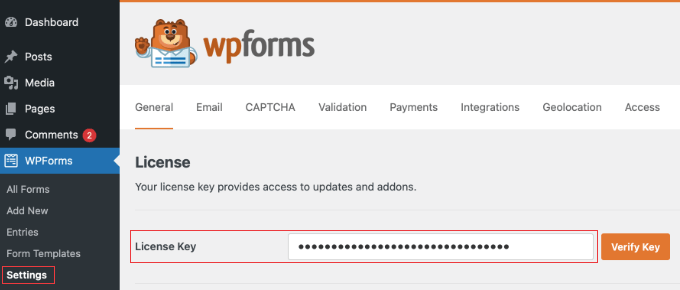
You can find this information in your account on the WPForms website. Then, just click the ‘Verify Key’ button.
Step 2: Enable the Square Addon
Next, you need to enable the Square addon so your forms can accept recurring Square payments.
From your WordPress dashboard, go to the WPForms » Addons page. Find the Square addon in the list and click the ‘Install Addon’ button.
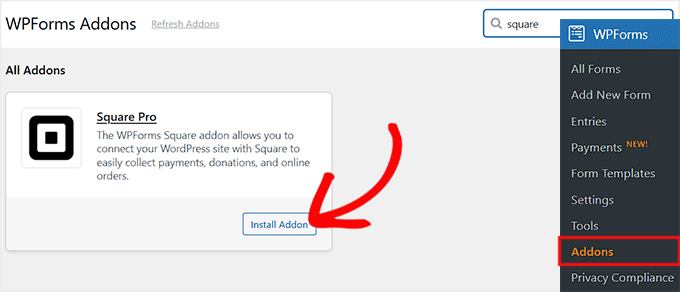
Once the Square addon is installed and activated, your WPForms plugin is ready to start creating subscription forms that can take Square payments.
Step 3: Connect Square to WPForms
Previously, you downloaded and activated the Square addon, which added Square as a payment option in WPForms. But at this stage, it’s not yet connected to your Square account.
Without this connection, the forms you create won’t be able to process any payments. I’ve seen many beginners miss this step, so it’s important to follow it carefully.
To connect Square, go to WPForms » Settings » Payments » Square in your WordPress dashboard. You’ll see a section labeled ‘Connection Status’ with a ‘Connect with Square’ button.
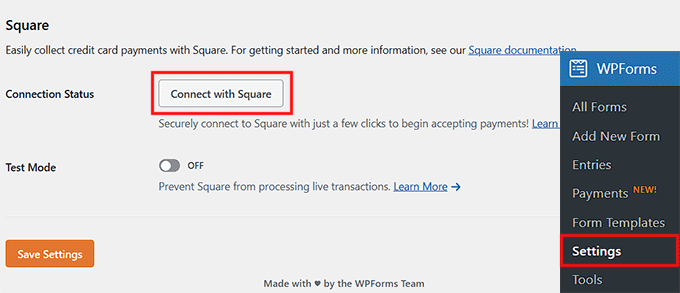
Click it, and you’ll be redirected to the Square login page. Here, you need to enter your email and password, then click ‘Sign In.’
When you log in, Square will show a permissions screen. Don’t worry—this is just asking for approval so WPForms can manage payments on your behalf.
I recommend taking a moment to read through the permissions so you know exactly what access is being granted. Then, click ‘Allow’ to proceed.
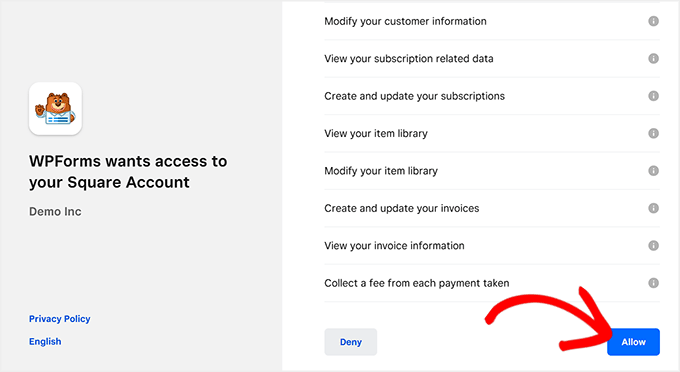
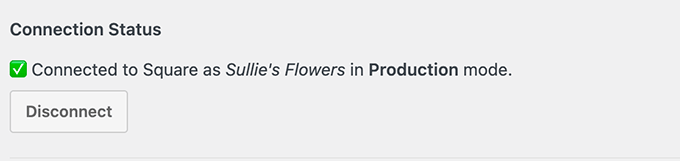
Once you allow permissions, you’ll be sent back to your WPForms settings. If the connection is successful, you’ll see a green checkmark and a success message next to Connection Status.
Finally, don’t forget to click ‘Save’ to confirm the settings.
💡Expert Tip: WPForms offers a Test Mode, which I always recommend using first. It lets you simulate payments to make sure everything is working correctly before going live.
Once you’re confident, switch to Live Mode to start accepting real recurring payments.
Step 4: Create a Square Payment Form
If you don’t have a form yet, creating one with WPForms is really easy thanks to its drag-and-drop builder. From your WordPress dashboard, go to WPForms » Add New Form.
WPForms offers 2000+ premade templates for contact forms, surveys, order forms, and more, so you can get started quickly without building everything from scratch.
You can also use its AI Form Builder to generate a custom template—just give your form a name, describe what you want, and it will create a starting point for you.
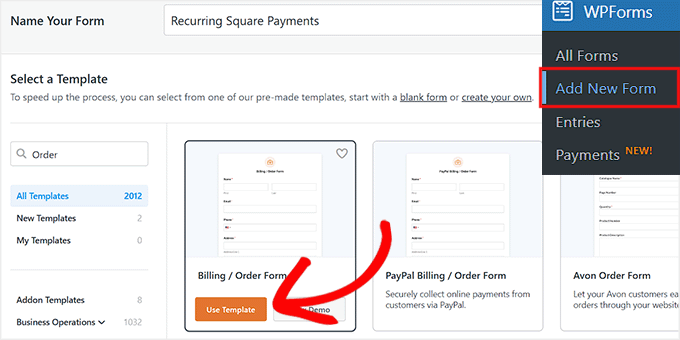
Once your template is ready, it will open in WPForms’ visual editor, where you can easily edit, delete, or rearrange form fields with just a few clicks.
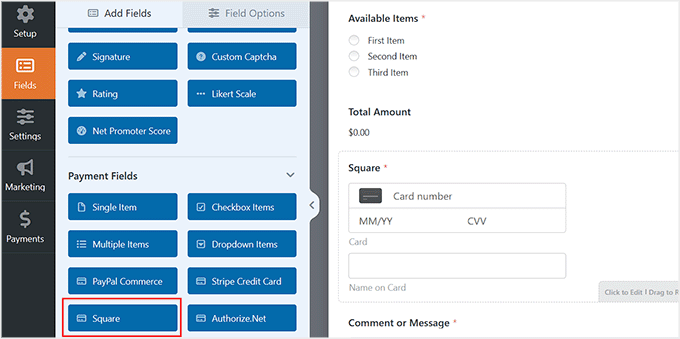
After that, make sure to add the ‘Square’ payment field from the left column. This is the field where users enter their credit card information.
Right now, it is just a basic payment field. It does not yet accept recurring payments—that comes in the next step.
For more information, see our tutorial on integrating Square payments in WordPress.
If you want to see real-world examples of how recurring forms can be used, check out these guides:
- How to Create a Subscription Box Service in WordPress
- Beginner’s Guide to Selling Cleaning Services with WordPress
- How to Create an Online Order Form in WordPress
Step 5: Enable Recurring Payments on Your Form
Now it’s time to set up recurring payments for your Square payment form. From the WPForms visual editor, switch to the Payments » Square tab on the left.
To charge users on a recurring basis, toggle on the ‘Enable recurring subscription payments’ option. This tells WPForms that the payment field you added in the previous step should be used for subscriptions, not just one-time payments.
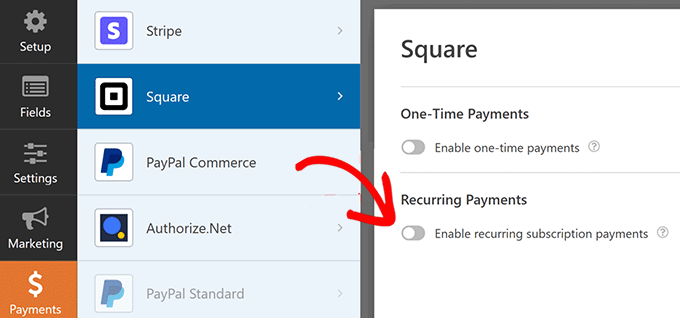
Once you enable recurring payments, you’ll need to fill in a few key fields:
- Plan Name: Give your subscription a title. This is what will appear in transactions in your Square account, so make it clear and descriptive.
- Phase Cadence: This is just a technical term for the billing cycle. Choose how often the payment should occur—options include Monthly, Yearly, or a custom interval.
- Customer Email: Select the email field from your form to map it to Square. This ensures Square can send the receipt to the right person.
- Customer Name: Select the field in your form that contains the customer’s name so it appears correctly in your Square dashboard.
- Customer Address: Select the field containing the customer’s address (required for some payment types).
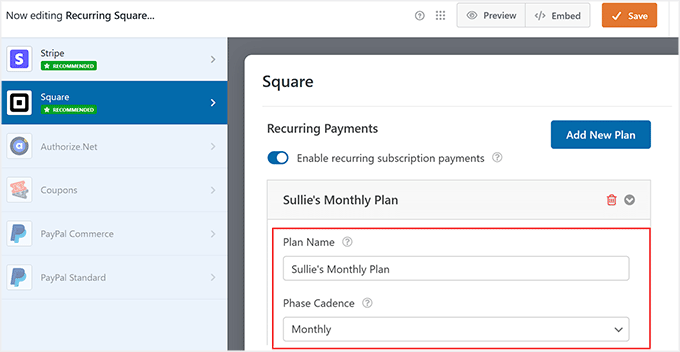
You can also add as many payment plans as you need by clicking the ‘Add New Plan’ button.
For example, if you run a subscription box service, you might offer a Monthly Premium Box plan, a Quarterly Box plan, or even a Yearly VIP Box plan, each with its own recurring payment schedule.
This flexibility lets you tailor subscriptions to your customers’ preferences and needs. Once your plans are set up, don’t forget to click the ‘Save’ button to store your changes.
Step 6: Embed Your Form and Manage Payments
Once your form is ready, the next step is to make it accessible to your users.
WPForms comes with a built-in block that lets you add your form to any page or post without touching a single line of code.
Just open the page or post where you want the form, click ‘Add Block’, select WPForms, and choose the form you just created.
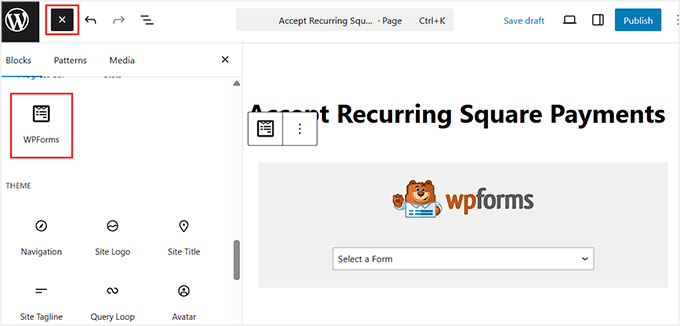
That’s it—your form is live, and users can start subscribing right away.
For a more detailed walkthrough, you can see our guide on how to embed a form in WordPress.
After you start receiving payments, WPForms makes it easy to track and manage everything directly from your WordPress dashboard.
Go to WPForms » Payments and open the ‘Overview’ tab. Here, you can see all your transactions, track revenue trends, and monitor how your subscription forms are performing.
You can also view subscriber details, manage refunds, or adjust subscriptions if needed.
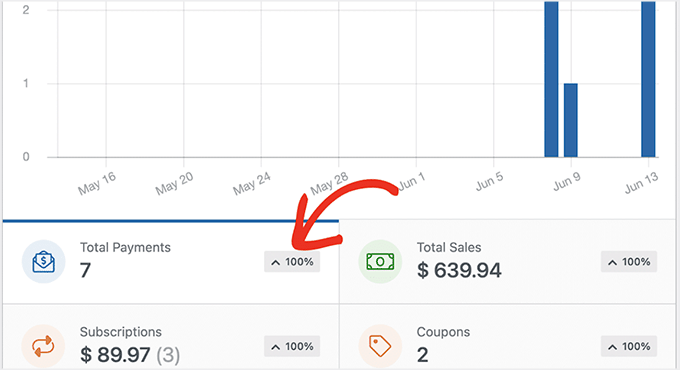
I’ve found this Payments overview really convenient because it keeps all your transaction information in one place—no need to switch between WordPress and Square.
Method 2: Accept Recurring Square Payments With MyPayKit (For Simple Recurring Payment Forms)
If you’re looking for a simple way to accept recurring payments through Square, I recommend MyPayKit.
It’s a lightweight payment plugin that focuses specifically on collecting Square payments, making it perfect for service businesses, memberships, and deposits.
The plugin handles both one-time and recurring payments, and setting it up usually takes just a couple of minutes—even if you’re not very technical.
I’ve tested MyPayKit myself, and it delivered on its promise: clean, professional payment forms that connect directly to Square’s payment system.

Step 1: Install and Activate MyPayKit
The first step is to install the MyPayKit plugin on your WordPress site.
If you want a detailed walkthrough, check out our guide on how to install WordPress plugins. It covers everything step by step, so even beginners can follow along easily.
📍Note: To use recurring payments, you’ll need the Pro plan of MyPayKit. The free version works for simple one-time payments, but subscriptions and recurring billing require the Pro upgrade.
Step 2: Connect Your Square Account
Once MyPayKit is activated, you’ll see a new menu in your WordPress dashboard called MyPayKit Forms. Click on it to get started.
This will take you to a new screen where you have to click the ‘Connect With Square’ button.
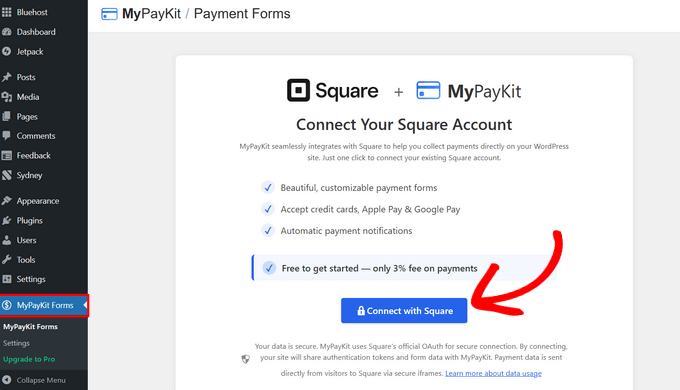
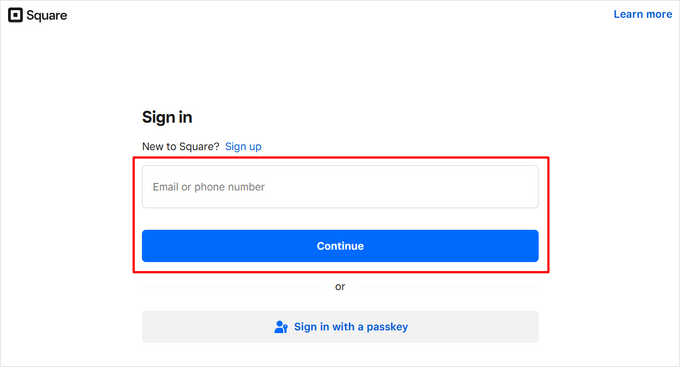
This will open the Square login page. Sign in using the email address or phone number associated with your Square account.
Then, click the ‘Continue’ button.
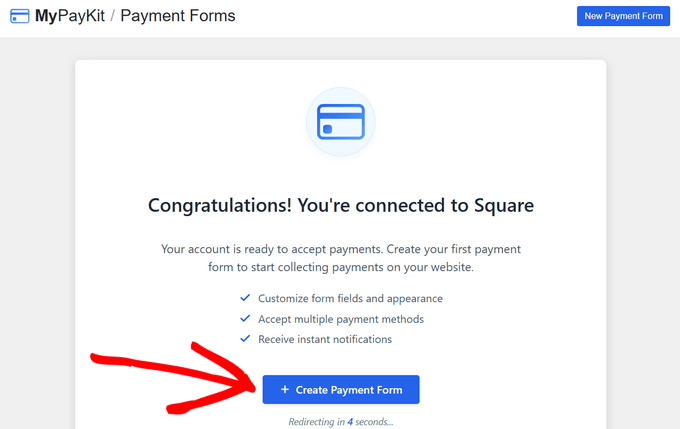
After that, you’ll be sent back to your WordPress site. You should see a success message letting you know MyPayKit is now connected to Square.
Once the connection is complete, you can click ‘+ Create Payment Form’ to start building your first payment form.
Or, if you prefer, just wait a few seconds—you’ll be automatically taken to the form builder.
Step 3: Create a Square Payment Form
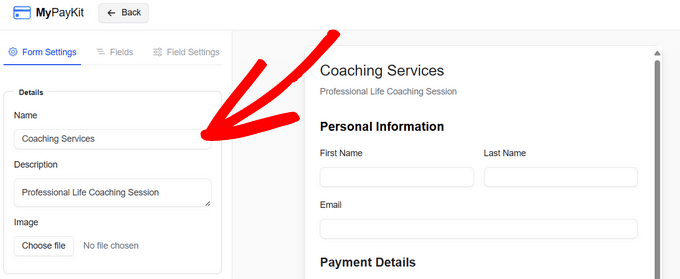
Once you’re in the MyPayKit form builder, you’ll see the form settings panel on the left and a live preview of your form on the right.
By default, it already includes fields for the customer’s first name, last name, email, and payment details.
I suggest starting by giving your form a clear name so you can easily identify it later, and adding a short description to explain what the payment is for.
You can also upload an image, like your business logo, to make the form look more professional and match your branding.
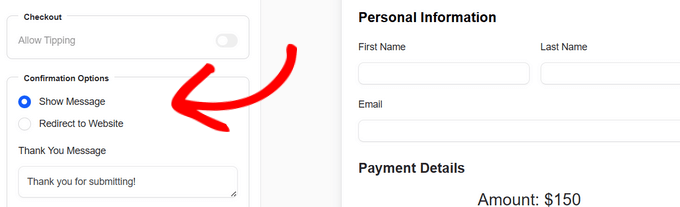
After that, decide what your customers see once they complete their payment by scrolling down to the ‘Confirmation Option’ section.
I recommend either showing a custom thank-you message on the screen or redirecting them to a specific page, like a dedicated thank-you page on your site.
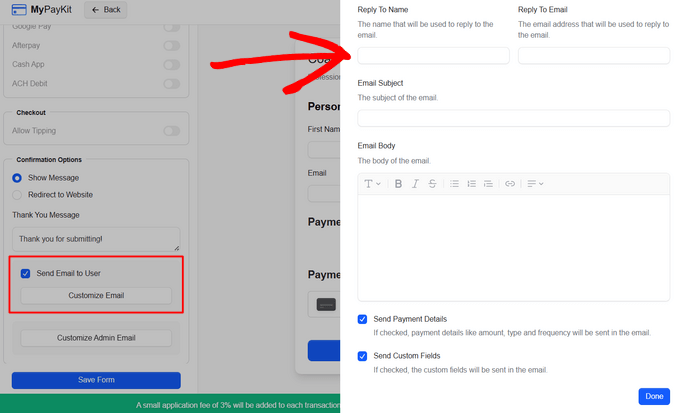
You can also send a confirmation email to your customers after payment.
Just enable the email option and click ‘Customize Email’ to set the subject, ‘Reply To’ information, and message. I’ve found this helps build trust and keeps everything professional.
Finally, if you need extra information from customers, you can add more fields to your form. Click the ‘Fields’ tab, choose the type of field you want—like text, dropdowns, checkboxes, or date pickers—and it will appear on your form.
If you need more guidance, check out our full guide on how to integrate Square payments in WordPress.
Step 4: Set Up Recurring Payments
Now it’s time to set up recurring payments in MyPayKit. From the form builder, scroll down to the ‘Amount Type’ section in the left column.
Here, you have two main options. First, you can set an exact amount that you want your customers to pay. Then, select how often the payment should repeat using the dropdown menu.
You can choose one-time, weekly, every 2 weeks, monthly, quarterly, twice a year, or annually. This is perfect for a monthly service retainer, a quarterly subscription box, or an annual membership.
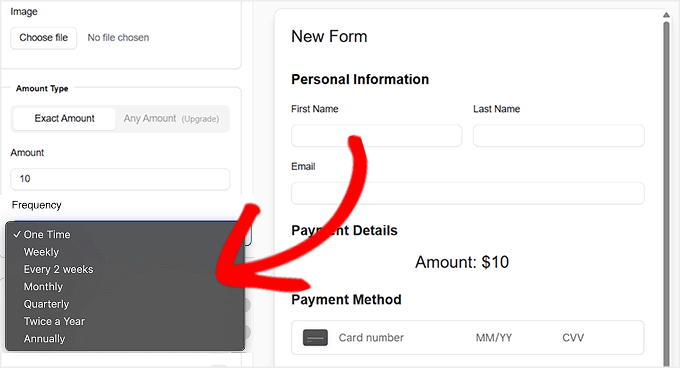
On the other hand, if you want customers to decide how much they pay, switch to the ‘Any Amount’ option. This comes in handy for donations, pay-what-you-want services, or flexible subscription models.
Once you select this, you can still choose the frequency of the recurring payment, and your customers can enter the amount they want to pay each period.
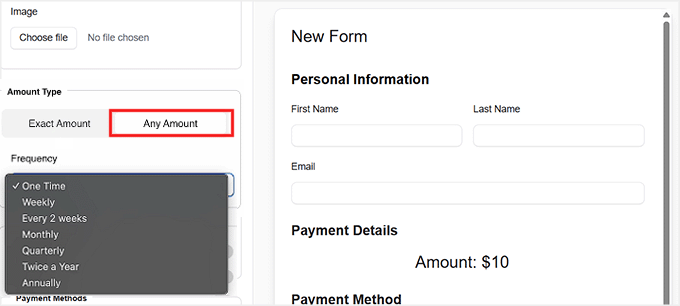
When you’re happy with your payment form and recurring settings, don’t forget to click ‘Save Form.’ This will lock in all your choices and make your form ready to start accepting recurring payments.
Step 5: Embed Your Payment Form
Now that your form is ready, go back to the main MyPayKit Forms page in your WordPress dashboard. You’ll see the form you just created listed there.
Next to the form, you’ll find a shortcode. If you’re new to WordPress, a shortcode is a small piece of code that makes it easy to add features, like forms, directly into posts or pages without touching any other code.
Click the ‘Copy’ button next to this shortcode.
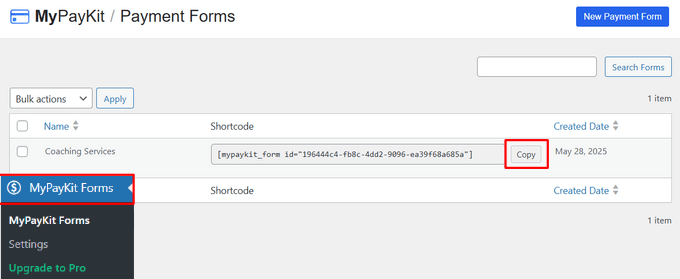
To add the form to your website, open the page or post where you want it to appear.
You can also create a new page if needed. In the WordPress editor, click the ‘Add Block’ button, choose the ‘Shortcode’ block, and paste your shortcode there.
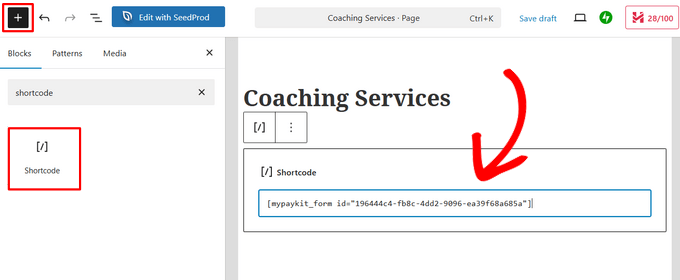
After that, just click the ‘Update’ or ‘Publish’ button.
Then, simply visit the page to see your form in action.
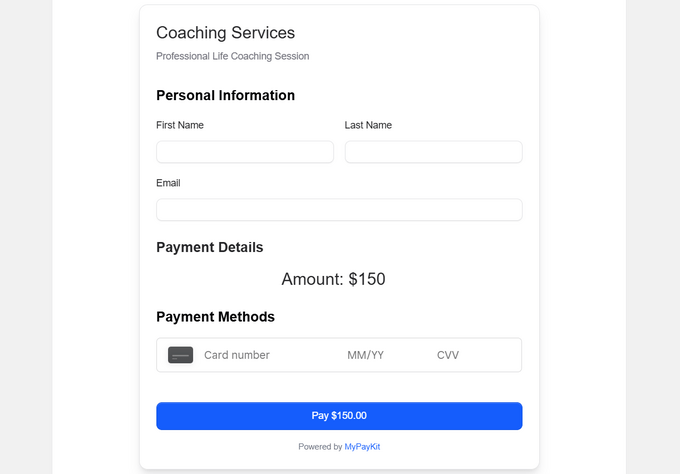
Method 3: Accept Recurring Payments With Charitable (For Nonprofits and Recurring Donations)
If you’re running a nonprofit, church, or fundraising website, then I recommend using Charitable.
It’s hands down the best donation plugin for WordPress, especially when you need to collect recurring donations through Square.

Instead of trying to adapt a general payment or eCommerce plugin, Charitable gives you tools that actually make sense for fundraising, donor management, and ongoing contributions.
If you want a deeper look at everything it can do, check out our Charitable review.
Step 1: Install and Activate Charitable
You can start by installing and activating the Charitable plugin on your WordPress site.
If this is your first time, we have a step-by-step guide on how to install a WordPress plugin that walks you through the entire process.
📍Note: Charitable has a free version, which is great for collecting one-time donations.
However, to accept Square payments and set up recurring donations, you’ll need at least the Charitable Plus plan. This plan unlocks both the Square addon and the Recurring Donations addon, which are required for this method.
Upon activation, the next step is to add your license key. This ensures you receive updates and can use all the premium features.
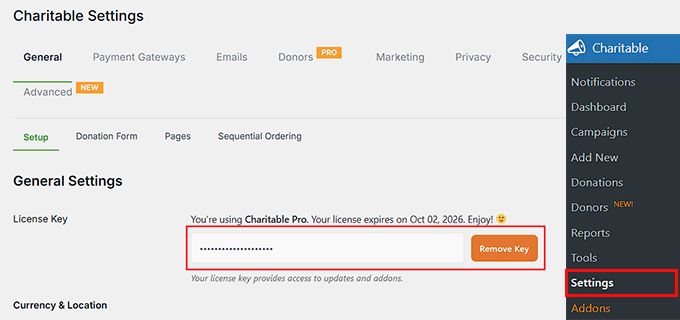
To do this, go to Charitable » Settings from your WordPress dashboard. From there, paste your license key into the ‘License Key’ field and save your settings.
You can find this information in your account on the Charitable website.
Step 2: Enable the Square and Recurring Donations Addons
Next, you’ll need to enable the Square and Recurring Donations addons in Charitable. These two work together to make recurring donations possible.
The Square addon lets you accept Square payments directly on your donation forms, while the Recurring Donations addon lets donors give on an ongoing schedule, such as monthly or yearly.
To get started, go to Charitable » Addons from your WordPress dashboard. From here, locate the Square addon and click the ‘Install Addon’ button.
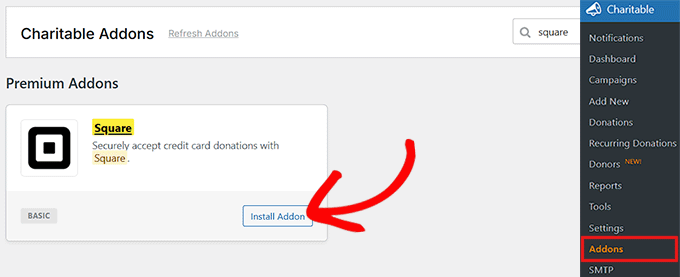
After that, find the Recurring Donations addon and click ‘Install Addon’ for that as well.
Once installed, both addons will be automatically activated, so there’s no extra setup needed at this stage.
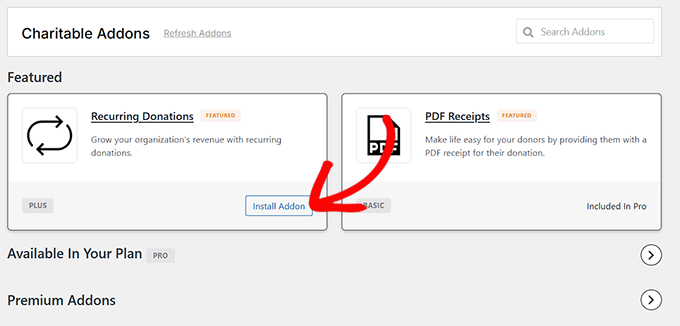
Step 3: Connect Square to Charitable
Now it’s time to connect your Square account to Charitable.
From your WordPress dashboard, go to Charitable » Settings » Payment Gateways. You’ll see Square listed there. Simply click the ‘Enable Gateway’ button next to Square.
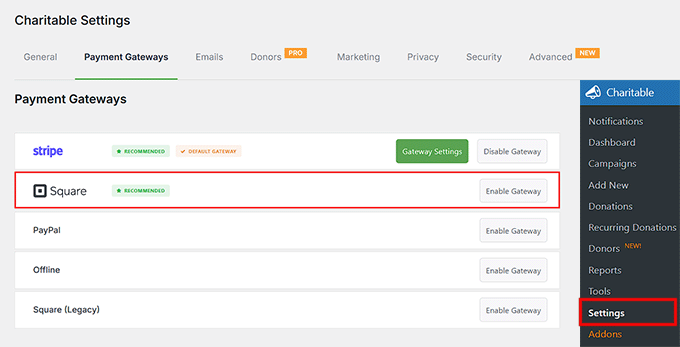
Once you do that, Charitable will take you to a new screen where you can click the ‘Connect to Square Account’ button. This opens Square’s secure login screen.
To complete the connection, Square will ask you to grant Charitable a few permissions related to your account.
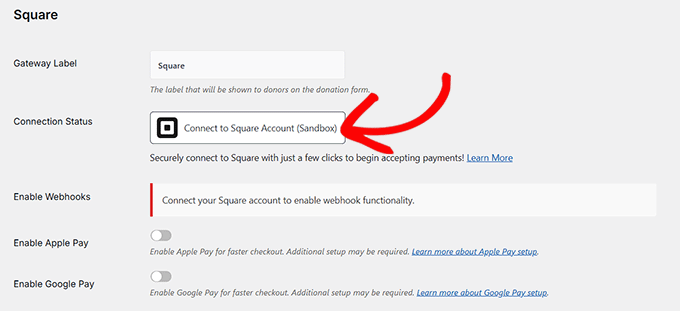
This is required so Charitable can properly process donations and manage recurring payments. Go ahead and click ‘Allow’ to continue.
After approving the permissions, you’ll be redirected back to the Charitable payment settings page.
If everything is set up correctly, you’ll see a green check mark and a success message next to the connection status. That’s your confirmation that Square is connected.
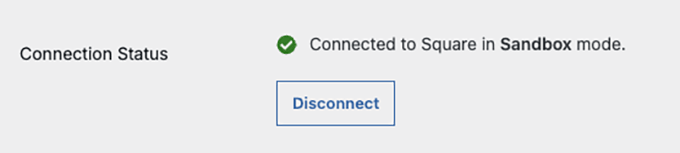
Don’t forget to click ‘Save’ to apply your changes.
Step 4: Create a Donation Form
Now it’s time to create your first donation form in Charitable.
From your WordPress dashboard, go to Charitable » Add New. This is where you’ll set up your fundraising campaign and donation form.
Start by giving your campaign a clear, descriptive name. I usually recommend something short and specific, like ‘Support Local Animal Rescue.’
This title appears on your donation form and campaign page, so it should instantly tell visitors what they’re supporting.
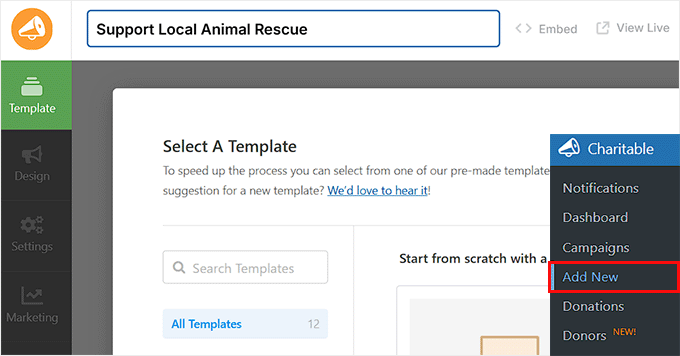
Next, choose a campaign template. Charitable comes with several ready-made templates, each designed for different causes.
You’ll see options like Animal Rescue, Disaster Relief, Medical Support, and Environmental Campaigns. I suggest picking the one that best matches your goal because you can always customize it later.
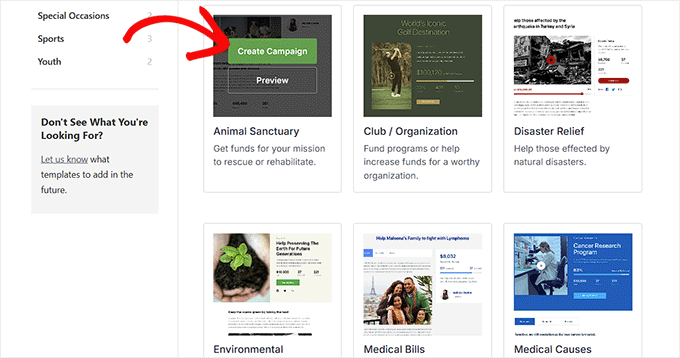
Once the Campaign Builder opens, you’ll see a live preview of your donation form on the right and a list of fields on the left. You can drag and drop fields to rearrange them, edit existing ones, or remove anything you don’t need.
Common fields include the donation amount, progress bar, social sharing buttons, and donor details.
You can also add images, videos, and a short description to explain your cause. I’ve found that a simple story and a clear goal go a long way in encouraging people to donate.
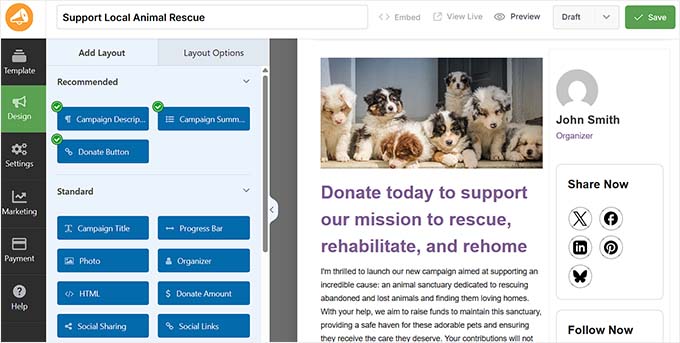
One thing worth noting is that Charitable doesn’t use a separate Square payment field like some form plugins. Instead, it uses a Donate button.
When a visitor clicks that button, Charitable automatically shows the available payment options, including Square, based on what you’ve enabled in your settings.
This keeps the donation process clean and easy for donors, without overwhelming them with extra steps.
If you’d like more detailed guidance, you can check out our tutorial on how to create a donation form in WordPress.
Step 5: Set Up Recurring Donations in Your Form
Next, you’ll go to Settings » Donation Options in the Charitable Campaign Builder. This is where you control all the details for your donation form, including recurring donations.
Start by reviewing the ‘Suggested Donation Amounts.’
Here you can define preset donation amounts, like $5, $10, $15, or $20, and even add a short description for each, such as ‘This is a small donation.’
I usually make the middle option the default because it encourages most donors to give a reasonable amount without feeling pressured.
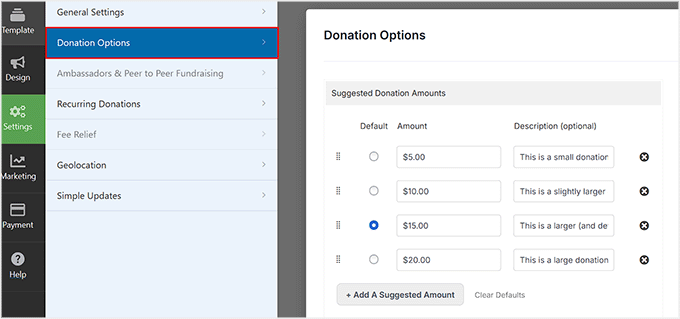
Next, check the minimum and maximum donation amounts. Leaving these blank allows donors to give any amount they choose, while filling them in sets limits.
I often leave the minimum blank to be inclusive, but set a reasonable maximum to prevent accidental large contributions.
You can also enable ‘Allow Custom Donations,’ which lets donors enter any amount they’re comfortable with.
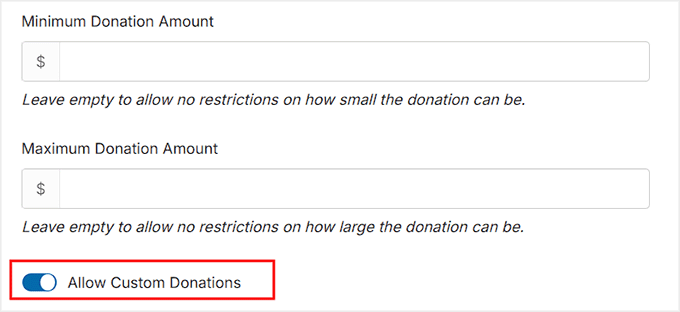
Now scroll down to the ‘Recurring Donations’ section and toggle ‘Allow Recurring Donations’ to ‘On.’
Charitable offers two modes for recurring donations: Simple and Advanced.
I usually recommend starting with Simple. With this option, donors can set their donations to recur using the default period you set, keeping things straightforward for both you and your supporters.
If you want, you can also let donors choose their own donation period by turning on the ‘Allow donors to choose donation period’ option.
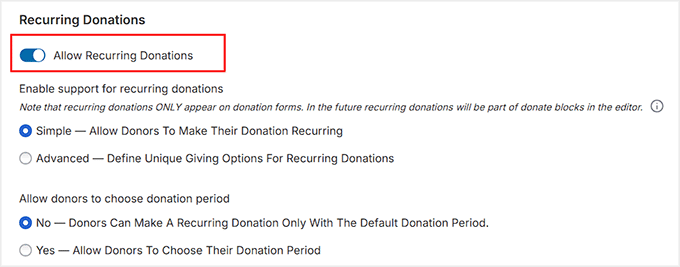
You can offer daily, weekly, monthly, quarterly, semiannual, or yearly intervals, depending on what works best for your cause.
Other than that, decide how often donors are billed and whether the recurring donation never expires or ends after a set number of payments.
For most campaigns, I recommend at least a monthly interval—it’s easier for donors and reduces churn.
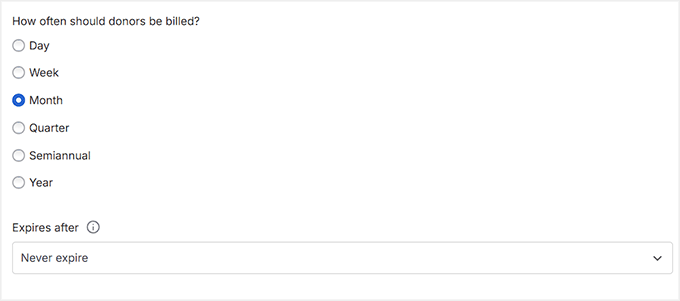
For more detailed instructions, see our guide on creating a recurring donation form in WordPress.
Step 6: Publish Your Recurring Square Donation Form
Once you’ve finished configuring your recurring donation form, the next step is to publish it. Switch the form’s status to ‘Publish’ and click ‘Save’ to store your changes.
Your fundraising campaign is now ready to accept recurring payments through Square.
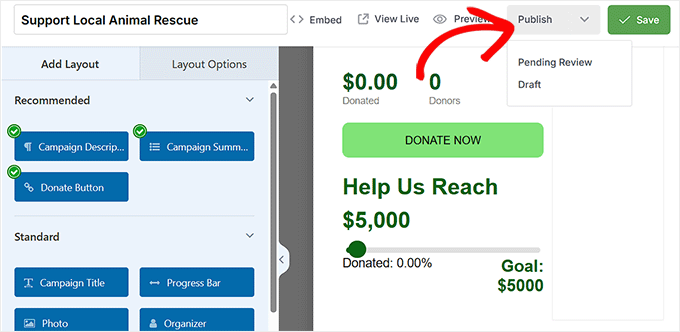
To display the form on your site, open any page or post in the WordPress block editor and add the ‘Charitable Campaign’ block. From the dropdown, select the campaign you just created.
This embeds your recurring donation form directly on the page, so visitors can start donating right away.
After adding the block, click ‘Update’ or ‘Publish’ to save the page.
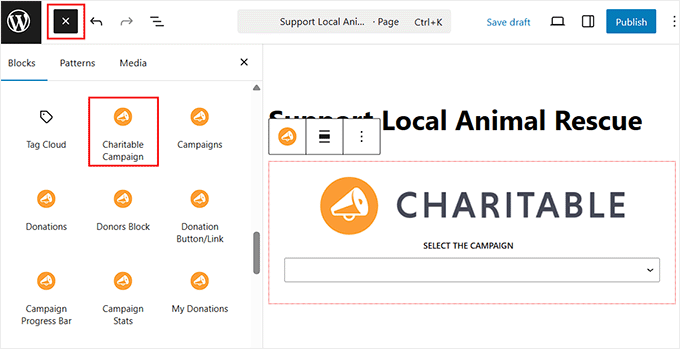
Managing your recurring donations is just as easy. From your WordPress dashboard, go to Charitable » Donations to see all contributions for your campaigns.
Each donation is linked to the donor and their chosen recurring schedule, giving you full visibility into who is subscribed and when payments will be processed.
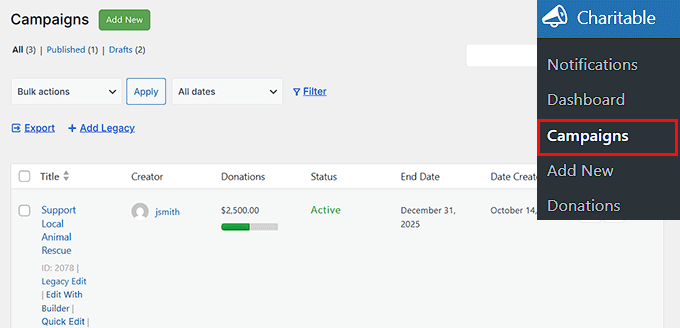
You can also check the Reports page for a summary of total donations, total donors, and other key donor management statistics.
If you ever need to adjust the campaign—like changing the donation amounts, updating the frequency options, or extending the campaign’s duration—you can do so from the campaign settings.
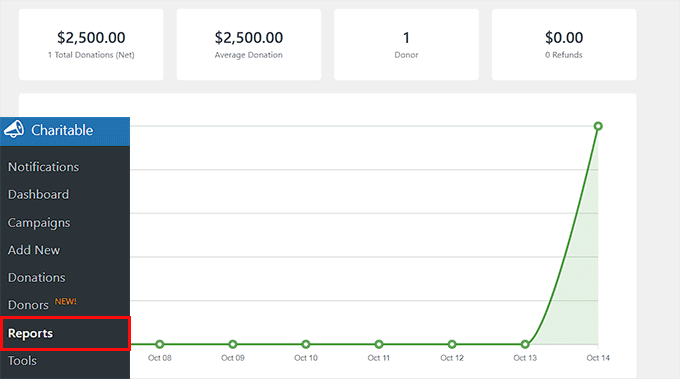
This makes it easy to keep your recurring donation campaign flexible as your nonprofit grows.
Before You Go Live With Recurring Square Payments (Final Checks)
Before you start accepting recurring payments, I always recommend a few important checks.
This ensures your forms run smoothly and your customers have a clear, professional experience.
1. Testing Your Recurring Payments
I always recommend running a full test before going live.
Most WordPress payment plugins, including WPForms, MyPayKit, and Charitable, let you test Square payments in test or sandbox mode, so you can simulate real payments without actually charging a card.
To start testing, first enable Test Mode (sometimes called Sandbox Mode) in your plugin settings. This ensures you don’t accidentally charge your own credit card while trying things out.
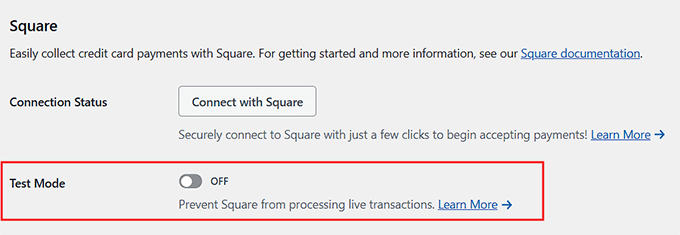
Then create a test subscription with a test card and ensure the payment goes through successfully. Finally, verify that the recurring process works correctly.
For subscriptions, I usually create a test plan with a shorter interval, like daily or weekly, so I can see automatic renewals in action before going live.
I’ve tested this myself, and it’s the best way to make sure everything runs smoothly from day one. If you want, our guide on testing Stripe payments in WordPress covers the process, and testing Square works in a very similar way.
⚠️ Important: Once you have finished testing, don’t forget to disable the Test Mode and switch back to Live Mode. If you skip this step, you won’t be able to accept real payments.
2. Add Clear Payment Terms
Next, make sure your payment terms are crystal clear. I suggest adding this information to the page where your payment form is embedded, so customers see it before they submit their payment.
Ideally, you should include:
- Billing Frequency: How often payments will be charged (monthly, quarterly, annually, etc.)
- Cancellation Policy: Explain how users can stop their subscription.
- Refund Policy: Whether refunds are available, and under what conditions.
Here’s an example you can use or tweak:
“Your subscription will renew automatically every month. You can cancel anytime from your account. Refunds are available within 14 days of payment.”
Clear terms reduce confusion and build trust with your subscribers.
3. Setting Up Email Notifications
Next, make sure your email notifications are configured. WPForms and Charitable let you set these up directly in the plugins. At a minimum, enable notifications for payment confirmations, failed payments, cancellations, and renewal reminders.
Here’s a quick overview of what each email does:
| Notification Type | What It Does |
|---|---|
| Payment Confirmation | Immediately lets customers know a payment was successful. |
| Failed Payment Notice | Alerts customers if a payment didn’t go through, so they can update their card. |
| Cancellation Confirmation | Confirms when a subscription is canceled |
| Renewal Reminders | Optional. Reminds customers before a recurring payment is processed. |
💡Expert Tip: WordPress sends emails using PHP, the underlying programming language on your server. By default, this can sometimes cause emails to end up in spam or not arrive at all.
To fix this, I recommend using WP Mail SMTP. It is the best WordPress SMTP plugin that ensures your payment receipts and admin notifications are actually delivered to the inbox, not the spam folder.
To get started, take a look at our tutorial on fixing the WordPress not sending email issue.
Frequently Asked Questions About Accepting Recurring Square Payments in WordPress
Even after setting up your recurring payment form, it’s normal to have a few questions.
In this section, I’ll answer the most common questions I get about using Square with WordPress. This will help you avoid surprises and make sure your recurring payments run smoothly from day one.
Can I use Square on WordPress.com?
Yes, but only on a Business or eCommerce plan. Square works best on self-hosted WordPress.org sites, which give you full control to install plugins like WPForms, MyPayKit, or Charitable.
Does Square charge extra for recurring payments?
No, Square doesn’t add a separate fee for recurring payments. You’ll pay the standard Square transaction fee for each payment processed. This makes it simple to budget for your subscriptions without hidden costs.
Can customers cancel their own subscriptions in Square?
Yes, but it depends on how you set it up in WordPress. With WPForms or Charitable, customers can cancel from a dashboard or account page if you enable that option. Otherwise, you’ll manage cancellations from your Square account.
What happens if a Square payment fails?
If a payment fails, Square will not automatically retry it unless your plugin supports it. WPForms and Charitable can notify the customer via email so they can update their card.
Can I offer free trials for my service or product with Square?
Yes, you can offer free trials through Square using a plugin that supports recurring payments, like WPForms or Charitable.
You can set a trial period, and the customer’s subscription will start charging automatically afterward.
Do I need Square hardware to accept payments on my website?
No, Square hardware, such as card readers, is not required for online subscriptions. All recurring payments can be processed online directly through your WordPress payment forms.
Can I accept multiple currencies with Square?
Yes, but there is a catch. Square accounts are tied to the currency of your country (for example, a U.S. account can only accept USD). You generally cannot accept a different currency than the one associated with your bank account.
If you need to accept multiple currencies on your site, I recommend using Stripe instead. Most payment plugins support both Square and Stripe.
I hope this article helped you learn how to accept recurring Square payments in WordPress without WooCommerce. You may also want to see our guide on adding a PayPal payment form in WordPress and our list of important online payment statistics.
If you liked this article, then please subscribe to our YouTube Channel for WordPress video tutorials. You can also find us on Twitter and Facebook.
The post How I Setup Recurring Square Payments in WordPress Without WooCommerce first appeared on WPBeginner.
Open Channels FM: How WooCommerce’s Open Source Model Spawns Innovation
Looking at WooCommerce’s open source nature, we learn how community contributions drive innovation, foster flexibility, and ensure collaborative growth in ecommerce.