Open Channels FM: Underfunded PHP Tools: A Global Business Threat
In this episode of Open Web, host Anne chats with Juliette, the sole maintainer of PHP_CodeSniffer. They dive into the challenges of maintaining crucial open-source projects, funding issues, and AI’s impact on software development.
Matt: What a Week
There are decades where nothing happens, and there are weeks where decades happen
No attribution, but fun Quote Investigator dive.
Sorry for dropping off the daily blogging train; it just turned out to be a week of pleasant surprises and life-changing events. I’ll share with y’all the second-most exciting one.
I know I’ve been pushing you all to learn the AI coding stuff as deeply as possible, and I have been doing some myself, my favorite a few years ago, a script to count when we had too many words in a presentation slide, but I knew Claude Code was something different and better.
However, I fell into the trap of bookmarking and downloading tens of hours of Claude Code tutorials and not installing the thing itself. And work has been busy! My colleague Dave Martin was hosting an internal livestream. I joined late, then had to leave because an important call came in. I decided to forget it all, throwing caution to the wind, and just install Claude Code and play with it without reading anything.
The next 24-36 hours are a bit of a blur. I haven’t locked into a multi-day coding session fueled by energy drinks, sugar, and cheesy carbs since my early 20s! There were some interruptions for previous commitments, but I basically became addicted to the feeling of that steep learning curve. Every minor annoyance or workflow became an opportunity to create new software in languages I’d never touched before.
It also really rewired my brain, even in how I talk. (Found myself saying “thinking” after a colleague’s question.  ) I’m thinking about problems in a much more structured manner now, how to divide and chunk tasks, and provide appropriate context and skills. I really do feel like my brain is being terraformed a bit.
So far I’ve written scripts or apps for grabbing daily summaries from my calendar, spinning up new projects and syncing them with Github, switching between Brave tabs better, an app to search and launch Brave tabs quickly…
Did you know that macOS Preview regressed and no longer lets you export a single page of a PDF as an image? I have an app that does that. What do I do with it? Do I open source it? Am I a Mac App developer now? Do I want to support this for other people forever? Should I even put it in source control? Or publish a set of tests and prompts, as Drew Brenig did with whenwords.
It’s a strange and wonderful time to be a lover of software and computers. A little bit of code goes a long way. I’m at a CCL leadership training this week so offline during the days and exhausted at night but I gotta keep all those little bots running.
Best Donor Management Software: I Tested 10, Recommend 6
Running a nonprofit is hard enough without having to spend hours managing donor data.
When I first started helping nonprofits build their websites, I quickly realized that many organizations were drowning in disorganized data. They’d have donor information scattered across Excel files, email inboxes, and even handwritten notes.
That chaos could be costing you time, money, and momentum.
That’s where the right donor management software comes in. This isn’t just a fancy address book – it’s the tool that helps you automate thank-you emails, track pledges, spot key fundraising trends, and generate accurate reports that actually make sense.
To cut through the noise and find the true winners, I put 10 leading donor management platforms to the test. I checked their pricing, core features, how easy they are to use, and whether they can actually help your nonprofit raise more money.
Based on these results, here’s my top 6 recommendations for your nonprofit.
Quick Pick – The Best Donor Management Software for Nonprofits
| Product | Starting Price | Best For | Key Feature |
|---|---|---|---|
| WP Charitable | Free (Lite) | Full control + zero platform fees | Easy donor management in WordPress |
| Bloomerang | $40/month | Donor retention | Rich donor profiles with giving patterns and capacity insights |
| Donorbox | Free with transaction fees | Small organizations that need a fast setup and checkout experience | Start collecting donations in minutes with zero technical configuration |
| DonorPerfect | Contact for quote | Comprehensive donor lifecycle management | Customizable fields for detailed donor tracking |
| GiveWP | Free (Lite) | Established nonprofits needing a built-in CRM | Built-in donor database with complete WordPress integration |
| Little Green Light | $45/month | Small teams managing complex donor databases | 360-degree view of your supporter relationships |
| Keela | $144/month | Data-driven AI insights | AI-powered donor behavior analysis |
| Virtuous | Contact for quote | Automated donor communications | Marketing automation integrated with CRM |
| GiveButter | Free (Plus at $29/month) | Grassroots organizations on tight budgets | Free platform with unlimited donation forms |
| goDonate | Contact for quote | Large, UK-based nonprofits | Supports over 50,000 donations per hour |
Why Use Donor Management Software?
Donor management software can completely change how your nonprofit operates. It’s the difference between spending hours digging through spreadsheets and having instant access to organized, actionable donor information.
If you’re worried you’ll forget to thank a major donor or lose track of who gave last year, then you’ll almost certainly benefit from a good donor management system.
Here’s a look at what this software can do for you:
- Saves time: Many donor management systems can automatically send things like thank-you emails and receipts, which means you’re doing way less manual work. This gives you more time to focus on the actual fundraising efforts that truly move your mission forward.
- Increases donations: With the right reports and analytics, you can spot important trends and identify the perfect time to follow up with a supporter. I’ve seen many organizations significantly increase their donations just by timing their appeals better.
- Improves relationships: By creating a complete donor history, the right system can help you personalize your outreach and make every person feel valued. Rather than sending a generic email, you can acknowledge their past donations and build stronger, more meaningful relationships.
- Reduces errors: You won’t have to worry about lost data or forgotten follow-ups, as many processes are automated.
- Provides insights: A good donor management system will show you which campaigns are working well and which donors might be ready to give more to your cause. This is how you turn raw data into a smart, winning fundraising strategy.
Overall, the right system doesn’t just store information – it helps you use that information to raise more money.
How I Test and Review Donor Management Software
I’ve seen too many nonprofit organizations struggle simply because they chose the wrong software.
Some teams picked a system that was far too complex for their needs, while others chose platforms that couldn’t possibly grow with them, forcing a painful migration later.
That’s exactly why I don’t just read feature lists when I’m reviewing these tools. Instead, I set up real test campaigns, process small test donations, and see how the software handles day-to-day nonprofit work.
Here are the key areas I focused on while testing the donor management systems listed in this roundup:
- Setup and ease of use. I time how long it takes to get from signing up for an account to publishing your first donation form. For example, systems like Donorbox really impressed me because I could get my forms live in minutes, while other platforms required hours of confusing configuration and technical setup.
- Donor tracking capabilities. I rigorously test how well each platform stores and organizes donor information, which is essential for any great customer relationship management (CRM) app. The best tools don’t just record gifts – they analyze the data and show you key giving patterns and overall engagement levels.
- Automation features. This is a critical one. I set up automated thank-you emails, recurring donation reminders, and follow-up sequences. This can help you build real donor relationships at scale.
- Reporting and insights. I create test campaigns and then evaluate the data that each platform provides. I ask myself, ‘Can I easily see which appeals actually worked?’ and ‘Am I getting truly actionable insights, or am I just looking at raw, confusing numbers?’
- Integration options. Since no single tool does everything, I test how well each system connects with essential services like your email marketing provider, your accounting software, and other key nonprofit tools. If the integrations are poor, they create more work for you, rather than less.
My goal in all this is simple: I want to find the tools that genuinely help nonprofits like yours raise more money with far less stress.
Why Use WordPress for Donor Management?
Deciding how to track your supporters usually comes down to two choices: using a dedicated SaaS (Software as a Service) platform or a WordPress plugin.
SaaS platforms are hosted on someone else’s servers and often charge a monthly fee plus a percentage of every donation you receive. This can get expensive as your organization grows.
By contrast, using a WordPress donation plugin gives you complete ownership of your data and the relationships you have with your donors. Because the software lives on your own website, you also don’t need to worry about platform fees. This means WordPress is often the most cost-effective long-term solution for nonprofits.
To get started with WordPress donor management, you’ll need a few basic things:
- A Domain Name: This is your website’s address on the internet, such as yournonprofit.org. Wherever possible, I recommend using a .org extension because it’s the global standard in the nonprofit sector.
- Web Hosting: This is where your website’s files and donor database live. I recommend using Bluehost because it’s beginner-friendly and affordable for growing nonprofits. For other recommendations, see our pick of the best WordPress hosting.
- An SSL Certificate: You’ll need this to process payments safely. Most good hosting providers now include a free SSL certificate to encrypt your donors’ sensitive information.
- A Donation Plugin: As you’ll see in our reviews below, plugins like WP Charitable allow you to create forms, manage a donor database, and send receipts without leaving your WordPress dashboard.
1. WP Charitable – Overall Best Donor Management Software for Nonprofits
| WP Charitable Pros | ✅ Free core plugin lets you launch a professional fundraising site with zero upfront cost ✅ Drag-and-drop campaign builder to create high-converting donation pages ✅ Modern payment support, including Apple Pay and Google Pay, creates a friction-free checkout experience ✅ Automated email notifications and receipts ✅ Zero platform transaction fees mean 100% of your donors’ contributions go directly to your cause (minus standard bank fees) |
| WP Charitable Cons | ❌ Advanced features like peer-to-peer and recurring donations require paid extensions ❌ Limited reporting capabilities for detailed donor analytics, compared to some alternatives |
| Pricing | Free (Core plugin) / Premium starts at $69/year |
| Best For | Small to medium-sized nonprofits that want a simple, WordPress-native solution to manage donation campaigns without monthly fees |
WP Charitable is our top recommendation because it offers the most powerful and flexible fundraising tools while remaining incredibly easy to use. Because it’s a WordPress plugin, it integrates directly into your WordPress website and gives you full control over your donation data and forms.
We use WP Charitable to run the Balkhi Foundation website, and we love how easy it is to use. For more details, see our full WP Charitable review.
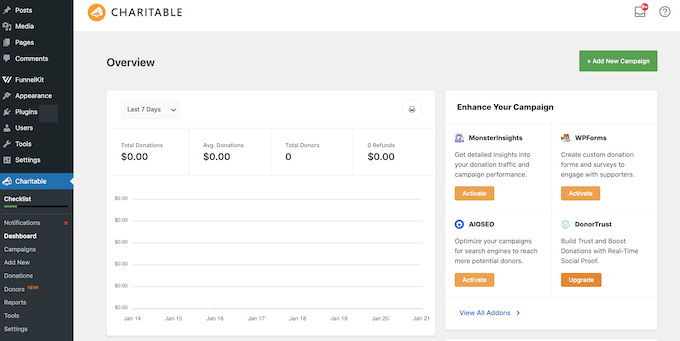
Plus, unlike many other platforms that charge ‘success fees,’ WP Charitable doesn’t charge any platform transaction fees. This means more of your donors’ money goes directly toward your mission.
You also don’t have to worry about a third-party service changing its terms or losing access to your database, because everything is stored securely on your own server.
My Experience
I wanted to see if WP Charitable truly delivered on its promise of being simple, especially for smaller organizations. I know the nonprofit space on WordPress can often feel overwhelming with complex solutions that require a ton of setup.
After installing the free core plugin from the WordPress repository, I had a test campaign up and running within minutes using their professionally designed campaign templates.
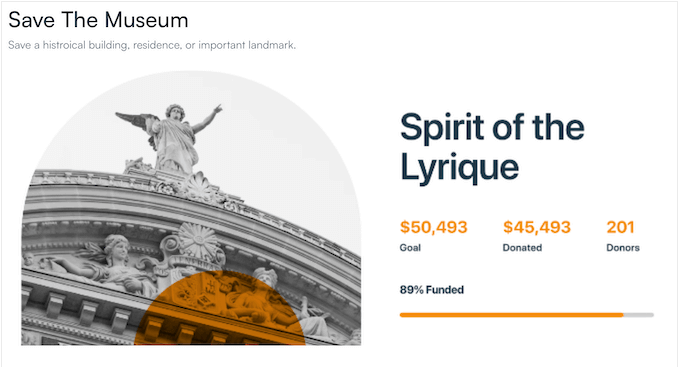
These templates let you create high-converting donation pages immediately, ensuring your campaign looks professional without spending precious funds on a designer.
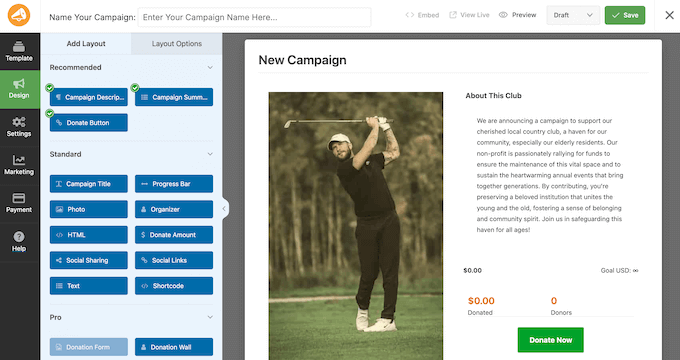
WP Charitable’s visual campaign builder is another standout feature. Its drag-and-drop interface lets you add donation buttons, progress bars / fundraising thermometers, and social sharing links with a live preview.
Beyond the design, the backend donor management tools are excellent.
Unlike other plugins that only record transactions, WP Charitable provides a dedicated donor management area where you can view a complete giving history for every supporter.
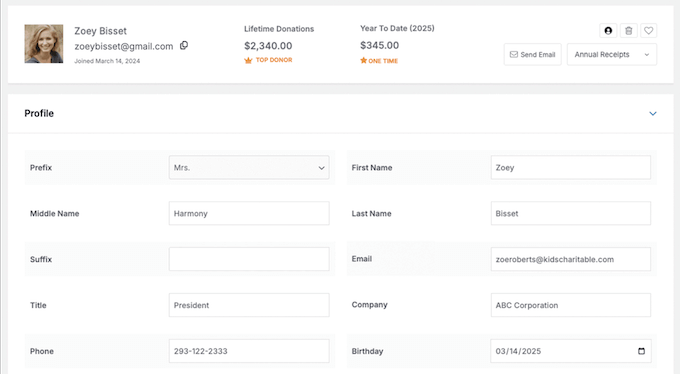
You can easily search, filter, and export your donor lists, making it easy to track your most frequent contributors.
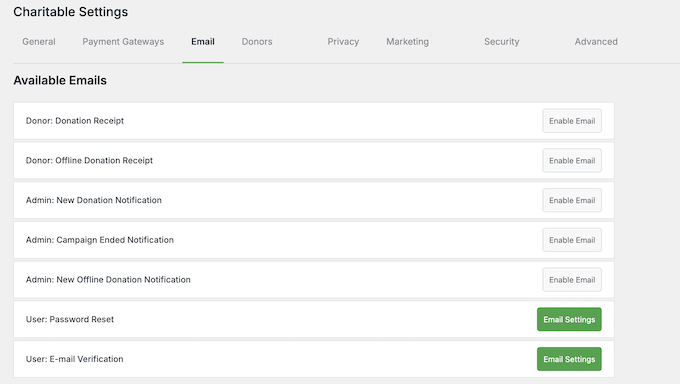
To save time on administration, I also enabled WP Charitable’s automated email features. WP Charitable sent PDF donation receipts to my test donors automatically, saving me time and effort.
In my experience, WP Charitable is the best choice for WordPress users who want a fast, integrated system that simplifies both the donor’s experience and the organization’s backend management.
Why I Recommend WP Charitable: This plugin is the most comprehensive fundraising solution for WordPress because it balances powerful features with a focus on maximizing your revenue.
The platform doesn’t charge any platform transaction fees on its premium plans, so 100% of every donation goes directly to your cause (minus standard bank processing fees).
WP Charitable also provides access to a library of conversion-optimized fundraising templates that are mobile-responsive and proven to increase donation completion rates.
2. Bloomerang – Best for Donor Retention

| Bloomerang Pros | ✅ Actionable donor profiles with Generosity and Engagement scores ✅ Intuitive interface makes donor management easy ✅ Real-time analytics to track campaigns ✅ Offers insights into donor engagement and retention strategies ✅ Integrates directly with Mailchimp for actionable engagement insights |
| Bloomerang Cons | ❌ The mobile app lacks full functionality compared to the desktop version ❌ Initial setup can be time-consuming for large databases ❌ Higher costs |
| Pricing | Starts at $40/month (billed annually) |
| Best For | Nonprofits focused on building long-term relationships and improving donor retention |
Bloomerang stands out as a full-fledged CRM (Customer Relationship Management) system, which means it acts as a centralized ‘memory bank’ for your nonprofit. While basic tools simply process payments, a CRM tracks every touchpoint, from email opens to event attendance. This gives you a 360-degree view of each supporter.
In this way, Bloomerang can help you build long-term relationships with every single supporter you have.
My Experience
I tested Bloomerang on a demo site, specifically focusing on its donor retention features. I found that the platform absolutely delivered on its promise of turning donor data into insights you can actually use.
When I pulled up a donor’s profile, it wasn’t just a basic list of gifts. The system actively displayed Generosity and Engagement scores that immediately told me whether this person was likely to give again or could potentially increase their donation amount this year. This is a huge time saver.
Bloomerang also integrates with Mailchimp, so you can get engagement insights to create targeted campaigns. This connection between donor behavior and email marketing felt completely seamless during my testing, which is exactly what nonprofits need.
After exploring the main dashboard, I found the real-time reporting especially valuable for tracking fundraising performance. These powerful analytics help your organization spot trends and adjust your overall strategy quickly before your campaign loses momentum.
Overall, Bloomerang is an excellent fit for nonprofits that want to focus on nurturing deep, lasting donor relationships rather than just managing transactions.
Why I Recommend Bloomerang: This platform absolutely excels at turning raw donor data into solid retention strategies. It provides clear, immediate insights that help you build lasting supporter relationships without the guesswork.
3. Donorbox – Best Donor Management Software for Quick Setup and International Reach
| Donorbox Pros | ✅ Simple setup process gets you collecting donations fast ✅ Clean, mobile-optimized donation forms ✅ Peer-to-peer fundraising built in ✅ Detailed donor history for relationship tracking ✅ Supports multiple currencies and languages for global donors ✅ Connects with over 2,000 apps through Zapier |
| Donorbox Cons | ❌ Limited branding options on free forms ❌ Advanced analytics require third-party tools ❌ Zapier integrations may add extra costs |
| Pricing | Free (with 2.95%-3.95% transaction fees) or $150/month (Pro plan with lower fees) |
| Best For | Small nonprofits that need to start fundraising immediately with minimal setup time |
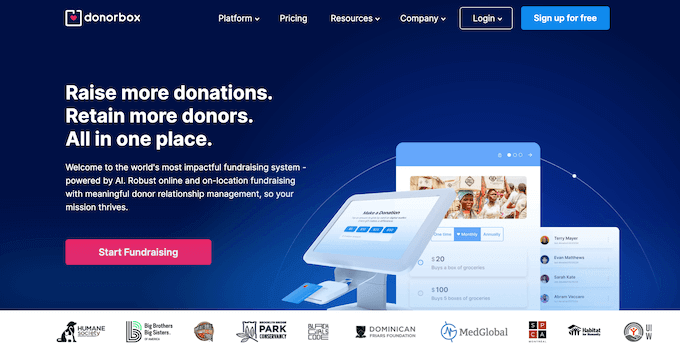
Donorbox is a versatile fundraising solution that makes donation management simple for organizations of all sizes. It’s excellent at supporting international donors.
In my opinion, Donorbox really stands out for removing technical barriers so you can start collecting donations quickly and efficiently.
My Experience
I approached testing Donorbox from the perspective of a small nonprofit that needs to start collecting donations right now with minimal technical fuss.
To start, I got Donorbox’s WordPress plugin up and running without any complicated configuration steps at all.
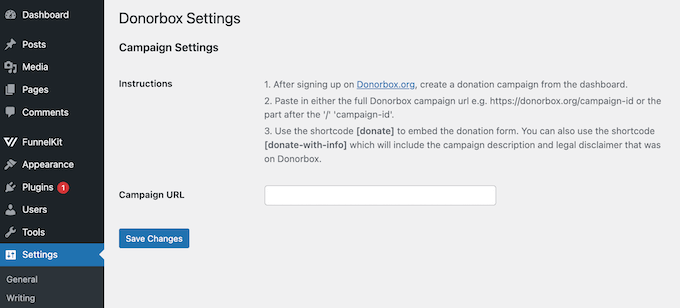
Within minutes of completing the setup, I’d created a donation form that perfectly matched my site’s design.
Unlike some other platforms that limit your currency options, Donorbox accepts donations from international supporters in their local currencies. This removes a major barrier, especially for organizations with a global reach or a diverse, international donor base.
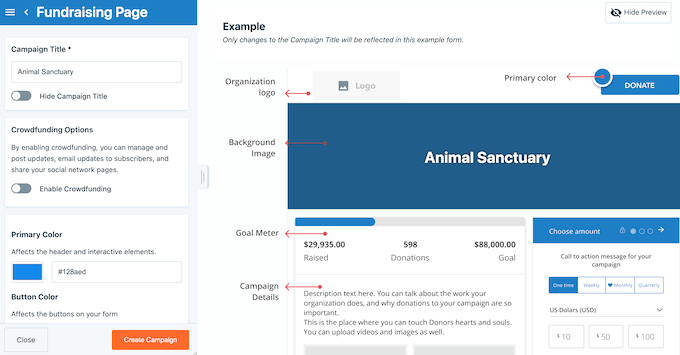
In addition, the peer-to-peer fundraising feature proved even more useful than I initially expected. Supporters can easily create personalized fundraising pages and share them with their networks, increasing your organization’s reach organically with minimal effort.
The basic donor management tools should be enough for smaller campaigns, although larger organizations might need to connect Donorbox to an external CRM for deeper analytics.
Finally, the Zapier integration is great because it lets you connect to thousands of other tools to automate your campaign management.
Overall, Donorbox is a great fit for nonprofits that want to start accepting donations quickly without a high upfront cost or long setup time.
Why I Recommend Donorbox: This tool successfully removes all the technical barriers to donation collection. Plus, I love that it supports international donors so effectively.
4. DonorPerfect – Best for Comprehensive Campaign Management
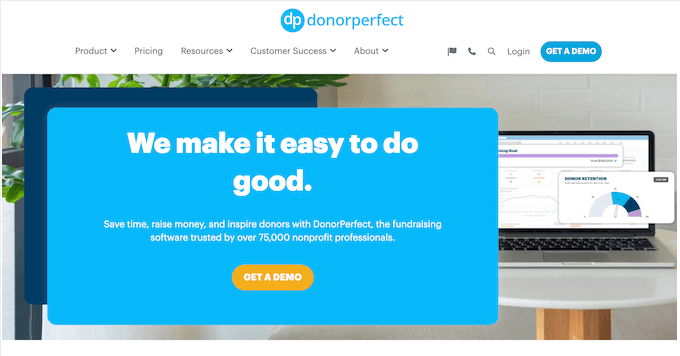
| DonorPerfect Pros | ✅ Customizable fields let you record detailed donor history ✅ Automatic thank-you letters save hours of manual work ✅ Integrated payment processing for recurring donations ✅ Event management features help coordinate fundraisers ✅ Advanced reporting tools track campaign performance clearly ✅ Mobile app gives you donor access anywhere |
| DonorPerfect Cons | ❌ User interface feels outdated compared to some newer platforms ❌ The reporting feature is less intuitive to navigate ❌ Data migration from other systems may take significant effort |
| Pricing | Contact DonorPerfect for a personalized quote |
| Best For | Nonprofits that need a scalable solution to manage the entire donor relationship from first contact through repeat giving |
DonorPerfect stands out as a complete donor management system that truly handles every single aspect of your nonprofit operations.
It’s specifically designed for organizations that want one unified platform to manage donors, events, and fundraising campaigns all in one centralized place.
My Experience
During testing, I was impressed that DonorPerfect actively tracks every single touchpoint with supporters, from their very first gift through to ongoing volunteer work and event attendance.
Plus, its customizable fields gave me complete control over donor data. This meant I could easily track volunteer hours alongside donation history, which is something that most basic donation tools simply can’t handle.
Going further, the automatic thank-you letters alone saved me hours of manual work during my testing. I was able to spend that time creating personalized templates that felt genuine rather than generic.
Compared to some of the newer platforms I’ve tested, DonorPerfect’s main desktop interface does feel a little dated. However, I found that the mobile app works surprisingly well for quickly checking donor information when you’re on the go at an event or heading into a meeting.
After using DonorPerfect to handle complex, comprehensive donor tracking, I can clearly see why so many larger nonprofits choose this system. It successfully manages complicated data relationships that simpler tools may struggle to handle.
Why I Recommend DonorPerfect: This system works really well for nonprofits that manage multiple campaigns, fundraising appeals, and large-scale events. In particular, the customizable fields help you track detailed, complex donor relationships very effectively.
5. GiveWP – Best Donor Management Software for WordPress-Native Control
| GiveWP Pros | ✅ Everything lives in your WordPress dashboard ✅ Full ownership of donor data ✅ Customizable donation forms match your brand ✅ Recurring donations with flexible schedules ✅ Works directly with PayPal and Stripe ✅ Extensive add-on library for extra features |
| GiveWP Cons | ❌ Advanced features locked behind paid addons ❌ Limited offline donation recording ❌ Requires WordPress knowledge for setup |
| Pricing | Free (Lite), Premium starts at $149/year |
| Best For | Nonprofits that want complete control over their donor data and fundraising pages without relying on external platforms |
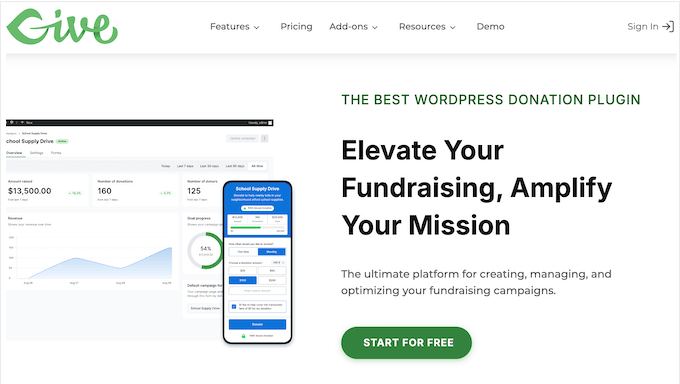
While many WordPress plugins focus on simple donation collection, GiveWP acts as a powerful ‘mini-CRM’ directly inside your WordPress blog or website.
It’s designed for established nonprofits that have outgrown basic forms and now want detailed data on donor behavior.
In particular, one of GiveWP’s best features is its built-in reporting. This provides visual charts and granular filters to help you understand exactly which campaigns are driving your growth.
My Experience
I found that GiveWP excels most when you need to understand the data behind your donations. It acts as a built-in CRM (Customer Relationship Management) system that tracks the entire lifecycle of a donor, so you can see their lifetime value and giving frequency over time.
While many tools provide a basic list of transactions, GiveWP offers visual, real-time charts that let you filter data by campaign, payment method, or date range.
This level of granular reporting is essential for larger organizations that need to make data-driven decisions about which fundraising appeals are actually working.
After setting up multiple campaign types, I was also really impressed by how customizable everything was. I created forms that matched my WordPress theme and branding perfectly, without having to write a single line of code.
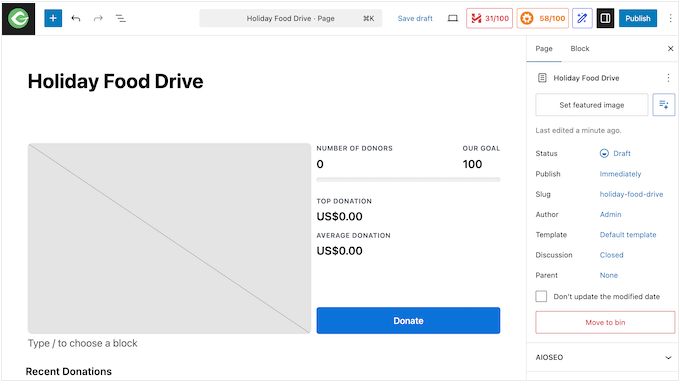
GiveWP is also uniquely suited for organizations that handle ‘In Honor Of’ or ‘In Memory Of’ gifts. It features a robust Tributes add-on that transforms donations into collaborative acts of remembrance or celebration.
When a donor chooses to give in honor of someone, the system triggers an automated workflow designed to notify the family or the honoree.
You can configure the system to send customizable eCards immediately upon donation, allowing the donor to include a personal message. This is particularly valuable for memorial gifts, as it provides instant comfort to grieving families, letting them know a gift has been made in their loved one’s name.
Why I Recommend GiveWP: This plugin gives you complete data ownership and control, right within WordPress. It also offers extensive form customization without relying on external dependencies.
6. Little Green Light – Best for Small to Medium-Sized Nonprofits
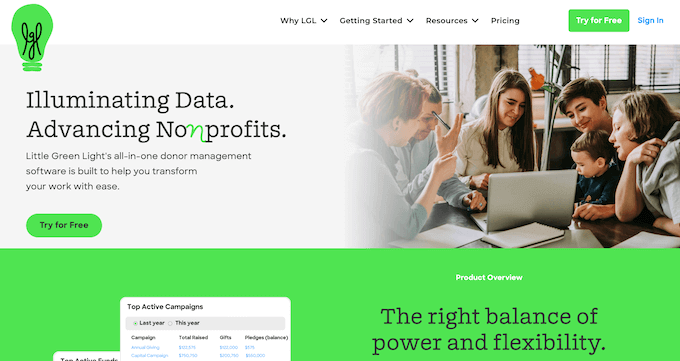
| Little Green Light Pros | ✅ Rich set of features specifically designed for donor relationship management ✅ Intuitive interface makes it easy for non-technical staff to use ✅ Strong reporting and analytics tools help measure fundraising success ✅ Efficient data entry processes minimize administrative workload ✅ Seamless integration with third-party tools like Constant Contact, Mailchimp and QuickBooks ✅ Comprehensive donor management system with customizable fields and event tracking |
| Little Green Light Cons | ❌ Not optimized for very large organizations with complex needs ❌ Limited number of built-in integrations, which may require third-party apps ❌ No free version, although a 30 day free trial is available for testing |
| Pricing | Starts at $45/month for up to 2,500 constituents |
| Best For | Small to medium-sized nonprofits that need a straightforward, all-in-one donor management system without overwhelming complexity |
Little Green Light successfully bridges the gap between those basic spreadsheets we all dread and the overly complex enterprise systems that are just too complicated for a small team.
It’s specifically designed for small to medium-sized nonprofits that need powerful features without the technical headaches that often come with them.
My Experience
During my testing, I approached Little Green Light from the perspective of a small, two-person development office. The clean interface immediately stood out to me as something that wouldn’t require extensive, expensive staff training, which is a massive bonus.
Unlike some more complicated platforms I’ve worked with, the data entry process does a great job at reducing your workload. I could quickly add new donor information, track ongoing pledges, and set up communication workflows without getting completely lost in complex menus.
After setting up a few sample donor profiles, the reporting tools delivered exactly what a small nonprofit truly needs. The clear analytics helped me quickly measure fundraising success without overwhelming me with a ton of unnecessary data points.
The bottom line is that this tool eliminates all the painful training that usually comes with rolling out donor management systems. For busy nonprofit staff, saving that time translates directly into more energy for the actual fundraising work that matters.
Why I Recommend Little Green Light: This software successfully reduces the learning curve for small nonprofit teams. It includes all the essential donor management tools you actually need.
Other Donor Management Tools I Tested
If you’re still exploring your options, here are a few other donor management tools that are worth mentioning.
These aren’t my top picks, but they can make sense in certain situations.
7. Keela – Best for AI-Powered Fundraising Insights
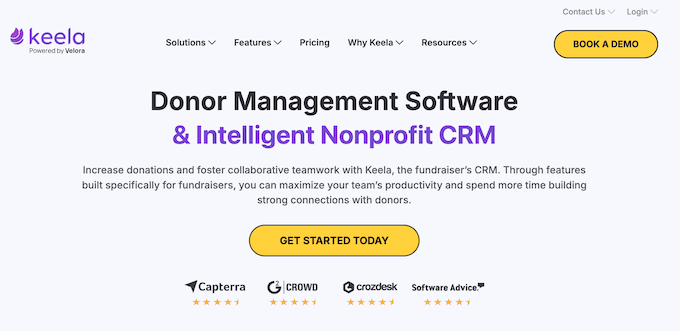
Keela combines smart AI technology with powerful CRM capabilities to help nonprofits make data-driven decisions.
This platform genuinely stands out by actively removing the guesswork from fundraising through intelligent automation and powerful predictive analytics.
| Keela Pros | ✅ AI tools identify likely donors and suggest optimal outreach times ✅ CRM, email marketing, and donation tools work together seamlessly ✅ User-friendly interface simplifies complex management tasks ✅ Efficient donor relationship management tools for retention and engagement ✅ Scalable solution that grows with your organization |
| Keela Cons | ❌ Advanced features require an understanding of AI tools ❌ Some users experience difficulties with real-time syncing across platforms |
| Pricing | Starts at $144/month for up to 1000 contacts |
| Best For | Nonprofits ready to use data-driven insights to make smarter fundraising decisions and automate donor engagement |
Why I Recommend Keela: This platform perfectly combines smart AI tools with practical donor management features. It truly helps you make better, more effective fundraising decisions based on real data, every single time.
8. Virtuous – Best Donor for Automation and Relationship Building
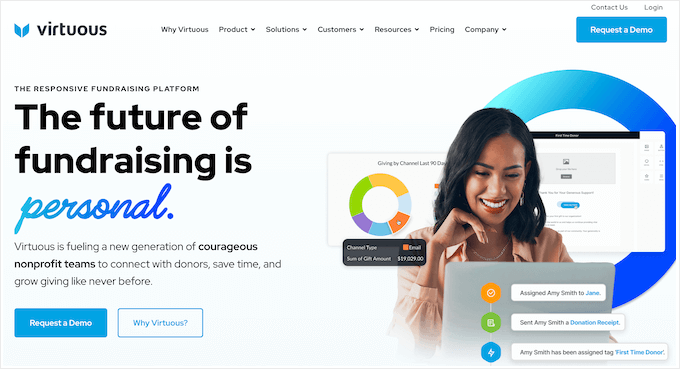
Virtuous is a dynamic platform that combines CRM, marketing, and fundraising tools to build meaningful donor relationships and drive engagement.
The platform truly stands out because it combines comprehensive donor management with built-in marketing automation, all within a single, unified system.
| Virtuous Pros | ✅ Beginner-friendly interface for managing donors ✅ Powerful automation handles repetitive tasks for you ✅ Syncs effortlessly with tools you likely already use ✅ Shifts the focus from simple transactions to real relationships ✅ Built to scale, so you won’t have to switch software as your nonprofit grows |
| Virtuous Cons | ❌ Limited real-time collaboration features for team-based tasks ❌ Limited ability to customize dashboards without technical support |
| Pricing | Contact for a quote |
| Best For | Nonprofits wanting to combine relationship tracking with automated donor communications in one platform |
Why I Recommend Virtuous: This platform beautifully combines donor management with marketing automation. It truly helps nonprofits build stronger relationships and improve engagement without time-consuming manual work.
9. GiveButter – Best for Grassroots Organizations
GiveButter provides an accessible, cost-effective fundraising solution with a strong focus on community engagement and seamless social media integration for nonprofits.
What really sets this platform apart is the fact that you can access powerful fundraising tools without monthly subscription fees.
| GiveButter Pros | ✅ Generous free plan with unlimited donation forms ✅ Built-in event ticketing and management features ✅ Easy social media integration for increased reach ✅ User-friendly design makes setup straightforward |
| GiveButter Cons | ❌ Performance issues with large-scale campaigns ❌ Limited reporting customization options ❌ Transaction volume handling may vary |
| Pricing | Free (Core features) |
| Best For | Small grassroots nonprofits that need comprehensive tools without monthly fees |
Why I Recommend GiveButter: This platform gives small nonprofits access to truly comprehensive fundraising tools for free. Plus, the social sharing features actively help your campaigns reach wider audiences naturally and effectively.
10. goDonate – Best for High-Volume Fundraising

goDonate is a specialized donation platform built specifically to handle large-scale fundraising campaigns for UK-based nonprofits.
If your organization manages national appeals or expects significant traffic spikes during televised events, this platform can process thousands of transactions without performance delays.
| goDonate Pros | ✅ Can handle over 50,000 donations per hour during major campaigns ✅ Fully optimized for the UK market with built-in support for Gift Aid ✅ Creates branded donation forms that match your organization’s identity ✅ Offers personalized, dynamic donation pages to boost engagement ✅ Accepts both one-time and monthly recurring donations ✅ Reduces donor friction with fast, one-click payment options ✅ Supports multiple payment methods, including PayPal, Apple Pay, and Google Pay |
| goDonate Cons | ❌ May require technical expertise to fully personalize donation pages ❌ Limited focus on peer-to-peer fundraising features |
| Pricing | Contact goDonate for a personalized quote |
| Best For | Large nonprofits and organizations running major fundraising appeals that need to process thousands of donations quickly and reliably |
Why I Recommend goDonate: This tool works best for established, UK-based nonprofits that regularly run major campaigns. It consistently handles high donation volumes that would likely crash or seriously slow down other platforms.
Overall, goDonate is the right choice for organizations that need industrial-strength donation processing and simply can’t afford technical failures during their most important appeals.
What Is the Best Donor Management Software?
Based on my testing, I believe WP Charitable is the best donor management software for most nonprofits.
I love that it provides a user-friendly, WordPress-based platform that expertly handles campaign creation, multiple payment gateways, and donor communication without ever overwhelming smaller teams.
If you’re already using WordPress, then WP Charitable is the simplest way to get complete ownership of your donor data.
However, choosing the ‘best’ option really depends on your exact needs. That said, there are two other donor management systems that I highly recommend:
- If you want to retain donors and boost engagement over the long term, then Bloomerang is truly ideal. Its actionable donor profiles and smart engagement scoring immediately tell you who to reach out to next.
- If you’re an established nonprofit that needs comprehensive features like full event management, advanced reporting, and reliable mobile access, DonorPerfect offers a full-featured, scalable solution that’s proven to handle complex operations.
Donor Management Software FAQs
Choosing the perfect donor management system is a major decision, so I’m not surprised if you still have some questions.
After testing all these different platforms myself, I’ve gathered the most common issues and concerns that people bring to me. My aim is to clear up any confusion so you can confidently pick the best tool to support your mission.
What is donor management software?
Donor management software helps your nonprofit track every single donation, effectively manage all your donor relationships, and automate communication tasks like sending timely thank-you emails and receipts.
Do I need donor management software for a small nonprofit?
In my experience, the answer is a definite yes. Even small organizations can benefit from having organized donor data, automated receipts, and the ability to track giving patterns over time.
Relying on spreadsheets might work for the first year, but as soon as you start getting repeat donors or run multiple campaigns, that data will become disorganized and start costing you time and potential donations.
By investing in a donor management system early, you can save your small team a ton of manual admin work, so you can focus on building those all-important donor relationships.
Can I use donor management software with WordPress?
Yes! I’m glad to say that platforms like WP Charitable and GiveWP integrate directly with WordPress.
This is a huge benefit because it keeps everything clean, giving you full control over your donation data and ensuring your forms seamlessly match your site’s design. In fact, I always recommend using a native plugin solution where possible because it simplifies your tech stack.
What’s the difference between a donation plugin and donor management software?
This is a great question I get all the time. Simply put, donation plugins focus mainly on collecting gifts and processing transactions right on your site.
Meanwhile, donor management software does much more. It tracks the full donor relationship, manages engagement history, and provides the powerful analytics you need to make smarter fundraising decisions.
I always advise people to start with a great donation plugin, but plan to upgrade to full donor management software as soon as they start growing, and need to understand why people are giving.
How much does donor management software cost?
The cost varies widely depending on the platform’s complexity and scale. You can find excellent free options like WP Charitable and GiveButter that cover the basics, especially if you’re a smaller team.
Alternatively, more comprehensive platforms like Bloomerang often start at around $125/month for basic CRM features.
Remember to also factor in any transaction fees, setup fees, and potential hidden costs as your donor list grows.
Which donor management platform is easiest for beginners?
Based on my testing, both WP Charitable and Donorbox offer incredibly simple setup processes that truly let you start collecting donations within minutes, even if you don’t have any technical expertise.
If you’re already using WordPress, then I’d suggest opting for WP Charitable since it integrates directly with WordPress.
More Resources for Nonprofit Organizations
Choosing the right donor management system is a great first step. However, if you’re serious about growing your nonprofit, then you’ll need an entire toolset where everything works together perfectly.
To help you take the next steps, here are some helpful WPBeginner guides I recommend to strengthen your overall fundraising strategy:
- How to Create a Nonprofit Website in WordPress
- Best WordPress Plugins for Nonprofits (Expert Pick)
- How to Build an Email List in WordPress
- WordPress Plugins That Will Quickly Help You Get More Traffic
- Nonprofit Marketing Statistics and Insights You Should Know
If you liked this article, then please subscribe to our YouTube Channel for WordPress video tutorials. You can also find us on Twitter and Facebook.
The post Best Donor Management Software: I Tested 10, Recommend 6 first appeared on WPBeginner.
Gutenberg Times: AI Experiments, WordPress 7.0, Gutenberg 22.3 and 22.4, Playground for theme builders — Weekend Edition 354
Hi there!
Yes, it’s been a while. Did you miss me? I hope you and yours had a great start to the new year, and I wish you a healthy, happy and prosperous 2026. I am infinitely grateful you are a reader on this site and newsletter. Thank you for your ongoing support.
My Year-End vacation directly merged into an intensive training and exploration into AI-first software development. It was eye-opening to say the least and entirely liberating. Ideas can be prototyped fairly quickly and their implementation is not stifled by the level of my personal coding skills. Success heavily depends on a clear vision, architectural consistency and radical quality control.
Although there was a downturn in publishing over the holidays, I found a plethora of posts and plugins again. This edition catches up on most of it.
Looking forward to going through our connecting with you in our eighth year of Gutenberg Times.
Yours, 
Birgit
Developing Gutenberg and WordPress
Aaron Jorbin published the WordPress 6.9.1 Release Schedule. RC1 will be next week on January 29, 2026, and the final release on February 3, 2026.
The GitHub project board of WordPress 6.9.x Editor Tasks lists the PRs that will make it into the release in the Done column. Other core updates are available in this trac report.
WordPress 7.0
Jeff Paul announced the WordPress 7.0 release squad, led by Gutenberg’s chief architect Matias Ventura. It’s a team of veterans and newbies spread around the globe.
Rae Morey, The Repository, also reported with more background and details on the state of real-time collaboration feature in her post: Matías Ventura Named WordPress 7.0 Release Lead as Contributors Close In on Real-Time Collaboration Approach
WordPress 7.0 will run your post editor inside an iframe by default, so now’s the time to test your blocks for compatibility. If you’re still registering blocks with apiVersion 2, you’ll start seeing console warnings in WordPress 6.9. The main gotcha: your document and window references won’t work inside an iframe. You’ll need to switch to useRefEffect with ownerDocument and defaultView instead of globals. You can find more details in the official migration guide.
In his post WordPress 7.0 Enforces Block API v3: Why Existing Blocks Begin to Fail, Benjamin Zekavica, core-team rep, also provides some tips and Tricks. Custom blocks that target admin selectors like .wp-admin or .editor-styles-wrapper, rely on global document queries, or initialize libraries globally and now fail consistently. Reading through the article, it seems this is mostly related to agency work, with bespoke theme and block development on sites of the early block era.
Gutenberg releases
Gutenberg 22.3 and 22.4 have been released.
Hector Prieto highlights in his release post Gutenberg 22.3 (December 17)
- Dedicated Fonts page for easier typography management
- Image editing improvements
- Responsive Grid block
- Other highlights
JuanMa Garrido led the 22.4 release together with Anne McCarthy and they had to tame quite a large changelog with more than 400 PRs merged by 77 contributors, of whom 16 were first-timers! It must have been difficult to pick the top highlights for their release post What’s new in Gutenberg 22.4? (20 January):
- Classic and Hybrid Theme Support for the Font Library
- Pattern Overrides: Custom Block Support
- Image Block: Focal Point Controls
- Block Visibility Based on Screen Size (Experimental)
- Other Notable Highlights
 The latest episode is Gutenberg Changelog #125 – WordPress 6.9, Gutenberg 22.1 and Gutenberg 22.2 with JC Palmes, WebDev Studios

Justin Tadlock‘s January developer roundup covers new responsive Grid blocks with adjustable columns and widths, an easy-to-use Fonts admin screen, and experimental PHP-only block registration with full metadata. New tools include an image cropper and an updated Abilities API client. The Breadcrumbs block is on track for WordPress 7.0, and Navigation overlay tests are allowing template part assignments. Playground now features a DevTools extension and a new dashboard interface.
Plugins, Themes, and Tools for #nocode site builders and owners
If you’ve ever watched a client accidentally drag your carefully crafted block layout into chaos, Eric Karkovack has your back. In his guide on How to Protect WordPress Block Layouts From Accidental Changes he walks you through two built-in WordPress safeguards: save your layouts as exportable block patterns you can restore anytime, then use the Lock feature to let clients update content without rearranging your design. You can even lock entire Group blocks at once for extra security.
Wes Theron demonstrates the Details block for WordPress, showcasing how you can create collapsible sections perfect for FAQs, definitions, transcripts, and supplemental content. The tutorial covers inserting the block, navigating with List View, and customization options for keeping pages organized and tidy. Theron walks through practical examples showing how the accordion-style functionality helps hide and reveal content on demand, offering a native WordPress solution for managing long explanations without cluttering the page layout.
Matthew Cowan released Find Blocks, Patterns & Shortcodes, a plugin that helps users locate Gutenberg blocks on WordPress sites and allows CSV export for content audits. The tool includes batch processing, post-type filtering, synced pattern searches, and WP-CLI support, with sortable results tables. It also features security measures like rate limiting and XSS prevention, and improves accessibility for screen readers and keyboard navigation.
In his post How to create magic effects in WordPress with core blocks, Joel Olawanle demonstrates creating cinematic effects using only WordPress core blocks, focusing on the Cover block’s layering capabilities. In his tutorial, Olawanle covers fixed backgrounds for parallax simulation, scroll snap with minimal CSS, creative typography using duotone filters and blend modes, and multi-layered depth through nested Group blocks. Olawanle emphasizes building premium visuals while maintaining performance through native blocks, avoiding heavy page builders and keeping sites lightweight, accessible, and fast.
Matt Cromwell created the Synced Pattern Popups plugin, which turns WordPress’s reusable synced patterns into modal popups that load content with AJAX and use smart caching. Triggers can be activated using simple class or href attributes, and third-party blocks display correctly with good styling. The plugin supports accessibility with keyboard navigation and ARIA support, has an optional AI-powered summary feature, and works with WordPress 6.9’s Abilities API for automated workflows—all without any setup needed.
Justin Tadlock‘s Media Data plugin reveals hidden information from uploaded files—like camera settings, audio tags, and video codecs—through easy-to-use editor blocks that need no coding. Photographers can show exposure details below images, podcasters can add artist info next to players, and archivists can log file sizes and lengths, all using WordPress’s existing metadata with customizable labels and complete block theme integration. Users of WordPress 6.9 also benefit from Block Bindings support for improved workflows.
Troy Chaplin‘s Priority Plus Navigation plugin enhances the core Navigation block by managing menu items more efficiently. When space is limited, it moves items into a dropdown for better accessibility. Using ResizeObserver, it monitors width and changes submenus into a “More” dropdown while following core overlay settings. The plugin fully supports theme.json for customizing dropdown styles, hover effects, and separators, and ensures keyboard navigation and screen reader compatibility.
Kadim Gültekin created Block Style Modifiers plugin to enhance Gutenberg’s block styles with additional CSS classes that can layer together. Developers can easily add modifiers for specific blocks or globally using simple PHP functions and can reorder these classes in the editor sidebar. An experimental companion pack showcases hover effects, responsive utilities, and overlay treatments.
In his post, Bernhard Kau presents his Campaign Archive Block plugin, which fixes Mailchimp’s complicated archive problem by creating dynamic API-driven listings instead of manual archives. Annoyed with Mailchimp’s clunky JavaScript and formatting issues, Kau developed a plugin that automatically pulls archives and can share API credentials with other Mailchimp plugins. Users can set the display count, choose between title and subject, and include sender metadata, reducing the need for manual updates after sending emails.
Johanne Courtright released Groundworx Core 1.3.0 with Dynamic Flow, a query-powered carousel filtering posts by taxonomy or keywords with curated mode for manual selection, Static Flow for building custom slide carousels with any blocks and media pause controls, and Featured Posts displaying content in responsive grids. The update adds responsive breakpoint systems across layouts, block transforms between post disp
Theme Development for Full Site Editing and Blocks
In my latest post, I show how WordPress Playground Blueprints turn theme demos from basic setups into fully functional sites in a browser. Developers create demo content locally, export it, and host assets on GitHub to avoid CORS issues. They then make JSON files that define installation steps, including content import and site setup. The WordPress Importer automatically resizes media and updates URLs. Using this method theme builders can share links that launch complete working demos with sample content, navigation, and settings preserved.
On the Developer Blog, you can read my article Streamlining block theme development with WordPress Playground and GitHub, where I explained a simple workflow using WordPress Playground, the Create Block Theme plugin, and GitHub to connect visual design with version control. Designers can work entirely within browser-based Playground instances, using CBT’s Save Changes to update theme files and submit pull requests to GitHub—without needing to use a terminal or code editor. This method makes it easier for anyone to work on block themes while upholding professional development standards. It’s the blog post to the presentation I gave at WordCamp Gdynia last September. The video is now available on WordPressTV.
Building Blocks and Tools for the Block editor
Carlo Daniele explores the Block Bindings API for Kinsta, demonstrating how to connect external data sources to Gutenberg blocks. The tutorial walks you through registering custom binding sources, fetching weather data from Open-Meteo API, and creating a UI for custom sources introduced in WordPress 6.9. Daniele builds a practical example binding temperature and conditions to Paragraph blocks, showcasing how the API transforms WordPress into a dynamic application platform beyond traditional blogging.
Ian Svoboda helps developers with creating custom blocks using the create-block package. He covers static and dynamic rendering options and explains important files like block.json, edit.js, and save.js. In his tutorial, he builds a dismissible Notice block, outlines naming conventions for assets in the editor and frontend, and demonstrates automatic block registration with glob pattern matching. Developers need local environments and build tools like wordpress/scripts or 10up-toolkit.
In his last week’s live stream, Ryan Welcher went fully into PHP mode and build Custom WordPress Blocks WITHOUT JavaScript. The Gutenberg plugin now also entails a PHP-only block API in version 22.2 and refined in 22.3. Check out the video and see how it all works.
Paulo Carvajal published a comprehensive guide on managing Interactivity API state flow for large-scale WordPress applications. You’ll learn the three foundational pillars: Global State for page-wide data, Local Context for component isolation, and Derived State for reactive consistency. You also learn unidirectional data patterns, asynchronous actions with withSyncEvent, store namespacing, and server-side hydration strategies to help you build performant enterprise projects.
WordPress and AI
In his latest video, Jonathan Bossenger discussed recent AI-related news in WordPress, including the Plugin Check Namer tool for evaluating plugin names and the introduction of the Abilities API JavaScript client in Gutenberg. He also showcased the AI Experiments plugin and WP Bench for evaluating the AI capabilities in WordPress development.
As James Le Page announced on X, the AI Experiments plugin has received significant updates that include AI-powered excerpt generation fully integrated with the editor, along with a new Abilities Explorer admin screen for viewing registered AI features. The backend now supports Content Summarization and Image Generation experiments, which are pending UI development. Additionally, documentation and onboarding materials were improved, and WordPress Playground preview support was added to streamline workflows, allowing developers to test changes directly from pull requests.
Ray Morey has the skinny for you here: AI Experiments 0.2.0 Adds Excerpt Generation and Abilities Explorer
WordVell‘s editorial team examined fourteen practical MCP implementations changing WordPress and WooCommerce workflows from manual tasks to AI-driven automation. This protocol allows natural language commands, such as “publish this post,” to be executed instantly via servers like InstaWP, OttoKit, and n8n. Use cases include AI-driven content creation with SEO, automating admin tasks across sites, product search conversations, personalized customization, and guided checkout experiences.
James Le Page also announced WP-Bench, a benchmark that measures how well language models understand WordPress development. This tool assesses models on WordPress APIs, hooks, security patterns, and features like the Abilities API while testing code in a secure WordPress environment. The goal is to set a standard evaluation for AI providers, encouraging them to improve for WordPress’s many developers.
David Levine, a senior software engineer at rtCamp, explained in the article Beyond AI: What the Abilities API means for WordPress Composability that the new Abilities API allows developers to register specific “abilities” using a clear, machine-readable format. This approach replaces scattered hooks and custom REST endpoints, making plugins and core features more composable. It helps third-party code integrate easily without needing extensive knowledge of internal functions. The API also allows AI and automated tools to find and use capabilities automatically, leading to a more modular and future-ready WordPress ecosystem while maintaining backward compatibility for gradual changes.

Questions? Suggestions? Ideas?
Don’t hesitate to send them via email or
send me a message on WordPress Slack or Twitter @bph.
For questions to be answered on the Gutenberg Changelog,
send them to changelog@gutenbergtimes.com
Open Channels FM: It’s Okay to Let Go
Being a creator also means there are many times where it’s tough to let go of ideas or even businesses. You need to figure out that sweet spot for yourself.
How I Set Up Guest Checkout in WooCommerce in Just 5 Minutes
I once tried to buy a pair of headphones I really wanted. But when I got to the checkout page, the store asked me to sign in.
Since it was just a one-time purchase, I didn’t want to create an account and start getting promotional emails. So, I left and found the same model somewhere else.
That’s when it hit me—many online shoppers probably do the same thing.
Curious, I started digging and found that WooCommerce actually offers a built-in guest checkout option. It’s a simple setting that can save sales you’d otherwise lose at the very last step.
That’s why I created this guide—to walk you through everything you need to know about guest checkout in WooCommerce.
By the end, you’ll know how to set up guest checkout correctly and turn more visitors into paying customers. 🚀
Here is a quick overview of all the topics I will cover in this guide:
- What Is Guest Checkout in WooCommerce?
- Benefits of Guest Checkout in WooCommerce
- When to Use Guest Checkout (Best Scenarios)
- How to Enable Guest Checkout in WooCommerce
- Optimize Your Store with Merchant
- More Options to Customize WooCommerce Checkout
- 🏆 Quick Wins to Improve Guest Checkout
- 🚀 Take Guest Checkout Further with FunnelKit
- Frequently Asked Questions About WooCommerce Guest Checkout
What Is Guest Checkout in WooCommerce?
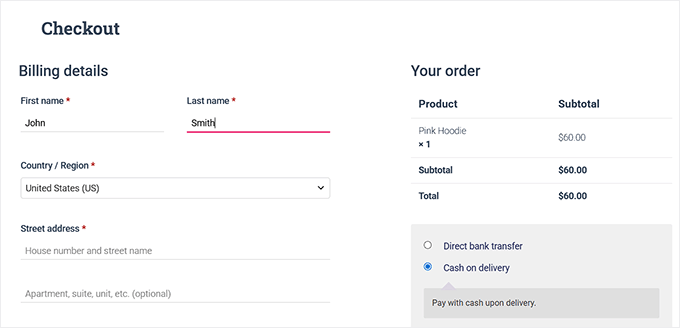
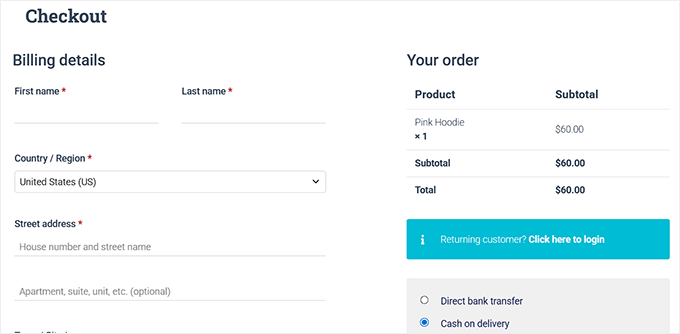
Guest checkout lets customers buy from your WooCommerce store without creating an account on your website.
Instead of signing up or logging in, they can simply add items to their cart, enter their details at checkout, and complete the purchase.
Think of it like walking into a physical store: you grab what you need, pay at the counter, and leave, with no membership or signup required.
This option speeds up the shopping process and makes it more convenient, especially for first-time or one-time buyers.
Benefits of Guest Checkout in WooCommerce
Enabling guest checkout improves the shopping experience for customers and helps store owners make more sales.
It removes extra steps, reduces frustration, and makes shopping smoother. Here’s a simple breakdown:
| For Store Owners 🛍️ | For Customers 🙌 |
|---|---|
| Higher conversion rates – More people finish their orders since they don’t have to create an account. | Faster, hassle-free checkout – Shoppers can pay and go in just a few clicks. |
| Reduced cart abandonment – Guests are less likely to quit halfway through. | No forced sign-up – Customers don’t feel pressured to share extra details. |
| Faster impulse purchases – Perfect for one-time or last-minute buys. | Privacy and trust – Shoppers can keep their data limited to what’s needed for delivery. |
| Email capture is still possible – You can still collect shoppers’ emails for receipts or future marketing. | More control – Customers can decide later if they want to create an account. |
👉 In short: guest checkout helps store owners sell more while giving customers a simpler, stress-free shopping experience.
When to Use Guest Checkout (Best Scenarios)
Guest checkout can help you get more sales, but it’s not ideal for every situation.
For example, stores selling high-value items or subscriptions may require accounts for security and long-term management.
From what I’ve seen, guest checkout works best when customers want a quick, hassle-free purchase.
Some common scenarios include:
- 🎉Holiday or seasonal sales – Shoppers want to grab deals fast.
- 👋First-time customers – Make it easy for new visitors to finish their first order.
- 🎁Gift purchases – People buying gifts often don’t want to create an account.
- 💸Low-cost, one-time products – Quick buys don’t need long-term accounts.
- 💻Digital downloads – Instant access to files without extra steps.
Using guest checkout in these situations can reduce friction and help more visitors complete their purchases.
How to Enable Guest Checkout in WooCommerce
The easiest way I found to enable guest checkout was by using WooCommerce’s default settings.
WooCommerce is the best eCommerce plugin for WordPress, and it gives you complete control over your online store. That’s why it’s my top recommendation for selling physical products.
We also have a detailed WooCommerce review you can check out to learn more about all its built-in features and options.
To enable guest checkout, you need to visit the WooCommerce » Settings » Accounts & Privacy page.
Here, you’ll see an option labeled ‘Enable guest checkout (recommended).’
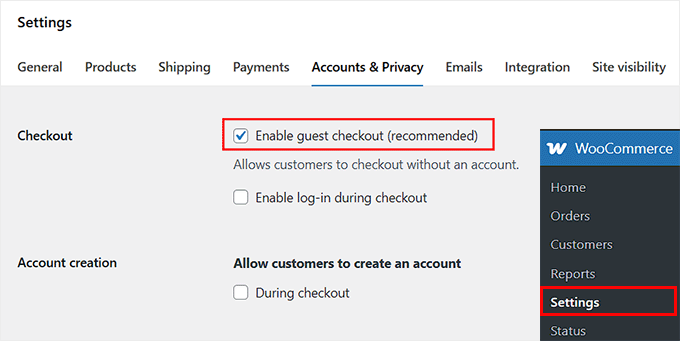
This setting allows people to buy without creating a username or password. Go ahead and tick that box to enable guest checkout for your store.
Once that’s done, simply click the ‘Save Changes’ button to store your settings.
You can now visit your online store and test the checkout to make sure everything is working properly.
Optimize Your Store with Merchant

Merchant by aThemes is an all-in-one WooCommerce plugin that helps improve your store and optimize the checkout.
It offers features like stock scarcity notifications, free shipping bars, and buy X, get Y promotions.
These modules help reduce cart abandonment and encourage guests to finish their orders without making the checkout process complicated.
More Options to Customize WooCommerce Checkout
While exploring the guest checkout settings, I noticed a few other options on the same page that can improve your checkout experience.
You don’t have to use all of them, but knowing what’s available can help you tailor the experience.
Let Shoppers Create an Account During Checkout
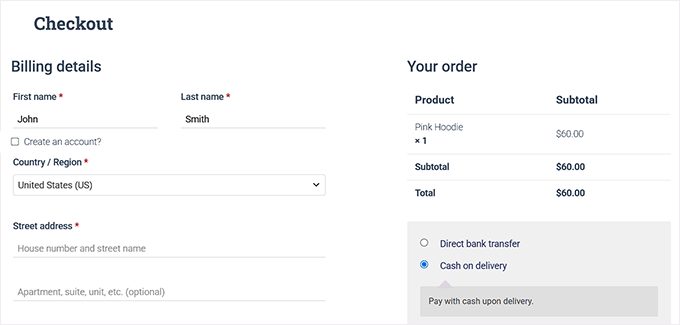
You can also give customers the option to create an account during checkout. WooCommerce can even auto-generate usernames and passwords, so customers don’t have to think about it.
To turn it on, go to WooCommerce » Settings » Accounts & Privacy and tick ‘During Checkout’ for the ‘Allow customers to create an account’ setting.
This gives you the best of both worlds: a fast guest checkout flow that still lets users sign up seamlessly without redirecting them to a separate registration page.
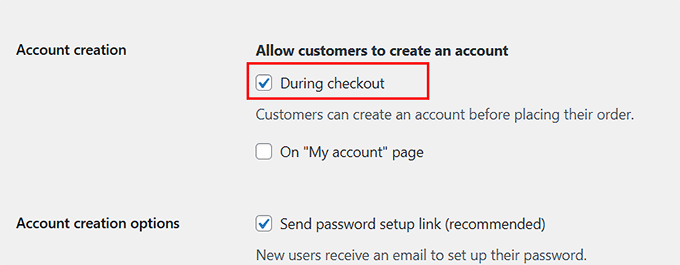
This comes in handy when you want repeat shoppers to save their information for next time. It also helps people who like to track orders or save shipping addresses.
This setup is ideal for stores where customers are likely to return for future purchases.
Force Guest-Only Checkout
Sometimes, you may want to skip accounts altogether and keep the checkout 100% guest-only. To do this in WooCommerce, you need to disable both account creation and login options during checkout.
Just go to WooCommerce » Settings » Accounts & Privacy and untick the account creation options. Then, also make sure to uncheck the ‘Enable log-in during checkout’ option.
Once these settings are turned off, shoppers can only check out as guests.
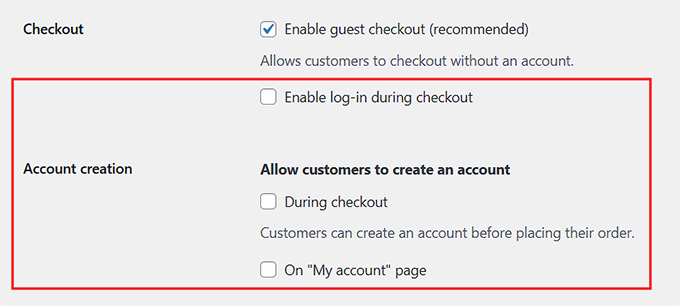
This setup works really well for quick, one-time purchases, like digital downloads, seasonal items, or flash sales.
Shoppers can complete their order quickly without extra steps, which is exactly what they want in these scenarios.
Let Returning Customers Log In During Checkout
You can also let returning buyers log in during checkout instead of going through the guest flow.
Just tick ‘Enable log-in during checkout’ on the WooCommerce » Settings » Accounts & Privacy page. This makes things easier for people who have shopped with you before.
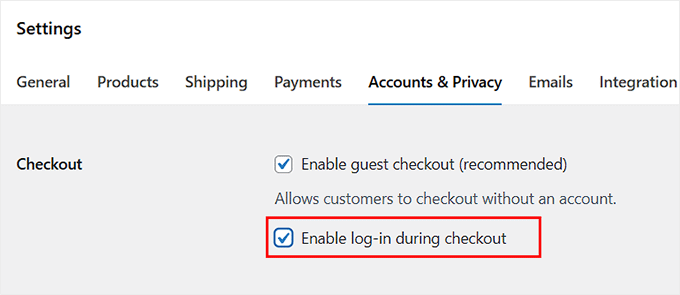
They can grab saved addresses, check past orders, and finish their purchase faster.
It’s perfect if your store has a mix of new and repeat shoppers, or subscription-based products where returning buyers benefit from logging in.
🏆 Quick Wins to Improve Guest Checkout
Now that your guest checkout is set up, the next step is to make things even smoother for your shoppers.
Here are some quick tips I find most effective for boosting conversions and giving shoppers a better experience:
- ✨Simplify the checkout flow: Combine shipping and billing sections and remove unnecessary fields. Fewer steps = faster checkout.
- 🏠Enable address autocomplete: Let the checkout form suggest addresses while typing. This speeds up checkout and reduces errors.
- ✅Add inline validation: Highlight mistakes as customers type so they can fix them right away.
- 📱Ensure mobile-friendly design: Most shoppers use phones, so make sure your checkout works smoothly on small screens.
- 🛤️Show progress indicators: Let customers see how many steps are left in the checkout process.
- 💳Offer multiple payment options: Give buyers a choice so they can pay in the way that’s easiest for them.
- 📝Use clear, concise field labels: Avoid confusion by keeping labels short and easy to understand.
I recommend trying a few of these quick tips because they’re super easy to implement and can make an immediate difference in your checkout experience.
To learn how to set up these strategies, check out our guide on how to create a faster checkout experience in WooCommerce.
🚀 Take Guest Checkout Further with FunnelKit
The tips I just covered are great quick wins. But if you really want to take your guest checkout to the next level, FunnelKit Funnel Builder is worth checking out.
It lets you fully customize your WooCommerce checkout, making the experience smoother and more tailored for your shoppers.
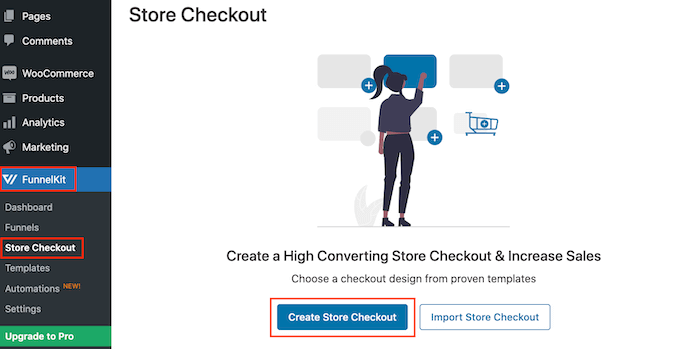
I’ve thoroughly tested FunnelKit and found it very reliable. This powerful WooCommerce plugin offers features like rearranging checkout fields, adding upsells / cross-sells, sticky add-to-cart buttons, countdown timers, cart reserved timers, and progress bars.
You can also highlight recently viewed products, show complementary items, and create a guided checkout flow to reduce abandoned carts.
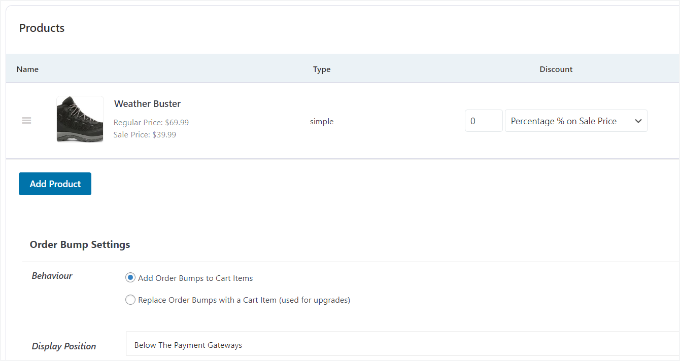
To see exactly how to use FunnelKit and customize your WooCommerce checkout, take a look at our step-by-step guide on how to customize the WooCommerce checkout page.
Frequently Asked Questions About WooCommerce Guest Checkout
A few of our readers have asked about guest checkout, so I’ve put together answers to the most common questions:
Is guest checkout secure?
Yes! Guest checkout is just as secure as a regular WooCommerce checkout. All payment processing is handled by your payment gateway, so customer data is protected.
Can I collect customer emails without forcing them to create an account?
Absolutely. Even with guest checkout, WooCommerce still collects the customer’s email during checkout.
This allows you to send transactional emails, such as order updates, receipts, and shipping notifications. If the customer opts in, you can also send marketing emails later—all without requiring them to create an account.
Can I disable guest checkout later?
Yes, you can. If you ever decide that only registered users should buy, simply go to WooCommerce » Settings » Accounts & Privacy and untick the guest checkout option.
How do I track guest orders?
Guest orders are saved in WooCommerce just like regular orders. As a store owner, you can view them on the Orders page and filter by customer email.
From the customer’s perspective, they can check their status on your website’s ‘Track Your Order’ page by entering their Order ID and email, or simply rely on the email updates sent by WooCommerce.
I hope this article helped you learn how to easily enable guest checkout in WooCommerce. You may also want to see our guide on how to add weight-based shipping in WooCommerce or our expert tips to recover abandoned carts on your store.
If you liked this article, then please subscribe to our YouTube Channel for WordPress video tutorials. You can also find us on Twitter and Facebook.
The post How I Set Up Guest Checkout in WooCommerce in Just 5 Minutes first appeared on WPBeginner.
Introducing WP Media Cleanup: Save Disk Space & Reduce Hosting Fees by Removing Unused Images
Ever wondered why your WordPress site takes up so much disk space?
Often, it’s because your WordPress site is quietly hoarding thousands of image files you’ve NEVER actually used.
Every time you upload a single image, WordPress automatically creates 5-10 different size variations, like thumbnails, medium, large, and custom theme sizes. Most of these variations never appear anywhere on your site. Not once.
A site with just 5,000 images can easily have 20,000+ unused image files. This wasted storage inflates your backup sizes, slows down migrations, and quietly drains your hosting budget every single month.
Now imagine if you could see exactly which image variations are taking up space for no reason and remove them safely in just a few clicks.
That’s exactly what WP Media Cleanup by Duplicator offers. WP Media Cleanup is a powerful new tool that lets you reclaim disk space by identifying unused media files and removing them quickly and easily.
That means faster backups, easier migrations, and lower hosting bills… all without risking your site’s images or spending days manually sorting through files.
Background Story – Why WP Media Cleanup?
If you’ve ever tried to clean up your WordPress media library manually, then you already know how frustrating the experience can be. You’re staring at thousands of files with names like image-150x150.jpg, image-300x300.jpg, and image-768x432.jpg.
You have absolutely no way to tell which ones are actually being used.
As someone who has managed several WordPress sites, I saw this problem over and over. In fact, I also get questions about this all the time from our readers.
Site owners were paying for extra storage. Backups were taking longer than necessary. Migrations were slower than they should be. And it was all because of unused image variations hiding in the media library.
That’s why my team at Duplicator built WP Media Cleanup.
Simply put, it’s the safest way to reclaim disk space on WordPress sites. It lets you identify unused image variations and remove them while keeping all your original files protected.
Get a Complete Picture of Your Unused Files
The problem with unused images isn’t that they exist… it’s that you can’t see which ones are safe to delete.
With one click, WP Media Cleanup scans every corner of your WordPress site. From your published content to your widgets, custom fields, and theme settings. It builds a map of which images are actually being used.
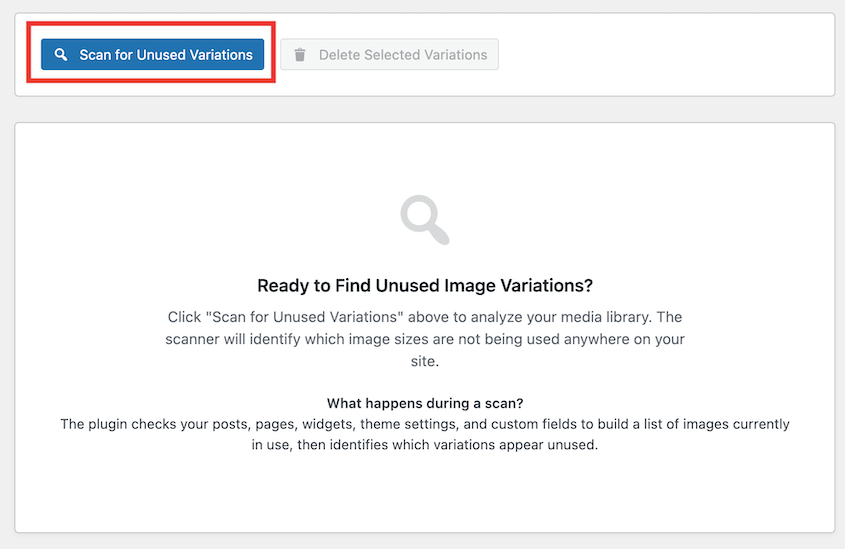
Then it cross-checks that map against your media library to show you exactly what’s sitting unused on your server.
The result? A clear, detailed report that tells you precisely which files are safe to delete. No more guessing. No more manually checking thousands of images. Just a straightforward answer to “what’s wasting my storage space”.
Clean Up Your Media Library Without Fear
Once WP Media Cleanup shows you what’s unused, the power is entirely in your hands. Delete everything at once if you want to reclaim space immediately. Or review files one by one if you prefer a more cautious approach.
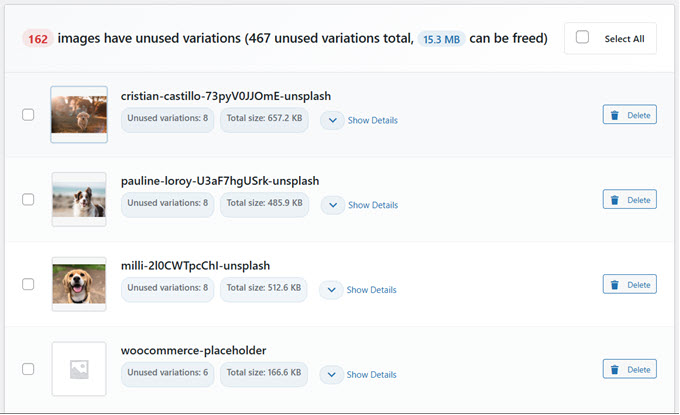
Either way, your original images are completely protected. WP Media Cleanup targets only the size variations, like thumbnail-150x150.jpg, medium-300x300.jpg, and similar files that WordPress generated automatically. Your source files remain untouched.
For agencies and freelancers managing multiple sites, this control matters. You can clean up client sites confidently, knowing you’re not risking their content or making irreversible changes.
Delete Now, Restore Later If You Need To
Cleaning up your media library shouldn’t feel risky. That’s why WP Media Cleanup builds in a recovery system from day one.
When you delete image variations, they’re not deleted forever, but they’re backed up. The files move to a safe temporary location and stay there for 30 days (you can change this duration in settings).
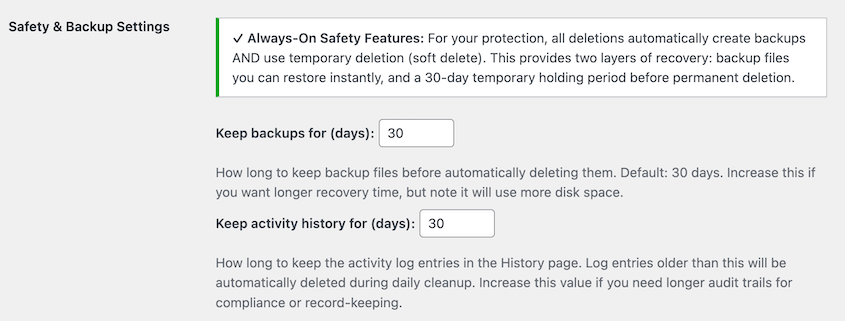
Need to retrieve the images you’ve deleted? Whether it’s one file or everything you deleted, restoration only takes seconds.
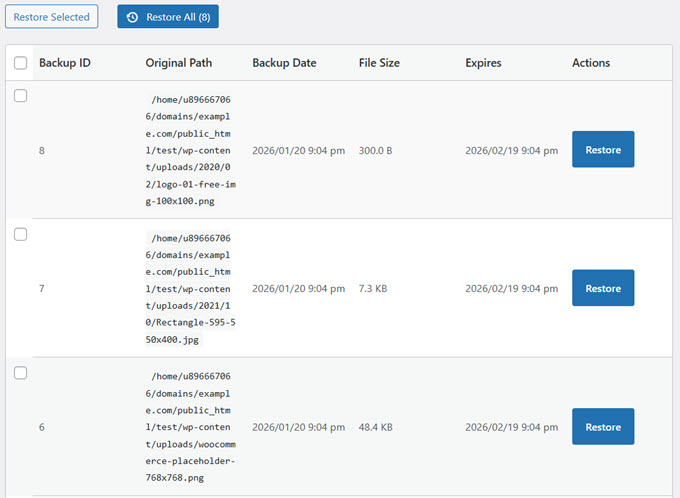
This approach gives you the confidence to actually clean up your site. You’re not gambling with permanent deletion… you’re making reversible decisions that you can adjust as you go.
Automate Cleanup Across Multiple Sites with WP-CLI
If you’re managing dozens of client sites, clicking through WordPress dashboards for every cleanup task isn’t realistic. You need speed and automation.
WP Media Cleanup includes full WP-CLI support, letting you handle everything from the command line. Scan for unused files, delete them, restore backups, check storage stats… all without touching a browser.
Here’s a typical workflow:
# Find and review unused variations
wp media-cleanup find_unused --format=table

# Delete them with confirmation
wp media-cleanup delete_unused --yes

# Check statistics
wp media-cleanup stats
For agencies, this means you can integrate media cleanup into your existing maintenance workflows, run it across all client sites at once, and reclaim storage at scale without manual intervention.
Built by the Team Behind Duplicator
WP Media Cleanup is built by the same team behind Duplicator, the WordPress backup and migration plugin trusted by over 1,500,000 professionals for protecting and moving their WordPress sites.
For years, Duplicator has helped you create reliable backups and handle complex migrations with ease. We’ve seen firsthand how unused image variations inflate backup sizes and slow down migrations across thousands of sites.
Our mission has always been to make WordPress site management simpler, faster, and more reliable… whether you’re backing up, migrating, or maintaining your site.
That’s exactly why we built WP Media Cleanup. It’s another tool in your arsenal for keeping WordPress sites lean, fast, and cost-effective.
Reclaim Disk Space and Reduce Hosting Costs
Your media library might look manageable, but behind the scenes, WordPress has been creating multiple versions of every single image you’ve ever uploaded. Over time, those unused variations add up to serious storage waste.
When you back up your site or move it to a new host, all those unnecessary files come along for the ride. That means bigger backup files that take longer to create, slower site transfers, and wasted storage you’re paying for every month.
Whether you’re running a blog, an online store, or a business website, WP Media Cleanup helps you avoid hitting storage limits, reduce your hosting costs, and keep your site running efficiently without the bloat. For agencies managing client sites, those savings multiply across your entire portfolio.
Here’s all it takes to get started:
✅ Install WP Media Cleanup on your WordPress site
✅ Click “Scan” to analyze your media library
✅ Review the list of unused image variations
✅ Delete the unused media in bulk or individually
✅ Restore anything if needed from the 30-day backup
WP Media Cleanup is available now as part of our Duplicator Elite bundle, or you can purchase it separately starting at $29 per year for a single site. Setup takes minutes, and you’ll immediately see how much reclaimable space exists in your media library.
We’re truly building something special here, and this is only the beginning. If you have ideas on how we can make WP Media Cleanup even more helpful for your business, I’d love to hear from you.
As always, thank you for your continued support of WPBeginner. I look forward to helping you keep your WordPress sites lean, fast, and cost-effective.
Yours Truly,
Syed Balkhi,
Founder of WPBeginner
The post Introducing WP Media Cleanup: Save Disk Space & Reduce Hosting Fees by Removing Unused Images first appeared on WPBeginner.
Open Channels FM: Growing Agency Success with People-Centric Values and Open Source Education
In this episode, Anne Bovelett chats with Rahul Bansal and Aviral Mittal from rtCamp, highlighting the agency’s growth since 2009, commitment to accessibility, and innovative training programs in WordPress.
#201 – Marc Benzakein on How Life Has Changed During the Internet Era
Transcript
[00:00:19] Nathan Wrigley: Welcome to the Jukebox Podcast from WP Tavern. My name is Nathan Wrigley.
Jukebox is a podcast which is dedicated to all things WordPress, the people, the events, the plugins, the blocks, the themes, and in this case how life has changed during the internet era.
If you’d like to subscribe to the podcast, you can do that by searching for WP Tavern in your podcast player of choice, or by going to wptavern.com/feed/podcast, and you can copy that URL into most podcast players.
If you have a topic that you’d like us to feature on the podcast, I’m keen to hear from you and hopefully get you, or your idea, featured on the show. Head to wptavern.com/contact/jukebox, and use the form there.
So on the podcast today, we have Marc Benzakein. Marc’s story is one that spans nearly the entire history of the internet, with roots reaching back to the mid nineties. He explores, how curiosity and an enthusiastic embrace of technology led him from running a small coffee importing business, accepting payments by snail mail, fax, then email, to helping wire up schools for internet access when modems worked incredibly slowly, and only a handful of people were online.
This episode is a departure from our usual topic about plugins, themes, and WordPress community news. Instead, we are more in the business of reminiscing this week, taking a reflective walk down memory lane to look at how the internet has evolved, not just as a technology, but as an integral part of society that’s transformed how we work, communicate, and think.
Marc shares some personal stories, building bulletin board systems, forging long distance friendships over phone lines and slow modems, and watching as internet access shifted from an intentional, difficult to navigate hobby for a few, to an invisible always on utility that we all take for granted.
We talk about how technology has affected not only business and productivity, often creating more work instead of less, but also our attention spans, expectations around entertainment, the pace of life, and even the social fabric that binds us together.
We discuss the cultural shifts that came with always connected living, digital minimalism, and the recent push by younger generations to step back from tech and reclaim a bit of analog life.
We chat about the early optimism of open standards, the rise of walled gardens and social networks, and the challenges of regulation, commercialisation, and the balancing act between freedom and responsibility online.
Marc’s perspective is shaped by decades of direct technical experience, as well as thoughtful observations of how technology is reshaping the world around us, sometimes for the better, sometimes in ways we need to pause and question.
Whether you are nostalgic for the old days of dial up, intrigued by how the internet’s culture has shifted, or curious about how these transformations might play out as new technologies like AI reshape society, this episode is for you.
If you’re interested in finding out more, you can find all of the links in the show notes by heading to wptavern.com/podcast, where you’ll find all the other episodes as well.
And so without further delay, I bring you Marc Benzakein.
I am joined on the podcast by Marc Benzakein. Hello, Marc.
[00:03:44] Marc Benzakein: Hello, Nathan. How are you?
[00:03:45] Nathan Wrigley: Yeah, good. This is going to be an episode unlike one I think we’ve ever done on the WP Tavern podcast. Because usually we have a conversation about, I don’t know, a plugin, a theme, a community idea, something along those lines. And today we’re just going to do memory lane. We’re going to go hand in hand down memory lane.
I think Marc’s memory lane is a little bit longer than my memory lane because it’s all about the internet and the way we’ve been using it and how it’s evolved and all of that. So if you’ve got an expectation of a plugin show, this is not the one for you. This is going to be a little bit different.
So before we crack in properly and have that conversation, Marc, would you just sort of paint the picture a little bit about your bio? Maybe go back right to the beginning of your experiences on the internet. When did you first get online and all that kind of stuff?
[00:04:30] Marc Benzakein: So I want to go back to, I think it was 1995 or 1996. There was a, of course people hear about, and it still exists, AOL and things like that. And then there was Prodigy. I got involved as a user of the internet with a company called Netcom. And it was kind of one of the first true internet service providers that I knew of at the time. It wasn’t like, it didn’t have like this interface and kind of guide you through where you needed to go and everything. You had to use things like Gopher, and you had to do research in order to be able to use the internet.
I of course, became fascinated with it always being a, kind of a tech head or just curious. I’m just infinitely curious. It doesn’t really matter, it doesn’t have to be technology. It can be anything and I find it, like I said, I’m infinitely curious and that leads to distractions sometimes, but it also leads me down paths that I never would’ve thought.
And while I was working on the internet, so this was at a time that I was actually importing coffee from Africa. So yeah, so related. So related. And I had actually made some pretty good money with the coffee business. I was doing the email thing. I had like my three friends who had email addresses and we were like, oh, this is cool. Look at this, instant gratification. And I thought, man, it sure would be cool to see what this looks like from the other side of things. Because I have no clue how any of this works.
And so curious thing happened with the coffee company. I was importing from a country called Burundi in Africa. Some people know where it is, some people don’t. I actually never visited, but my uncle was actually a big shot in the agriculture department there which is how I had the connection to be able to import coffee into the United States. They had a lot of civil and political unrest, and essentially burned the coffee fields. And my uncle fled the country because it had become so dangerous.
So one day I’m, basically I had set up a system in which I import the coffee, it goes to a distributor. Once a month I would go out to the mailbox and collect a cheque. And that was my job. It was the easiest thing I ever did, once I got the system built. And so, lo and behold, civil unrest and all that, which was just awful by the way, but I’m out of business because I can’t import coffee from Burundi. And I was really young, and probably not smart enough to think, maybe I should back this up with other countries too.
But coincidentally, a person that I had gone to high school with, they built computers for schools and things like that, so they had some government contracts and things like that. And they had this crazy idea that they wanted to connect schools to the internet. And they wanted to give them high speed access. Now, keep in mind that back in these days we’re talking about 14.4K, it was, well, we thought it was fast at the time. You know, you had US robotics with their HST standard. And we thought that we were doing well, but most people were actually on 24 hundreds back then.
So if you can imagine that, 2,400 baud modems. I remember it like it was a meal ago. I mean it was just crazy. And so now, I was like importing coffee and I was trying to figure out what to do next and Greg Franklin, who I have partnered with since like the eighties, we’ve been through a lot. We were partners at ServerPress. We’ve been through it all. He and I, you know, we were always good friends. And he says, hey, I’m going to work with Phil and Steve on this internet thing, and it’d be kind of cool if you help me out because I have no clue what I’m doing. I’m like, well, I have no clue what I’m doing either. And he said, yeah, but between the two of us, we can figure it out.
So the idea was, they had already set up, Phil and Steve, who were the other partners in this company, they had set up digital ISDN access. Now, ISDN, let’s see, what did that stand for? Something, something, digital network.
[00:08:32] Nathan Wrigley: I can’t remember what the acronym stood for, but it was banded around a lot, I remember that.
[00:08:36] Marc Benzakein: Yeah. And what made it fantastic was you had a modem, okay, but it was kind of on demand. So when your computer sent out a network request that was outside of your internal network, which nobody had home internal networks back then. You know, if they had a computer, that was it, right? Back then, internal networks were things like, there was like LANtastic was one of them, and then there was Novell networking and all that stuff. So it was like that token ring network stuff, right? Okay. So you have to go way back, right? So I can’t believe I’m remembering some of these terms because it’s been so long.
[00:09:11] Nathan Wrigley: Yeah, I remember all of the ways that they could be connected. I remember seeing the, you know, you’d read through TCP IP documentation and there’d be diagrams of computers connected with T cables all in circles because that was the most efficient way to connect them all. Oh gosh, you’ve taken me back.
[00:09:26] Marc Benzakein: It wasn’t just the most efficient way, it was, if any part of that ring broke, the whole network broke down. You had have it, you know? So this concept of plugging into a switch or a router or something like that was like completely, pardon the pun, but completely novel. Not Novell, novel.
[00:09:45] Nathan Wrigley: Novell, yeah, very good. Very good.
[00:09:48] Marc Benzakein: So I built a lot of token ring systems for local businesses and things like that, but nobody had a network at home. They generally, at most had one computer at home. And when they wanted to go online, I should go back even before that, I used to run a bulletin board service, a BBS, which was even more ridiculous than a 2,400 baud modem.
[00:10:11] Nathan Wrigley: This was when there were like three people in the United States online.
[00:10:14] Marc Benzakein: Yeah. And essentially I would have my computer, I was living in an apartment at the time. I would have my computer set up and only one person could connect at a time to my computer, which was set up with this BBS software on it. And they would play games. I had downloads of different files and things like that. I was the first BBS in our region to have a one gigabyte SCSI hard drive. And so I became very, obviously my BBS became very popular, not because I offered anything incredible, but because I had a one gigabyte hard drive.
[00:10:47] Nathan Wrigley: Yeah, you had the badge of honor.
[00:10:48] Marc Benzakein: Yeah. And word spread quickly and all that. In the old fashioned ways, which was carrier pigeons and things like that.
[00:10:53] Nathan Wrigley: That’s right. There was no, yeah, or the bulletin board.
[00:10:57] Marc Benzakein: Yeah, or the bulletin, yeah. And I think that was probably where I got kind of this taste of like how cool it could be because I would modify my own stuff. So I would, we used a bulletin board software called WWIV. It was all C++ coded. And there was this guy that somehow I found, I don’t even know, in Virginia. His name was Tony. And he and I got to be really good friends because he ran a bulletin board system too in Virginia and I’m in California. And we would get on phone calls, long distance mind you. If you remember what long distance was.
We would talk for hours and this guy was one of the funniest guys I’ve ever met. I mean we would, he would just call me up to tell me, we got to the point where he’d just call me up to tell me jokes and we would just laugh for hours. But he was in the military. He worked on the helicopters that flew George Bush senior around. He was in the Marines.
And we met up one time because he flew out to California. But that’s a whole side story. So that’s where I got started. And then I invested in a US Robotics 14.4 HST modem. So I could do, yeah, 14,400K per second, which was like, I don’t know what the time of $500 modem or something ridiculous like that.
[00:12:10] Nathan Wrigley: Yeah, you’ve suddenly taken your computer onto the highway instead of being stuck on back lanes.
[00:12:16] Marc Benzakein: Right. So not only did I have my one gigabyte SCSI drive, but I also had high speed BBS connection.
[00:12:23] Nathan Wrigley: You got all the bling that you can have.
[00:12:26] Marc Benzakein: I had all the bling on my 286 computer. It might have been a 486, I don’t know. I don’t remember the computer. But what was funny was like you would sit there, we’d be watching TV and I’d hear my modem go off because someone would be connecting to the BBS. I would drop what I was doing just so that I could go and see what they were doing, right? Because at my end I could see everything that people were doing, so on top of it all. That was probably my foray into the internet, even though I didn’t realise it at the time.
[00:12:53] Nathan Wrigley: Although for a proportion of the listeners, they’ll be kind of nodding their head and going, oh yeah, all of the things that you described make perfect sense. I guess for a significant proportion of the audience, all of this will sort of sound like a mystery. But hopefully you’ll have got some impression, deal listener, the internet as we now know it, where it’s ubiquitous, it really is everywhere. You know, you’ve got a connection if you’re walking down the street with your cellular network and what have you.
In the part of the world, certainly where I live, and I imagine where you live, there’s no real black spot where the internet does not really exist. And everything’s really straightforward. You buy a device from a shop, turn it on and it connects almost immediately. And yet that really wasn’t the case. It was kind of like more pioneering days. Most things didn’t work, but it was a heck of a lot of fun, and a heck of a lot hobbying. So more of actually. Now that I think about it, that’s the best way to phrase it. It was a hobby, things to do.
[00:13:48] Marc Benzakein: It absolutely was a hobby. Very few of us actually had, well, I don’t think any of us had the foresight that the internet would become what it is right now. At least none of the people in my circles. I think it was, it would be the equivalent of like being a Ham radio operator. You know, it’s kind of the same sort of thing. You kind of felt like you were part of this like little elite group of people who understood how it worked and could make it work, and it made you feel special. And for those of us who grew up kind of being that nerd in high school and things like that, and especially back in the seventies and eighties when, I mean I went to school, there were only three people who even knew how to use a keyboard on a computer. And of course we, I mean they made a fricking movie called Revenge of the Nerds. They made fun of us.
It’s amazing that we haven’t had, well, I think a lot of us have had to go through years and years and years of therapy. And I think that I just probably deflected a lot of that sort of treatment of nerds with like a very sharp tongue and a, you know, a very, I would laugh at it and things like that. So that was kind of my coping mechanism probably. And I probably have some trauma from all that that I don’t even remember. But there’s probably something there, but that’s a whole other show. We can talk about that another time.
[00:15:00] Nathan Wrigley: Yeah. So the fact that it was a hobby and also the fact that, so my recollections start a little bit later than yours, but we’re not like a whole decade out of kilter. I think you definitely started at times where I can remember some of that stuff. You certainly got the march on me. But nevertheless, I don’t think in my estimation I had any conception that it would grow beyond a thing that hobbyists did.
So I think it was always going to remain this sort of niche hobby thing. Maybe some sort of place where you would communicate with a handful of people, and that handful of people would be, you know, equally nerdy in the same way that you or I were. But no expectation that it would be adopted en masse. No expectation that every single human being would have some sort of device, either that they’re walking around with or just in their home or anything like that.
And so I think, looking back, I predicted it would just be this hobby thing and would never grow into anything else. And so it was just a bit of a lark, a bit of fun. Something that you’d put away from time, you know, you would set it down, go and do your regular day, then come back. There was no email, nothing like that. So you could safely put it away and then come back to it.
I look back on it very fondly. It’s almost like halcyon days. And so many things that the internet has been connected with, and is connected with now are fabulous, but there’s also a lot of downsides which have come serendipitously along the way as well. Nobody foresaw those either. So I think, like I say, it was sort of halcyon days. Just this notion that it would be, I don’t know, unicorns and rainbows all the way down.
[00:16:33] Marc Benzakein: Right. The closest prediction that I had made back then was I said, you know, one day we are all going to be connected. But I thought it was going to be one of these kind of like, we go on and we intentionally connect with each other, not like we’re always connected all the time kind of thing. Of course I was young and quite the gamer at the time. I said, here’s what’s going to happen is, I predict that one day games will exist where we keep all the files on our own systems, and the only thing that’s being transmitted to each other is just data to like, so we can like play together all at the same time in these games.
That was my prediction and people would laugh at me. And now of course it’s gone way, way, way beyond that. But every once in a while I’m like, see, I told them and I did nothing about it. I just knew it was going to happen and I did nothing about it.
[00:17:20] Nathan Wrigley: I remember when I was at school, sitting in a physics class, and I for some reason got sat next to probably the nerdiest nerd I’ve ever met. I won’t name him, but he is still very nerdy. He really was like on the extreme end of interested in all of this kind of stuff. And I remember we got into a conversation once where he said, do you know what I think is going to happen in the future? I think you’ll be able to, so we still had cathode ray tellies, so you’d turn the tele on, you’d wait for three minutes for the TV to warm up, and then the picture would slowly appear. And that was the level that we were at, and you had to walk over and press a button on the screen if you want to change it between the four channels or three channels that were available in the UK at the time.
[00:18:01] Marc Benzakein: Yeah, the kids were the remotes back in those days.
[00:18:03] Nathan Wrigley: That’s right. We were literally, either that or a big stick that you could try and prod from the sofa. But he said to me, in the future we’ll have televisions that are just connected to computers somehow, and we’ll pick what we want to watch, and we won’t have to just watch what’s provided to us. We’ll be able to say, I’d like that now, and this now, and watch this film now. And he just predicted this future. And I remember sitting there thinking, that’s never going to happen.
Now that’s kind of like the starting gate for children growing up in this era. That’s like the basic provision. If you haven’t got, you know, the computer switched on and the TV and the music and the radio and all of that on demand, yeah, that’s not life, that’s just some sort of poor version of life. It’s so interesting how it’s transformed what we expect.
[00:18:55] Marc Benzakein: It’s funny because, yeah, you hear the kids being like, what do you mean you had to wait till Tuesday night at eight o’clock in order to watch? And if you didn’t see it, you’d miss it completely. What do you mean by that?
[00:19:04] Nathan Wrigley: Yeah. But even map that further back and, you know, you go back a whole generation or a generation and a half prior to you and I, even the notion that you could watch anything on a box in a house, what do you mean, the theater? Somebody brought the theater to your house. Well, yeah, kind of, in a little box. What, they shrunk the people down? How? It’s insane.
And yet, every single generation, this is now the assumption. The technology of the magnitude that we’ve got now, and the complexity that we’ve got now, and the miniaturisation that we’ve got now, this is now the benchmark for the beginning of the next generation. And it’s so interesting watching it happen.
I don’t know what you feel. I’m probably jumping ahead because I want to go back and talk about some of the things which have gone wrong. But what’s your, do you see yourself fully able to engage with all of the new things that are happening?
So we’re in the year, we’re at the very, very end of 2025 and, you know, we’ve got things like AI. We’ve had all sorts of interesting things happening. And I do wonder, for me at least anyway, I do wonder if there’s a point in time where it just races ahead at such a speed that somebody like me really does genuinely struggle to kind of keep up. I don’t know if you’ve got the same intuitions.
[00:20:13] Marc Benzakein: I actually think everybody does. I think that kids do too. I just think that kids are focused, for instance, on what’s important to them. And they’re at a different point in their life, so what’s important to them is not important to us. And so the technology that’s important to them like, say for instance, TikTok or whatever, is just an example, right? I only care about TikTok insofar as, what can it do to boost my brand? Or something like that.
Although it is interesting that kids are interested in boosting their brand on TikTok and they’re kids. But that’s, they may not realise that that’s what they’re doing, but that’s what they’re doing. But as far as technologies go, I think we just tend to use a technology, I think we’ve reached an age where, with the exception of maybe teleportation, we really feel like, if I can think this, we can do this. And so we just kind of like, now we’re just like, okay, I want to do this, what do I have to do in order to do it? Not, that’s impossible. You know, I think we’ve crossed over that hump of things being impossible.
[00:21:15] Nathan Wrigley: I remember sitting in the car with my children. So this is going back several years now. I mean quite, maybe a decade or more. And I remember my child asking to play a certain song on the car radio. I said to him, we don’t have that. And he looked at me and he said, what do you mean we don’t have it? Because the setup that I had in the car still required compact disks. You know, the old CD player. You would put the CD in and so the arrangement of CDs that we had in the car was the available catalog of songs.
But he could not get over, unavailable. What? What do you mean? I mean, genuinely, it was a real moment where he had to think, the song is bound to that round thing. It’s not just coming out of the ether somehow. And that was quite a profound moment for me thinking, wow, your world is a lot bigger than mine, well, smaller and bigger at the same time, but your expectations are so different to what mine were when I grew up.
[00:22:10] Marc Benzakein: I think that, oh, I mean I hate to sound like, oh, kids today, but kids today, I mean they barely know what an iPod is. And how long ago was that? That wasn’t even that long ago. Because it’s like, what, you had to download your music onto this device? Yeah, because it could hold more music than a CD. For us, the iPod was groundbreaking, right? But I remember the first time I could put music on my phone and I was like, oh, this is awesome. I don’t even, once again, I don’t even know why we call them phones anymore. I hardly ever use it to talk to people.
[00:22:38] Nathan Wrigley: Yeah, your pocket computer.
[00:22:40] Marc Benzakein: It’s way more powerful than anything I ever had in the past. I think because kids are in a constant state of having to adapt anyway, that’s just what growing up is, is a constant state of adaptation. I think that it’s easier for them. I do find that I’m a little bit slower or I might be just more selective. I might just be like, you know, this doesn’t interest me. And it may this be like I’m becoming more and more, get off my lawn as I get older. Or it may be that I’ve always, even back when we started the internet service provider, my feeling was that we have all this power at our hands and we are still children when it comes to us as a society and our ability to be responsible.
[00:23:25] Nathan Wrigley: Yeah, that’s a curious insight isn’t it?
[00:23:28] Marc Benzakein: Technology has always been kind of a double-edged sword for me. It’s amazing what you can do, but going back to the coffee days, I remembered how the speed of business changed for me because we had fax machines. And so I would fax to the people in Burundi because we would, coffee would go to auction. I’d have to bid on it and, you know, get the lot and then have it shipped over here. And the next morning I would, you know, because of the time difference, I would send them a fax in my morning and then the next morning I’d have a fax from them.
And we’re talking about not even 10 years ago, everything had to be done by courier and things like that. And it would be days and days and days before you got information or you’d have to make a phone call. And so that was like the first part of, you could sign contracts in a fax machine. And then we got email, which became even more instantaneous. And as a result, going back to like when personal computers came into our homes, a big part of it was, hey, these things, well, you can do in two hours, what you used to be able to do it eight hours.
And I very quickly learned that nobody was working a two hour day once technology came into our homes. In fact, people were not only bringing their work home, but they were working 14 and 16 hour days. And my thought, I was probably 18 or 20 years old, and my thought even at that time was like, we are not responsible enough to have this kind of technology at our fingertips. And I still feel that way. And so I’ve always struggled with this like, we have technology but we do not have the ability to limit ourselves or to discipline ourselves to say, okay, but how much is actually enough here?
[00:25:06] Nathan Wrigley: Do you know? That’s really curious. It’s not something I dwell on a lot, but when you say it, it makes perfect sense. It’s not like the amount of work that we were doing 50 years ago, the amount that needs to be done objectively is the same now than it was then. I don’t think that’s the case. I think the amount of work always fills up the available time.
And so this promise, which has been offered in multiple generations over hundreds of years, you know, you can go back to the industrial revolution or the agricultural revolution, just the idea that the technology will free up time. Clearly it does, but I think it’s true to say that other things occupy that time because there’s an efficiency gained over here. Well, that leaves you a little bit of time to do this extra other task over here. And because everybody’s bound up to the technology, everybody has this available time, which they then fill up. And so the cycle begins.
And in many ways, I feel exactly like you’ve just described. Instead of going from an eight hour day, the fact that we’ve got the technology in our homes and we can check the email during the middle of the night, and so on and so forth, I think it is entirely possible that the workday could be longer now than it ever has been. I mean not for everybody, and not all the time, but it certainly could be.
Curiously, last night I went to, there’s a history society that I attend locally and we had a magic lantern show. And I don’t know if you’ve come across a magic lantern show, but a magic lantern show is, it’s a wooden box with a whole bunch of candles in it. They put painted glass slides in, and some of the painted glass slides, if they manipulate them in a certain way, they can simulate movement, or arms moving around or.
[00:26:41] Marc Benzakein: Yeah, they’re really cool.
[00:26:42] Nathan Wrigley: Yeah, I really was hit by a sense of, that was entertainment. And there was such pleasure and innovation in that. And it’s the same now, right? Along comes the internet and we get the same pleasure out of that. And along comes AI and the next generation will get the same amount of pleasure out of that. But it was also curious to see, and I’m just going to use the word slow, how slow that activity was.
There was a lot of breathing room. There was a lot of space for you to inject your own thoughts. There was a lot of time waiting for the chap to pull out one slide and put the other one in. Whole minutes would go by and nothing would happen. But there was no expectation that, well, we just lost a couple of minutes there.
So I think that’s kind of leading me onto an unexpected consequence of the internet is maybe that we’ve lost the capacity to think in that kind of slow manner, which I really hadn’t parsed it until last night when I saw what entertainment was 150 years ago. And it was so gentle and slow and enormously pleasurable. Once you’d suspended that there’s no CGI, there’s no Tom Cruise there, it’s just a person on a glass slide. But it was absolutely fascinating. It gave me a real window into the pace of life and what that might have been and how that has changed. And it will, I presume, never, that genie will never go back in the box.
[00:28:05] Marc Benzakein: Well, no. I mean it’s impossible for any of that. I mean I can bring it to modern day terms. When you watch or listen to a podcast, do you listen to it at regular speed or do you listen to it at 1.5 or 2?
[00:28:15] Nathan Wrigley: Yeah, there you go. Yeah, most people I think.
[00:28:18] Marc Benzakein: Yeah. If I have a day where I am doing nothing, I even watch my movies now, I watch them at 1.5x or 2x. And it’s crazy because your brain adapts to it very quickly. But then what happens is, if I’ve gone through a whole day of like listening to podcasts or something like that, which I’ll have going on in the background and I have no interaction with people, when I’m done listening to them, it is dreadfully dreadful. I become impatient talking to people because they talk so slowly.
And then I wonder, am I speaking faster than I normally do now because I’ve been listening to this podcast. And I have to reset my brain. And the thing is, I kind of feel like, I have this theory on ADHD, which I definitely have. My theory on ADHD is, there’s this misconception that ADHD is something where you can’t keep your attention on any one thing, which we’re finding out that’s not true. You either hyperfocus or you’re not focused, in simple terms.
And I feel like what it boils down to is a ADHDers have to have 100% of their bandwidth taken up all the time. That’s what it boils down to. So if what I’m working on requires a hundred percent of my bandwidth, I can hyper focus on it and do nothing else. If I don’t then, I’ve got four screens on my computer. I used to have six, but I’ve got four. I’ve pared it down to four and I’ve got something going on on all those screens. If I’m doing something that’s kind of mundane and just, because I have to have that filled all the time.
But I think that as a society, you talked about time, and it’s really kind of a rule of economics, right? You spend what you make. No matter what you’re making, you’re going to spend it all. That’s kind of like this echo. And it’s the same with time. Unless we actually discipline ourselves to say, look, mental health is just as important, so that means downtime, meditation, all these things are just as important no matter what society tells us. Those things are just as productive as putting out a widget or whatever you’re doing.
And so I think that what has to happen at a societal level, in order for us to gain back some of this discipline, is we need to recognise that while, yes, we need to take up a hundred percent of our time, what are the important things that we need to do in order to take up that a hundred percent of the time? And the reality is, some of that is downtime. Some of that is sleep, some of that is eating, some of that is interacting with people or whatever it may be. And I think technology, because it is constantly the shining new object, takes us away from all of that.
[00:30:45] Nathan Wrigley: I think for me, the profundity of the internet, let’s just use that term, you know, whatever is bound up inside that term, is enormous. You know, it’s probably the most, up till now, maybe AI will come to surpass that, but up until this point, I think the internet is probably the most profound technological invention of all time.
[00:31:04] Marc Benzakein: I call it the eighth wonder of the world.
[00:31:05] Nathan Wrigley: Yeah, right. So the capacity for all that it brings. The fact that you can communicate with people, as I am with you. You are literally on the other side of the planet, and I’m talking to you as if you are stood next to me. The mind boggles. But also access to news, access to publishing your own information, seeking out communities that are just like you and the myriad way, oh, commerce. Let’s not forget that. That whole thing. The capacity for that, remarkable. All of it, remarkable and amazing.
But I think fair to say that there’s always swings and roundabouts. All of those wonderful things that we’ve just described, there’s probably some missteps along the way. And that was one of the things that I wanted to ask you. Are there any bits during the internet’s evolution to where we are now, where you think, do you know what, maybe we shouldn’t have done that? Maybe that wasn’t a good idea. Have you got any sort of thoughts on that, where you look back and you think the internet probably could have avoided that aspect?
[00:31:58] Marc Benzakein: I could think of a lot of little things. I think it’s one of those million little things, right? So going back to those days, it was really quite interesting. You know, I didn’t know what DNS was. I didn’t know, I barely knew what an ethernet cable was. We had this box sitting there that was a Cisco router. I had no idea what a router was. I mean, all this stuff because it was all pre-configured.
And I think the thing that blew me away back then, and this doesn’t really answer your question, but the thing that blew me away was, here we had people that we would get on phone calls with each other to work through problems, because this guy understood DNS, this guy understood routing. The two didn’t both understand both. It was really insane that it worked at all.
And I remembered sitting there going, this is a worldwide thing and it’s going to become a worldwide phenomenon. I mean it’s already working on a worldwide level. And it’s a bunch of people who don’t know each other, who probably if they were in the same room as each other, wouldn’t like each other.
I mean there were guys that I dealt with, there was this one guy, Frank, every time there was a DNS problem, I had to call him. I would dread calling him because his first question would be, what did you do now? It wouldn’t be like, ironically, it would be like, accusatorily, right? If that’s a word. I hated calling this guy, right? But somehow or another, we knew that we were working on something bigger than all of us, and so we tolerated each other at these various levels.
[00:33:22] Nathan Wrigley: Can I just inject a couple of my things? Yeah. Is that all right?
[00:33:25] Marc Benzakein: Yeah, sure. Go ahead. Absolutely.
[00:33:26] Nathan Wrigley: Because where I was going with this was, at the outset of the internet, I think there was a widespread assumption, and hope, that open things would win. And for a period of time, I think they did. So an example would be, I don’t know, things like RSS and things like that. Just widespread, open standards, everybody understood. And I think a lot of that has been upended, you know, the social networks came along, and made these utterly beguiling interfaces, which consumed lots of time. I’ll get onto that as my second point in a moment.
But the standards sort of got, not thrown out the window because they’re still there and, you know, you can still build on top of them, but they got usurped. More utilitarian things that were more easily understood because you were in this silo worked. And so closed things started to dominate.
I have this notion, I have this hope that we are maybe seeing a little bit of a pushback against that. Obviously you and I are in the WordPress space where those kind of things are incredibly important. So that would be one of my things.
And the other thing, which I think I can say for me, and I think it maps across many people, but I can’t be certain about that, is the time that can be consumed on the internet, which with the benefit of hindsight could have been better spent doing other things. I think it’s easy to become, not addicted, but for me to really get lost in the internet.
[00:34:51] Marc Benzakein: What you’re talking about is a natural evolution though, because there’s no real way to regulate that. That’s like, you can’t. How do you regulate that? And I mean that was of course the appeal of all of it back then. Just like blockchain, that’s the appeal of blockchain is like, how do you regulate it? We knew that eventually people would figure out how to regulate it, even then. Because I remember us having these congressional hearings and things about monopolies and things like that, and all these things that had to do with the internet.
And it was very clear that the people asking questions had no clue what they were asking, because they had no clue what the internet really was other than they used email. They had no clue how far reaching. And so they would try to put standards in that just didn’t make sense. But we all knew that eventually people would be in those positions that actually grew up with the internet, understood it. And, of course, you can be cynical or whatever, the government is going to figure out a way to regulate everything so they can get their piece of the pie somehow.
And we saw a little bit of that with the regulation of, say, for instance, IP addresses, which back then were a lot harder to come by because there was a big concern about IP address shortages because we were on IP v4 and there was no such thing as what they call network address translation. So like every single website, if you had a web server, every website had its own IP address. If you were at home, you had a static IP address that was assigned to you.
And I remember filling out the forms, which was like a 20 page application, it may not have been 20, but it sure felt like it, application for more IP addresses, more blocks of IP addresses because after, so we had ISDN, which was kind of a big flop, and then we went to the modem standard which was dial up, which was actually, became very highly profitable for us. But then we got into DSL, which was the digital subscriber line concept. And it was cable or DSL. Those were the two high speed or broadband options.
And even when DSL just came out, we had to assign people IP addresses. So it’d be like, here’s your DSL modem. We would go out, we would install it in their home. Here’s your IP address. And with your DSL subscription comes a dial up subscription, so that when you’re traveling, you can access the internet and you can dial in from your hotel room or whatever.
And I’d say that the only thing we could have changed maybe was the messaging. Because everything else, and it’s still a matter of, look, the internet represents freedom. It represents the freedom to do what you want, when you want, how you want. And hopefully you’re not doing anything illegal. But of course there was a lot of that going on as well. But I don’t, the whole point of the wild westiness of it is that it was the wild west and you could do whatever you wanted. And people loved that freedom.
And so I don’t know, you know, my big frustration is I’d have people call me at two in the morning on my home phone line, because their internet was down and they were going to go on a raid on World of Warcraft or something like that, and they were the raid leader and, by the way, true story. I’m not making this up. And somehow this guy got my phone number and death threat. I mean, I got a death threat because he couldn’t go on this raid.
I mean the stories during that time are crazy. And I think it really is just a matter of, I think as always, with everything, messaging is everything, but people are still going to do what they’re going to do, whether it’s legal or not. So I’m not sure that there were any mistakes that were made because it was an evolution. It wasn’t, there was nothing intentional.
[00:38:21] Nathan Wrigley: I mean, it’s a technology which is just flooded with all of humanity. So the idea that it was going to be unicorns and rainbows all the way down was misguided because it was just waiting for humans to come in with all their interesting, fun, curious, illegal, time wasting stuff, and pour all of that into the internet. I am so fascinated about where all of that will go.
The bit that makes me most interested is that I had quite a significant portion of my life when the internet didn’t exist. And so I had a childhood which was completely inoculated from the internet. And so I have that perspective and so, okay, here’s the bit where I sound like the curmudgeonly old man and, you know, the youths of today and all of that. And that’s not really the intention.
But my children’s generation have never had that. And it’ll be curious to see how they grow up in a world in which always on was always a thing. From very early age, they had access to technology. The endeavor to acquire information is now more or less trivial. You just log onto something and all of that is available to you. We’ve got AI coming at a breathtaking pace. It would just be so interesting to see how this goes. And also very interesting to see how my generation cope with its onset because, sure as anything, it doesn’t look like it’s going to slow down. And so we are going to have to try and keep up, and hopefully we will, without becoming too curmudgeonly.
[00:39:52] Marc Benzakein: My son is going to be 21 this next year, and he hates everything that has to do with technology, which is really fascinating. He’s in college and outside of college, he works at a Barnes and Noble. He has his girlfriend and they go hiking every single day. He takes a hammock with him and puts it between two trees and lays in his hammock and reads books. And this is not something that I trained him to do.
This was, I mean I appreciate that about him other than he’s, you know, not nearby so the only way I can contact him is texting and phone calls, but he prefers phone calls to texting. He prefers email to texting because emails, you check your email when you want to, you don’t get interrupted by the text message notification. And he’s very, very bright and his whole circle of friends are very, very bright and they’re not into technology either.
[00:40:44] Nathan Wrigley: I was just going to say, I’ve noticed that that seemingly would be a bit of a trend over this side of the pond as well. There does seem to be a groundswell of turning things off or minimalising, tech minimalism, let’s call it that. So things like vinyl is coming back as a format for consuming music. The phone’s getting simplified so that there’s less on there. Apps being deleted because the assumption that it’s good to have more things coming in and that more connection is a good thing has been sort of pushed to the back.
Actually many of my children’s generations seem to have now grown weary of that, and they realise that actually that’s not in their best interest to be engaged all the time, every day. And so that will be a curious pushback. It almost seems like a sort of Hollywood plot that, doesn’t it?
[00:41:24] Marc Benzakein: Maybe it’s just that it’s so taken for granted now just like a car is or anything else, that they don’t think of it as anything other than what it is.
[00:41:36] Nathan Wrigley: So we were sort of caught up, our generation were caught up with this constant cycle of innovation, newness, the shiny thing. And actually for a whole sort of 20 years, there was no let up in that, was there? The internet came along, home computers came along. They got smaller. They became laptops, which you could then take everywhere. Internet and mobile phone networks got switched on. Then the advent of a computer, which you could hold in your hand came along. Social networks came along. All of that completely switched on, connectivity came along. There was a constant churn of evolution and next new thing. Maybe you’re right.
[00:42:09] Marc Benzakein: It’s like you’re talking about the television set. In our house growing up, the TV set was something that was kind of always on, and so when we turned it off, it wasn’t a big deal or we didn’t feel the need to watch it constantly. We didn’t need to, I mean let’s say that you live in a place where, out your front window, you have like this beautiful view. But every single day you see that same exact view, to the point where you can acknowledge that it’s a beautiful view, but you’re not as likely to acknowledge it every single day.
I think that that’s the way that technology has become. And of course, I welcome that because I want our kids to have some of the same experiences that we Gen Xers had, you know, where we had to drink water out of the garden hose because our parents told us to go out the door and not come back until after dark. And I don’t want to go that extreme but the point is that they have these things at their disposal, and they just know that they’re there, so they don’t feel like they have to constantly pursue it.
And I mean, I remember last year when my son was out visiting, I took him to this place called, it’s called the Medicine Buddha, which is about, it’s out by Santa Cruz. And it’s about, I don’t know how many acres it is, but it’s redwoods. It’s nothing but redwoods. And we were out there for about two hours hiking. He’s like, Dad, why didn’t you bring me here two days ago? We could have spent the whole weekend here. I mean, it was like, to give you an idea of what it’s like, it is so quiet there because the trees are so tall that the birds don’t even come down,
So I think that the pendulum is swinging in the right direction. I do think that youth today has a lot of the right ideas. You know, hopefully our generations haven’t screwed it up too much for them, that they get to appreciate all of that. But I’m not as worried about it.
But I will also say that with our kids, we were not super restrictive with the screen time with our kids. And it was always funny, you know, we kind of started it out as an experiment and what we found was that they’d play on their tablets, or on their computers for an hour or whatever, and then they’d be like, let’s go play basketball, or let’s go play football, or whatever.
And they would just put the things down and they’d go out and explore on their own. And my kids, it’s crazy how sometimes hard it is to get a hold of them because, oh, I left my phone at home, sorry Dad. And so I see it going in a good direction. But that’s the funny thing is like we went from this period, and I know this was supposed to be about the whole evolution of the internet and we kind of, as you and I do, went down.
[00:44:36] Nathan Wrigley: We segued.
[00:44:37] Marc Benzakein: We segued. But there was a time as crazy as it is, that when you wanted to get on the internet, it had to be intentional. You had to deliberately want to get on the internet. So if you went traveling and you had dial up access, you would have to hook up your laptop computer to a modem, unplug the phone line from the hotel phone line, plug it into your computer, and then hope that the dialing worked, right? That you could get an outside line and that it would take you to the internet and that you’d be able to have a connection. And then it would, nine times out of ten, it would be a long distance number that you had to call because you were in a hotel somewhere else. And now if we go into a hotel that doesn’t have WiFi, we freak out.
[00:45:21] Nathan Wrigley: Yeah. It’s like, what’s going on? This isn’t normal.
[00:45:25] Marc Benzakein: Welcome to the 20th century, I mean.
[00:45:27] Nathan Wrigley: I feel like we’ve grown up in such an interesting time. If you look back and if, like me, you’re into things like archaeology. Archaeology really does show that for most of humanity, especially if you go pre-history, thousands of years go by and the innovation is very small. You know, there might be one or two little things which built up this growing corpus of things which humanity use.
But it might be that somebody invents a slightly new way of cutting the wheat down, or it might be a new way of building a wall or what have you. And that’s the pattern of history. Slow, fairly slow, pedestrian until you get to much more recent times, couple of hundred years ago, and things start to pick up speed. And now we’re at a point where, goodness knows what is going to happen even in the next six months, especially in the realm of AI. We really are at a rate of change, which is very difficult to keep track of.
But it’s exciting. It’s a time when everything is up for grabs. It really is exciting. And hopefully we are going to maintain that enthusiasm, maintain that interest. Make sure that, you know, we’re all safe and well fed and everybody’s looked after. Let’s hope those kind of things happen. But what a breathtaking time to live in. What an interesting time we are in.
[00:46:43] Marc Benzakein: Well, I mean the idea of the internet, and I remember saying this when we started our internet service provider. I said, look, we have an opportunity to level the playing field for businesses. It doesn’t matter if you’re small or if you’re big. On the web, it all looks the same. And I think that that’s always been kind of one of the drivers for a lot of us, especially in the open source world, is this idea of leveling the playing field between kind of the haves and the have nots, right?
So we have the same access to knowledge that people with means might have. We have the same access to products. We have all the same accesses. So in many ways, from a consumption level, I’m talking about consuming knowledge as well as products, but from a consumption level, we have a level playing field. From the other side of things, it’s not as level as it used to be.
A Walmart or an Amazon obviously is going to show up in every search for everything, as opposed to back in the day, all you really had to do was just put in a few keywords and somehow or another you’d show up on Yahoo or AltaVista or Ask Jeeves or whatever it was at the time, you know, before Google came along. And then Google came along and the same thing was still true for a while, where you could like do just minimal amounts of SEO and get attention to your website and get business.
So the idea and I think the mission of the internet kind of should always be to keep the playing field level. I just don’t know that that’s necessarily possible because obviously the people who have the power and the money are going to be able to tilt things in their direction. But having said that, it is still the greatest opportunity for us to level the playing field of anything out there.
[00:48:33] Nathan Wrigley: Oh, that’s such a good way, I think we should probably end it on that, because that’s such a nice and optimistic note actually, in many ways.
We began this conversation not really knowing where we were going to end up, and that has proved to be the case. We really did go in all sorts of different directions there, but absolutely fascinating.
You know, we revealed a lot about our own past and our sort of heuristics and intuitions about how it’s going to be for our children’s generation, and what we’ve enjoyed and what we think might be of concern in the future. That was absolutely fascinating. Marc Benzakein, where can we find you online, 24/7?
[00:49:05] Marc Benzakein: You can find me online, not 24/7, I actually do try to take some time off of technology. But I am with MainWP. I do their marketing and partnerships, for MainWP, which is a fantastic WordPress management dashboard. That’s my plug. And you can also find me on LinkedIn. You can find me on Twitter, Marc Benzakein. I’m pretty sure I’m the only Marc Benzakein out there. I’m marcbenzak Twitter and Bluesky and those things. And then you can find me on Facebook and I’m just kind of generally all over the place.
[00:49:38] Nathan Wrigley: I will endeavor to find those links and I’ll drop them into the show notes. So if you go to wptavern.com and search for, well, I suspect if you just search for Marc’s first name, which is Marc with a C, M-A-R-C. If you search for that, you’ll probably come up in the search. But Benzakein, B-E-N-Z, as we say in the UK, A-K-E-I-N. Marc Benzakein, thank you so much for a really interesting chat today. I appreciate that.
[00:50:03] Marc Benzakein: Thanks for having me, Nathan. Appreciate it.
On the podcast today we have Marc Benzakein.
Marc’s story is one that spans nearly the entire history of the Internet. With roots reaching back to the mid-90s. He explores how curiosity and an enthusiastic embrace of technology led him from running a small coffee importing business, accepting payments by snail mail, fax, then email, to helping wire up schools for Internet access when modems worked incredibly slowly, and only a handful of people were online.
This episode is a departure from our usual topics about plugins, themes, and WordPress community news. Instead, we’re more in the business of reminiscing this week. Taking a reflective walk down memory lane to look at how the Internet has evolved, not just as a technology, but as an integral part of society that’s transformed how we work, communicate, and think.
Marc shares some personal stories, building bulletin board systems, forging long-distance friendships over phone lines and slow modems, and watching as Internet access shifted from an intentional, difficult-to-navigate hobby for the few, to an invisible, always-on utility that we all take for granted.
We talk about how technology has affected not only business and productivity (often creating more work instead of less), but also our attention spans, expectations around entertainment, the pace of life, and even the social fabric that binds us together. We discuss the cultural shifts that came with always-connected living, digital minimalism, and the recent push by younger generations to step back from tech and reclaim a bit of analog life.
We chat about the early optimism of open standards, the rise of walled gardens and social networks, and the challenges of regulation, commercialisation, and the balancing act between freedom and responsibility online.
Marc’s perspective is shaped by decades of direct technical experience, as well as thoughtful observations of how technology is reshaping the world around us, sometimes for the better, sometimes in ways we need to pause and question.
Whether you’re nostalgic for the old days of dial-up, intrigued by how the Internet’s culture has shifted, or curious about how these transformations might play out as new technologies like AI reshape society, this episode is for you.
Useful links
WordPress.org blog: Be Part of WordCamp Asia 2026
WordCamp Asia is back in 2026, this time in Mumbai, India, and it’s building on a year that showed just how ambitious and connected the WordPress community has become. Now is the time to get involved. Get your ticket, explore sponsorship opportunities, and help spread the word.
In 2025, more than 1,400 attendees from 71 countries gathered in person, with nearly 15,000 more joining online for WordCamp Asia 2025. With notable guests like WordPress Co-founder Matt Mullenweg and Gutenberg Lead Architect Matías Ventura, and a diverse lineup of speakers and panelists from across the ecosystem, WordCamp Asia 2025 brought together a community actively shaping the future of the open web.
It’s the people. It’s the friendships and the stories.
Matt Mullenweg, WordPress Cofounder
WordCamp isn’t just about sessions and schedules. It’s about connection. It’s about learning directly from people who are building, scaling, and sustaining WordPress in the real world. It’s about sharing ideas, debating the future of the open web, and leaving with renewed energy for the work ahead. And in 2026, that spirit returns stronger than ever.


Tickets for WordCamp Asia 2026 are on sale now, and this is the moment to secure your spot. WordCamps are intentionally priced to remain accessible, and early ticket sales help organizers plan an inclusive, high-quality experience for everyone.

Join 3,000+ Web Professionals
April 9 – 11, 2026 | Jio World Convention Centre, Mumbai, India
WordCamp Asia is also made possible by the organizations that step up to support it. Sponsorship plays a critical role in keeping the event accessible, supporting contributors and volunteers, and ensuring the experience reflects the values of the WordPress project. For sponsors, WordCamp Asia 2026 offers a rare opportunity to connect with a highly engaged, global audience in a setting built on trust, collaboration, and shared purpose.
Sponsorship packages are designed to support a wide range of organizations, from local companies to global businesses building products and services on WordPress. Beyond visibility, sponsors become part of the story—helping sustain the ecosystem and invest directly in the community that makes WordPress possible.
If your company is interested in becoming a sponsor or you would like to know more, please reach out.
At every level, WordCamp Asia is powered by people. Organizers, volunteers, speakers, sponsors, and attendees all contribute to an experience that reflects WordPress’s shared values of openness and collaboration. It’s a place where new voices are welcomed, long-time contributors reconnect, and ideas move from conversation to action.


WordCamp Asia 2026 is more than an event—it’s a moment to come together, reflect on where we are, and help shape what comes next. Whether you’re attending for the first time, returning for another year, or supporting the event as a sponsor, your involvement helps strengthen the WordPress ecosystem and the global community behind it.
We’ll see you in Mumbai.