WordPress.org blog: WordPress 6.9.1 Maintenance Release
WordPress 6.9.1 is now available!
This minor release includes fixes for 49 bugs throughout Core and the Block Editor, addressing issues affecting multiple areas of WordPress including the block editor, mail, and classic themes. For a full list of bug fixes, please refer to the release candidate announcement.
WordPress 6.9.1 is a short-cycle maintenance release. The next major version of WordPress will be 7.0; it is scheduled for release on 9 April 2026 at WordCamp Asia.
If you have sites that support automatic background updates, the update process will begin automatically.
You can download WordPress 6.9.1 from WordPress.org, or visit your WordPress Dashboard, click “Updates”, and then click “Update Now”. For more information on this release, please visit the HelpHub site.
Thank you to these WordPress contributors
This release was led by Aaron Jorbin and Aki Hamano.
WordPress 6.9.1 would not have been possible without the contributions of the following people. Their asynchronous coordination to deliver maintenance fixes into a stable release is a testament to the power and capability of the WordPress community.
Aaron Jorbin, Aaron Robertshaw, acmoifr, Adam Silverstein, Adil Öztaşer, Aki Hamano, Alexander Bigga, amanandhishoe, Andrew Serong, Bernie Reiter, brumack, David Arenas, David Baumwald, Deepak Gupta, Deepak Prajapati, Dennis Snell, digitalblanket, Ella Van Durpe, Fabian Kaegy, George Mamadashvili, Hit Bhalodia, iflairwebtechnologies, Isabel Brison, Jaydeep Das, Jb Audras, Jeff Golenski, Jeffrey Paul, jhtjards, Joe Dolson, John Blackbourn, Jon Surrell, Jonathan Desrosiers, Jorge Costa, Justin Tadlock, Karthick, Kirtikumar Solanki, Lena Morita, luisherranz, Madhavi Shah, Manuel Camargo, Maud Royer, Mehraz Morshed, Monarobase, mrwweb, Mukesh Panchal, Muryam Sultana, mydesign78, Narendra Sishodiya, Nik Tsekouras, Ninos, Noruzzaman, Olga Gleckler, Ophelia Rose, Ov3rfly, Ozgur Sar, Paragon Initiative Enterprises, Pascal Birchler, Pavel Vybíral, Peter Wilson, pmbs, Presskopp, r1k0, ramonopoly, Riad Benguella, Ricardo S., Rolly Bueno, Sarah Norris, Scott Reilly, Sergey Biryukov, Shazzad Hossain Khan, siliconforks, Soyeb Salar, spielers, Stephen Bernhardt, studio_m, Takashi Irie, Takashi Kitajima, threadi, Tobias Bäthge, Tomoki Shimomura, Umesh Singh, Vania, Weston Ruter, WFMattR, wolf45, zoe20
How to contribute
To get involved in WordPress core development, head over to Trac, pick a ticket, and join the conversation in the #core channel. Need help? Check out the Core Contributor Handbook.
Props to @audrasjb, @davidbaumwald, @westonruter, @jeffpaul, @presskopp for proofreading.
Jonathan Desrosiers: Offering Criticism in Open Source Projects
A recent episode of the Crossword podcast had me thinking about offering criticism constructively in open source projects. Jonathan Wold and Luke Carbis were discussing the new Notes feature in WordPress 6.9, which was added as a building block for real-time collaboration.
Luke mentioned how he was curious about the reasoning behind the related technical decisions. He was having some difficulties and was a bit concerned about the choice to use the preexisting Comments APIs with a new comment type to build out the Notes feature. The part of this conversation that I really found interesting was when they discussed how it was unfair to the contributors who did work on the feature for him to complain or criticize without knowing the full background of why it was built in the way that it was.
I’ve heavily condensed and paraphrased, so I definitely recommend giving the episode a full listen.
This premise stuck with me and sent me down several rabbit holes, each one leading to a different dynamic within open source communities. When is it acceptable to be critical in open source? Is it fair to offer criticism when you don’t have all of the information? If so, what is the right way to go about sharing? Who is allowed to criticize? When is it appropriate to solely observe rather than attempt to participate? How do you transition from an observer to a participant? Let’s dig into these questions a bit more.
Who Can Contribute?
The simple answer to this question is anyone and everyone, of course! It is open source after all! But don’t stop reading because it’s not actually that simple.
While everyone can participate, there are so many forces at play that impact how you should contribute. Knowing what these are, understanding them, and being able to recognize them can help make your open source journey a more successful and rewarding one.
I won’t be covering contributing from the perspective of specific disciplines (ie. code, documentation, testing, etc.), or even different ways of contributing (ie. financial, time-based, etc.). Instead I’m looking to define two broad “states” of contributing, how to move back and forth between these two groups, and how to communicate better so that everyone feels welcome to contribute.
First let’s establish what these two groups of contributors are.

Passive Contributing
Whether they know it or not, every single user and consumer of an open source project contributes back in some way.
When you use a piece of software (whether it’s open source or not), you are using your voice (and in some cases, your wallet) to communicate that the software is valuable to you. “This piece of software solves a problem that I have.” Over time, continued usage turns into a second layer of feedback. “This piece of software continues to solve a problem that I have well enough to continue using it.”
I like to think of this as “passive contributing” because it happens naturally through the normal use of software without any additional level of effort required. The examples I gave above are the most simple and pure examples of passive contribution and may not seem that useful. But passive contributions can be quite significant at scale.
Every WordPress site checks if there are available updates for plugins, themes, and Core itself every 12 hours. However, a few details are needed to ensure an accurate answer is given, such as the version of WordPress the site is currently running, the site’s PHP and database versions, the PHP extensions loaded, etc..
Now consider this happening across tens of millions of WordPress sites. This becomes metric-based telemetry and the data helps paint a larger picture of what the “typical” environment is for a WordPress site. This data allows contributors to make well-informed decisions about the software itself. What should the minimum required version of PHP be? Should a native PHP extension be required to run WordPress?
Understanding the actual real-world state is essential before making certain changes, especially in a project so staunchly committed to backward compatibility such as WordPress.
Untapped Potential
In many ways, this group is the most exciting one in open source. There is so much potential to tap into! One thing that I’ve learned is that you never know what will inspire someone or how they will discover contributing. This is just one compelling reason to underscore the importance of working in the open.
“Each interaction with a user is an opportunity to get a new participant.”
Producing Open Source Software – Carl Fogel
As maintainers of open source, we need to consider this group as much as possible. Since most passive contributors are simply users, the user-focused philosophies of the WordPress project help to keep this group front of mind.

Active Contributing
Conversely, if someone contributes to an open source project knowingly, they fall into the second type: active. These contributors are the backbone of every open source software project. They’re intentionally spending their time filing bug reports, building out new features and APIs, reviewing patches, translating strings, writing documentation, and so much more.
In an ideal world, many more passive contributors are activated than the number of active ones who leave a project to ensure growth. But be warned, if you’re ill-prepared to support newly activated contributors, they can easily become ghosts that quietly haunt the halls of your project.
Some Additional Considerations
I tried to clearly define these two buckets to encompass everyone. But like the question of “who can contribute?”, there is additional nuance to be aware of.
Awareness Of Passivity
One important thing to note is that individuals may not even be aware of the fact that they are passively contributing. Some (likely most) have no idea about what contributing is or how it works. In other cases, someone can be aware and intentionally choose to remain passive.
This was the case with Luke and the concerns he expressed about the implementation of the Notes feature. He is familiar enough with open source communities to understand that decisions are made by those who show up, but was also self-aware enough to recognize he was not properly prepared to engage. He intentionally chose to remain passive until he felt he had enough context to engage thoughtfully (which he has since).
By participating in discussions, contributing code, submitting bug reports or feature requests, or testing proposed changes, any individual can influence the direction of an Open Source project. By showing up, you ensure that your voice will be heard. But be aware, with presence comes responsibility. Showing up means being prepared, doing research, actively listening, and being thoughtful in your communication.
Maintainers in the WordPress Project – maintaine.rs – Jonathan Desrosiers
As contributors gain experience, they’re often active in some ways and passive in others. For example, someone who spends their time creating patches is still contributing by passing the PHP version their site is using when sending update requests. Contributors also tend to find the areas of a code base that they enjoy working the most and to focus their efforts there. When this happens they choose to be passive for the rest of the code.
Transitioning Unknowingly
It’s also common for someone to be completely unaware of the fact that they have “activated”. Let’s say you are experiencing a problem with your site and open a support ticket. On the surface it may seem like you are just seeking help with the issue that’s affecting your site. But it’s actually pretty common that support requests are the first sign of a larger bug or edge case affecting many users.
This is a great opportunity to help them recognize that they’re contributing. “Thank you for taking the time to create this report!” Be transparent about the process and answer any questions they have. Where can they follow along with the process? What is the process? And continue to engage with this person throughout the lifecycle of the report.
- “This seems to be due to X and as a result Y happens.” – Explain the concept behind what’s going on to pique their interest.
- “It’s likely that any site using feature Z is experiencing this.” – Shows them the importance of their report. It’s not just you, and you’ve helped the software improve for many other users.
- “There is a fix available in the form of a patch/hotfix plugin/nightly build. Would you be able to test using that to confirm the issue is resolved for you?” – Bring them along on the journey and show them how the sausage is made.
- “Thanks again for the report and helping to improve PROJECT.” – Their time was valuable and the result was meaningful.
If you spend any time talking to contributors, you’ll find that this is a very common path for discovering how to contribute to open source. Make this second nature and weave it into the culture of your project to ensure that no opportunity to grow the contributor base is missed.
A Healthy Balance
Even when maintainers have invested a considerable amount of time and effort into creating forms of passive contribution, passive contribution has a very low ceiling and will never sustain a project by itself.
In education there is a metric called the student-teacher ratio, which is a way to estimate the number of students per teacher in each classroom within a school. Though it doesn’t always work out this way, the idea is that a lower student-teacher ratio will result in a higher quality education.
Classes with too many students are often disruptive to education. Also, too many students in a class results in a diverse field of students, with varying degrees of learning ability. Consequently, the class will spend time for less academic students to assimilate the information, when that time could be better spent progressing through the curriculum. In this way, student–teacher ratios are compelling arguments for advanced or honors classes.
There are several variations of this concept at play within open source.
- The ratio of users to contributors.
- The ratio of active to passive contributors.
- The ratio of active contributors to those trying to become more involved (seeking mentorship).
- The ratio of mentors who are actually available to those seeking to be mentored.
- The ratio of contributors who have write access (Core Committers) to those who don’t.

Each of these ratios could help shine a light on an area of a project that is struggling. Just like there’s no widely accepted student-teacher ratio that every school should strive for, there’s no one-size-fits-all formula for the ideal ratio of each of these. It’s safe to say that the actual ratio is often nowhere close to an appropriate level. Unfortunately, this often results in maintainer burnout.
Equal Opportunity vs. Equal Outcome
Open source is at its best when opportunity is equal, but not necessarily contributions or outcomes. Every contribution is different, and that’s a good thing. But when everyone has the same opportunity to contribute, the number of participants will increase along with the diversity of experience, knowledge, and thought. This will naturally result in better solutions.
“Given enough eyeballs, all bugs are shallow.”
I understand that a state of true equity of opportunity is utopian. There will always be differences in socioeconomic, cultural, familial situations, etc. But as maintainers, we need to remain vigilant to ensure everyone has the opportunity they deserve. After all, that’s what open source is all about: a chance to participate.
Encouraging A Fluid State
Many studies have found that the cost of replacing an employee could cost upwards of 300% more than the previous employee’s salary. This includes the cost to terminate the employee, recruitment, hiring, on-boarding, lost opportunity while the position is vacant, and the loss of productivity as the new hire goes through a learning curve.
Consider this concept in the context of open source. The majority of OSS projects barely have enough resources to keep things running smoothly. Dealing with a 300% cost increase can be very detrimental, if not lethal, to the overall health of the project. It’s in everyone’s best interest to retain active contributors instead of dealing with the high costs of finding and training new contributors.
Allowing, encouraging, and respecting when contributors ebb and flow between an active and passive state is one way to help lower the risk of someone churning out of your project completely. Yes, they are not actively contributing when choosing to be passive. But when they feel entrusted to adjust their contributing patterns any time they need or want to, they still feel like part of the project. They are capable and knowledgeable enough to return anytime they choose, and that is much easier than a brand new contributor starting from scratch.
That’s not to say all on-boarding is bad! It’s usually a good sign when new contributors are joining a project. But it’s a concerning signal when it’s consistently a net-negative, or even a net-neutral pattern.
Non-human Contribution
Though there’s no human requirement to contribute, open source communities flourish because of community and strong human connections. Right now, AI is a passive consumer of software (or at least the documentation and other related materials). But since AI tools don’t actually use the software, they bypass passive contribution and exclusively extract value in a one-way transaction.
I also think it’s fair to say AI tools cannot actively contribute on their own. They require a human to make use of them while actively contributing. That said, these tools have the potential to amplify someone’s abilities and capacity.
A Note About Makers And Takers
A disproportionate number of passive contributors can be extremely damaging to an open source project. This is especially true when organizations and companies who are generating revenue purposefully choose to remain passive. Dries Buytaert, the creator of Drupal, has described this as the “maker-taker problem“.
As I defined what active and passive contributions are to provide context, I came to the realization that in many ways I’m trying to describe a similar problem. However, there are some key differences to what I’m exploring here. Dries explores project sustainability and what that means under a financial and governance lens. While the background I’ve shared so far may resemble the maker-taker problem, I’m focused on how and when to participate when you have criticism.
Criticism As A Contribution
So let’s return to the questions from the beginning: When is it acceptable to be critical? Is it fair to offer criticism when you don’t have all the information? Just like telemetry can help paint the full picture using data points, criticism can help maintainers understand what’s working and what’s not. The more feedback loops that exist between maintainers and different stakeholders, the better. It’s natural to be apprehensive about coming forward to condemn the work that has been done. But if something concerns you or doesn’t fit your use cases, it’s important to speak up.
Here are some tips to help you have the right mindset so your insight can have the most impact.
Silos Help No One
Learning together is better than learning in a silo. When you voice concerns or questions publicly, you’re not just advocating for yourself. You’re likely representing many others who share the same confusion or frustration but haven’t spoken up yet.
Luke is an experienced community member, so his bar for what constitutes a “quality” contribution is quite high. But his hesitation on the podcast actually illustrates an important point: by discussing his concerns openly (even while acknowledging his incomplete knowledge), he invites others into the learning process. The conversation itself becomes valuable, prompting everyone to explore technical decisions together.

When you keep your criticism private or wait until you have “complete” knowledge, you miss opportunities for collaborative problem-solving. Sometimes the act of asking “why was it built this way?” in public forums leads to documentation improvements, clearer architectural decision records, or simply helps other contributors understand the reasoning.
Research Is Not Everything
I mentioned above that showing up comes with the responsibility to be prepared. While it’s true that researching before engaging can be very helpful, it’s not a steadfast requirement, provided you approach the conversation with humility, genuine curiosity, and the desire to help.
There’s a balance to strike here. Some research shows good faith and respect for the contributors who came before you. It demonstrates you’ve tried to understand the context. But perfectionism about having complete knowledge can become a barrier to participation.
The key is being transparent about what you do and don’t know: “I’ve looked through the related tickets on Trac and the PR where the feature was built, but I’m not seeing where the decision about using the Comments API was discussed. Can someone point me to that conversation?” is far more productive than either staying silent or declaring “This was obviously the wrong choice.”
Your questions and criticisms are still valuable even when they come from incomplete understanding, as long as you frame them as questions and criticisms, not pronouncements.
A Voice, Not A Vote
Showing up does not grant you a vote, no matter how prepared, informed, or experienced you are. This can be a difficult reality to accept, especially if you’ve spent considerable time researching an issue or crafting a well-reasoned argument.
But understanding this distinction is liberating. Your goal in offering criticism isn’t to force a particular outcome. It’s to ensure your perspective is heard and considered. Decisions in open source are ultimately made by those who do the work and maintain the code. Your criticism contributes valuable perspective to that decision-making process, but the decision itself belongs to the maintainers who will live with the consequences.
When a change is made to a code base, the committer making that change is taking on a lot of extra responsibility. In some ways, they now own that change and any resulting test failures, bugs, features built on top of the change, or even security issues that may follow. They must be willing to stand behind the changes they make until new rationale is presented.
Maintainers in the WordPress Project – maintaine.rs – Jonathan Desrosiers
This is why the how of criticism matters so much. Criticism framed as demands or accusations puts maintainers on the defensive. Criticism framed as genuine questions and concerns begins a dialogue. “I’m worried this approach will cause problems with X” invites discussion. “You should have done Y instead” closes it.
The Responsibility of Voice
Luke eventually did engage with his concerns about the Notes feature, and the WordPress community is better for it. His journey from hesitation to informed participation is a model worth emulating: acknowledge what you don’t know, do some research, but don’t let the pursuit of perfect knowledge stop you from contributing your perspective.
The next time you find yourself frustrated with a technical decision or concerned about a direction your favorite open source project is taking, remember: your criticism is a contribution. The question isn’t whether you have the right to speak (you do). The question is how you’ll use that voice to make the project stronger for everyone.
Featured image credit: CC0 licensed photo by Naoko Takano from the WordPress Photo Directory.
The post Offering Criticism in Open Source Projects appeared first on Jonathan Desrosiers.
Introducing WPForms Quiz Addon: Easily Build Interactive Quizzes That Convert
Ever wanted to create quizzes that guide visitors to exactly what they need?
Imagine a quick “Find Your Perfect Product” quiz on your store… customers answer a few questions, and instantly see a personalized recommendation. Or a placement test that automatically sorts students into the right course level.
Quizzes like these boost engagement, capture emails, and turn undecided browsers into confident buyers.
Sadly, most quiz tools are either frustratingly expensive, too basic to be useful, or so complicated that you need a developer just to set up the scoring.
It simply shouldn’t be this hard to ask your visitors a few questions and show them a result.
That’s why today, I’m excited to announce the Quiz Addon by WPForms.
As you know, WPForms is the #1 form builder trusted by over 6 million websites. With the Quiz Addon, you can now create graded tests, personality quizzes, and weighted assessments right inside the form builder you already know and love.
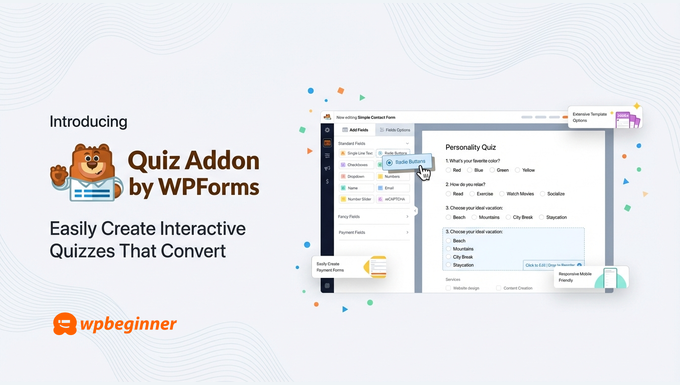
Whether you run an online store, teach courses, or offer consulting services, you can build professional quizzes that actually work… without the headache or the hefty price tag.
Background Story – Why the Quiz Addon?
For years, WPBeginner readers have asked us the same question: “What’s the best way to add a quiz to my WordPress site?”
And for years, the honest answer was… it’s complicated.
The dedicated quiz plugins either looked outdated, charged premium prices for basic features, or required hours of configuration just to get the scoring right.
I’ve watched store owners give up on product recommendation quizzes, course creators abandon placement tests, and coaches scrap lead qualification ideas… all because the tools made simple things feel impossible.
Meanwhile, businesses with big budgets were using quizzes to dramatically boost conversions. Product finders that reduce cart abandonment. Personality quizzes that segment email lists automatically. Assessments that qualify leads before the sales call.
These weren’t fancy nice-to-haves. They were proven conversion tools that most WordPress site owners simply couldn’t access.
That didn’t sit right with me.
So I challenged my team at WPForms to build something different: a quiz solution as powerful as the expensive standalone tools, but as easy as creating a contact form.
That’s exactly what the Quiz Addon delivers.
If you’d rather watch the video, here is what WPForms Quiz addon is.
What is WPForms Quiz Addon?

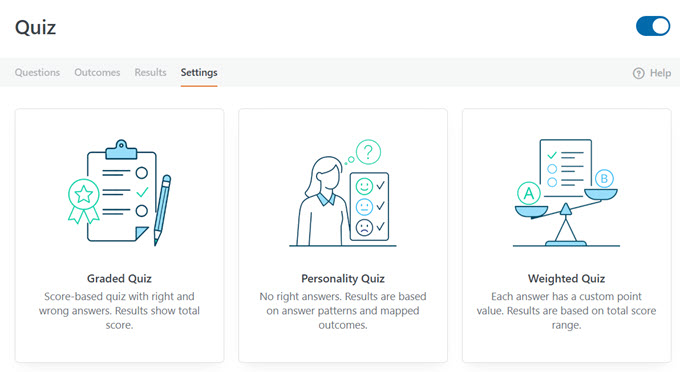
The WPForms Quiz Addon is a powerful extension that lets you create three types of quizzes directly inside the WPForms builder:
1. Graded Quizzes: Perfect when questions have right and wrong answers. Ideal for knowledge checks, course assessments, employee training, trivia contests, or classroom tests. You set the correct answers, define your grading scale, and WPForms calculates scores automatically.
2. Personality Quizzes: Best when you want to match visitors to outcomes rather than score them. Create “Which Product Is Right for You?” recommendations or “What’s Your Leadership Style?” assessments. Each answer maps to a personality type, and WPForms determines the match based on your outcomes.
3. Weighted Quizzes: Ideal when some answers should count more than others. Assign point values to each choice and trigger different outcomes based on score ranges. This is how you build lead qualification quizzes, readiness assessments, or risk scoring tools that actually work.
The best part? You can describe the quiz you want in plain English, and WPForms AI will build it for you… complete with questions, answer mappings, and outcomes.
No templates to customize for hours. A working quiz, ready to publish.
Personality Quizzes That Match Visitors to the Right Outcome
Ever taken a quiz that tells you which character you are, or what product fits your style? That’s a personality quiz… and now you can build them directly in WPForms.
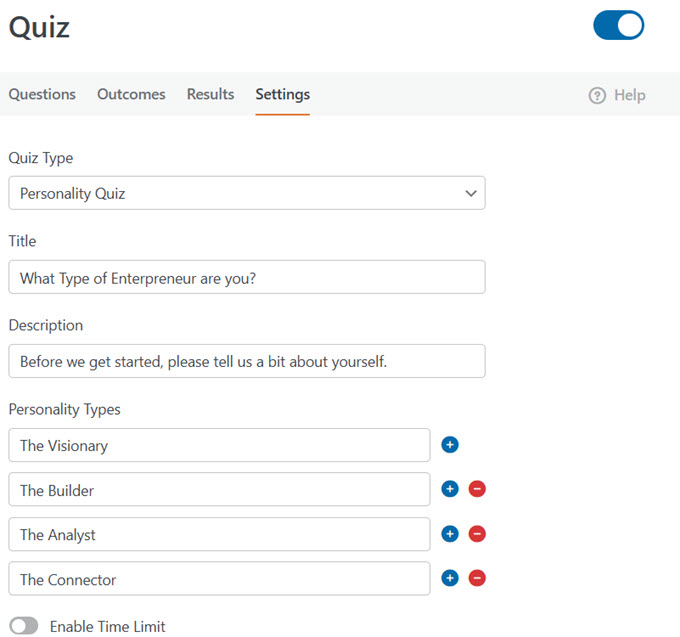
Each answer choice maps to an outcome, and WPForms determines the best match based on how someone responds.
You define your possible results (called personality types), then assign every answer choice to one of those types. When someone completes the quiz, WPForms tallies their responses and shows the matching outcome automatically.
This opens up powerful possibilities:
- Product recommendations:Ask about preferences, needs, or budget, then guide customers to exactly the right product with a direct link to purchase.
- Service matching: Help prospects self-select the right package or tier before they ever contact you.
- Lead segmentation: Automatically categorize subscribers by interest, experience level, or buying intent.
- Engagement quizzes: Create fun “What Type of [X] Are You?” quizzes that drive shares and grow your email list.
No manual sorting. No complex scoring formulas. Just questions, mapped answers, and personalized results.
Graded Quizzes That Score Answers Automatically
When questions have right or wrong answers, you need a graded quiz. WPForms calculates scores automatically — you just set the correct answers and define your grading scale.
For each question, mark which answer is correct (or for text fields, enter the accepted answers). Then customize your grading scale by setting percentage ranges for each letter grade. When someone submits, they instantly see their score, percentage, or letter grade.
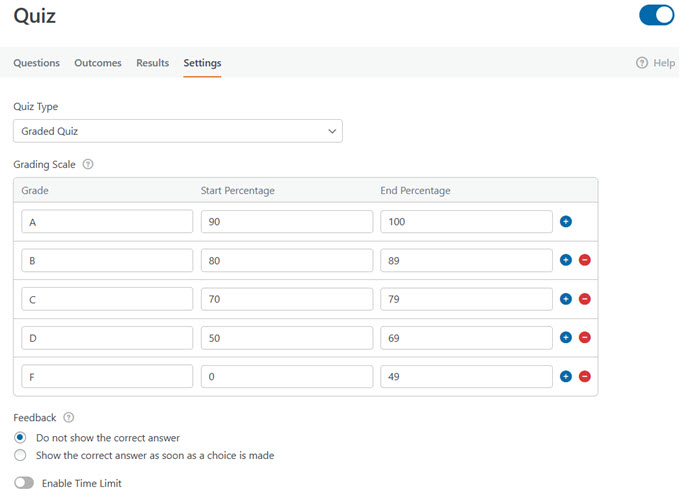
You can also enable instant feedback that reveals whether each answer was right or wrong as quiz takers progress — perfect for practice tests where learning happens in the moment.
This makes graded quizzes ideal for:
- Course assessments: Test knowledge before or after lessons, with automatic scoring that saves hours of manual grading.
- Placement tests: Use conditional outcomes to route people to different results based on their score. High scorers see advanced content; lower scorers get beginner recommendations.
- Training and certification: Create timed assessments for employee onboarding, compliance training, or skill verification.
- Trivia and contests: Run scored quizzes for engagement, giveaways, or community building.
No spreadsheets. No manual calculations. Just instant, accurate results.
Weighted Quizzes That Score Based on Value, Not Right or Wrong
Sometimes there’s no correct answer — but some answers should count more than others. That’s where weighted quizzes come in.
Instead of marking answers as right or wrong, you assign a numeric weight (0-99) to each choice. WPForms totals the weights from selected answers, and you use that total to trigger different outcomes based on score ranges.
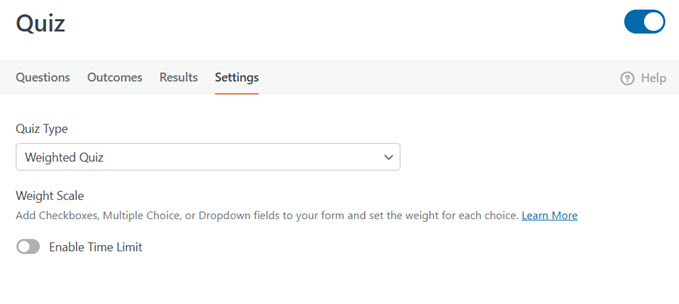
This gives you flexible scoring for scenarios like:
- Lead qualification: Assign higher weights to answers that indicate readiness (bigger budget, shorter timeline, urgent need). Route high scorers to your sales team; send others into a nurture sequence.
- Readiness assessments: Help prospects or students evaluate where they stand before committing to a program, service, or purchase.
- Risk scoring: Calculate risk levels for insurance, financial planning, or health assessments based on weighted responses.
- Surveys with priority: When some responses matter more than others, weights let you quantify preferences and tendencies accurately.
The total score drives the outcome — so you can show different messages, redirect to different pages, or trigger different follow-ups based on where someone lands.
Personalized Outcomes for Every Quiz Result
What someone sees after completing your quiz matters just as much as the questions themselves. The Quiz Addon replaces standard confirmation messages with Outcomes — result screens you can fully customize for each scenario.
Each outcome can display a personalized message, redirect to a specific page, or send quiz takers to any URL. Use smart tags to pull in dynamic details like their score, percentage, letter grade, or personality type.
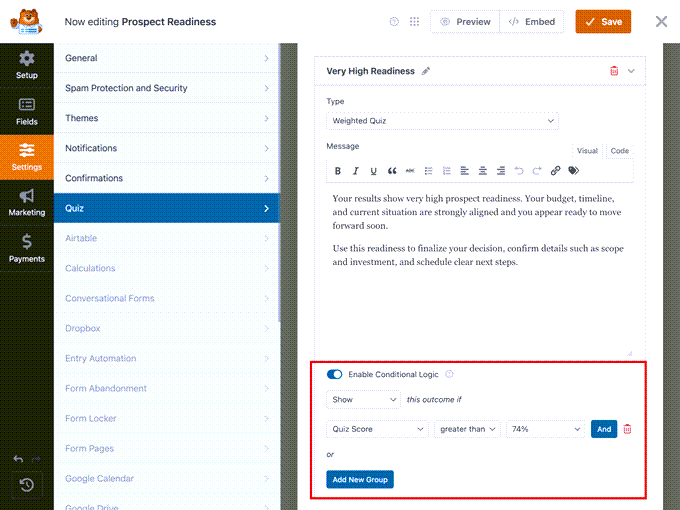
With conditional logic, you can create multiple outcomes and show different ones based on results:
- Graded quiz: Congratulate high scorers and direct them to advanced content. Encourage lower scorers with study materials and a retake link.
- Personality quiz: Show a unique outcome for each personality type with tailored recommendations or product links.
- Weighted quiz: Trigger different messages or redirects based on score ranges.
A default outcome catches anyone who doesn’t match your conditions — so every quiz taker sees something relevant.
Built-In Results Dashboard to Track Quiz Performance
Every quiz submission flows into WPForms’ entry management system — no separate dashboard to check or extra export steps.
The Quiz Addon adds a dedicated Results view with customizable graphs showing how people answered each question. Spot the most common responses, identify questions that trip people up, and understand patterns across all quiz takers at a glance.
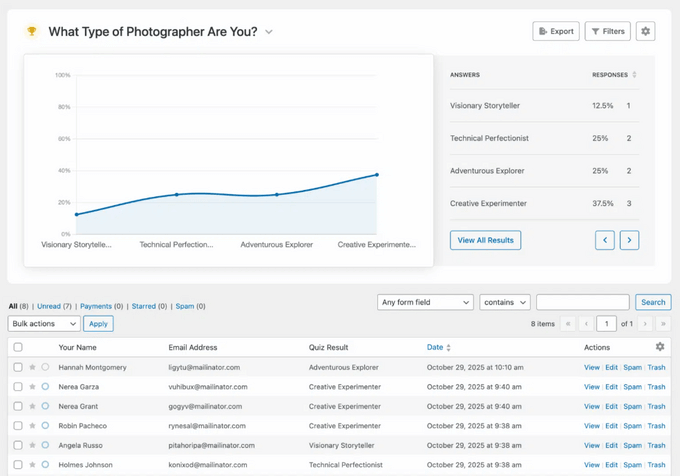
Filter results by grade range, personality type, completion status, or specific answers. Save custom filters for recurring reports — so if you want a monthly analysis of quiz completions above 75%, save that filter and pull it up instantly next time. Export in JPEG or PDF to share with your team.
And because quiz results live inside WPForms, they connect to your entire workflow:
- Send high-scoring leads directly to your CRM
- Trigger different email sequences based on personality type
- Add quiz takers to specific email lists automatically
- Route customer service quizzes to the right department
No manual data transfer. Your quizzes feed the systems you already use.
Time Limits for Timed Quizzes and Tests
Some quizzes need a clock. The Quiz Addon includes built-in time limits that work with any quiz type.
Set the duration in minutes and seconds, then choose what happens when time runs out:
- Auto-submit: Submits the quiz as-is when the timer expires
- Lock remaining questions: Prevents answers to unanswered questions but keeps the quiz open
- End completely: Stops the quiz immediately
You can also customize the message quiz takers see when time runs out.
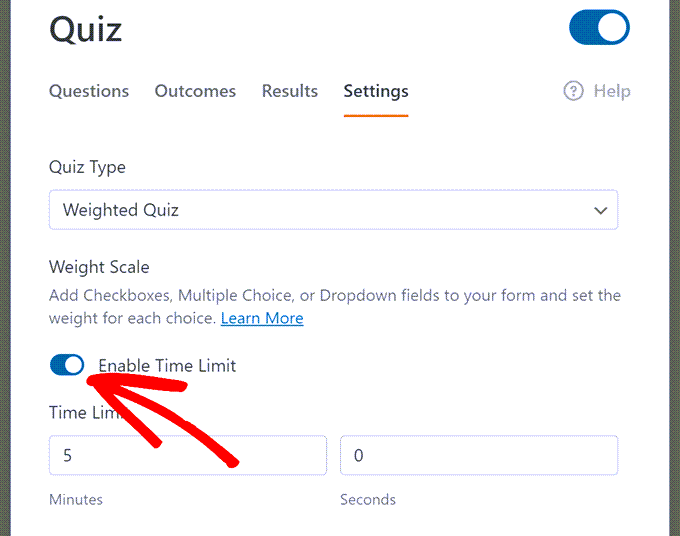
This makes timed quizzes ideal for:
- Certification tests: Ensure candidates complete assessments within required timeframes
- Classroom quizzes: Replicate exam conditions for students taking tests online
- Skill challenges: Add pressure to trivia contests or competitive assessments
- Screening assessments: Measure how quickly candidates can work through problems
No third-party timer plugins. Just set the limit and let WPForms handle the rest.
Built by the Team Behind the #1 Forms Plugin
WPForms is the most beginner-friendly form builder for WordPress, trusted by over 6 million websites.
For years, we’ve focused on making powerful features accessible to everyone. The Quiz Addon continues that mission by bringing advanced quiz functionality to WordPress — without the complexity or cost of standalone tools.
Everything integrates seamlessly with the features you already use: conditional logic, email notifications, payment integrations, CRM connections, and entry management. Your quizzes work with your existing workflow, not against it.
And because the Quiz Addon is included with all Pro plans, there’s no extra subscription eating into your budget.
Get Your First Quiz Live in Minutes
Remember those quiz tools that took hours to configure and still didn’t work right? This isn’t that.
Enable Quiz Mode in your form settings, pick your quiz type, and start adding questions. Mark correct answers for graded quizzes, map choices to personality types, or assign weights — depending on what you’re building. Set up your outcomes, embed the quiz, and you’re live.
If you want to move even faster, describe the quiz you need in plain English and let WPForms AI build it for you — complete with questions, answer mappings, and outcomes ready to customize.
Already have a form you want to turn into a quiz? Just enable Quiz Mode on any existing form and configure the fields you want scored. No need to start from scratch.
As always, thank you for your continued support of WPBeginner. I look forward to seeing the creative quizzes you build — and hearing how they help grow your business.
Yours Truly,
Syed Balkhi
Founder of WPBeginner
The post Introducing WPForms Quiz Addon: Easily Build Interactive Quizzes That Convert first appeared on WPBeginner.