Gutenberg Times: Block Themes, Icon Block and AI –Weekend Edition #356
Hi there,
AI is on my mind a lot these days. It speeds up my life when I research or analyze content, tools and technology. Even more so when working on workflow automation. This week saw an “explosion of visible AI progress in the WordPress project” as James LePage calls it. And on my travel through the feeds Block Themes and theme.json appeared as an important topic.
We are less than two weeks and one Gutenberg release away from WordPress 7.0 Beta 1 release on February 19th. WordPress 6.9.1 and Gutenberg 22.5 were released..
You all have a wonderful weekend!
Yours, 
Birgit
Developing Gutenberg and WordPress
As mentioned last week, WordPress 6.9.1 Maintenance Release shipped on Tuesday with 49 bugs fixed throughout Core and the Block Editor. If your site has automatic minor updates enabled you should have it by now. Otherwise you definitely should make it a point to update manually.
Rae Morey, editor of The Repository, has the skinny for you in WordPress 6.9.1 Released

Gutenberg 22.5 was also released. My post on the Make blog gives you What’s new in Gutenberg 22.5? (04 February). The highlights:
- Custom CSS Support for Individual Blocks
- Image Block: Aspect Ratio Control for Wide and Full Alignment
- List View Improvements
- Other Notable Highlights, among those, Text-columns support and focal point for fixed Cover background images.

In his trac ticket, Fabian Kägy proposed a “coat-of-paint” visual reskin of the WordPress admin for the 7.0 release. The goal is to modernize wp-admin’s appearance. It aims to reduce inconsistencies between older screens and the block editor. All elements should align with the WordPress Design System. Kägy has broken the work into focused sub-tickets covering color variables, buttons, inputs, notices, typography, spacing, and the admin frame. You can test early explorations via WordPress Playground. A new wp-base-styles handle has already landed to share admin color scheme CSS variables across core. Your feedback would be appreciated. 12 days before WordPress 7.0 beta, it’s not clear that it makes it into the next WordPress version. Kägy also mentioned that he is working with Tammie Lister on a post on the Make Core blog.
 The latest episode is Gutenberg Changelog #125 – WordPress 6.9, Gutenberg 22.1 and Gutenberg 22.2 with JC Palmes, WebDev Studios

Plugins, Themes, and Tools for #nocode site builders and owners
Troy Chaplin released Planned Outage for Block Themes, a simple maintenance-mode plugin for block themes. You can create your maintenance page directly in the Site Editor or use a maintenance.html template in your theme. Logged-in users can still browse normally, while other visitors see a 503 error with a Retry-After header. It also allows search engine bots to keep crawling during extended outages, helping to maintain your rankings while you make updates.
Johanne Courtright has restructured her Groundworx Core product into a bundle of four focused plugins — Query Filters, Showcase (Embla Carousels), Cards & Sections, and Tabs & Accordion — each now available separately. You can still buy the full bundle or grab just what you need. The core block extensions like responsive column controls and unified breakpoints have been spun off into a free plugin called Foundation, which also adds a new Gravity Forms block with proper block theme styling support.
Hans-Gerd Gerhards released version 1.5 of his Dynamic Header & Navigation for Block Themes plugin in January, fixing an annoying header flicker when scrolling back near the top of a page. You can now try the plugin instantly via a Live Preview directly from the WordPress plugin directory.
Theme Development for Full Site Editing and Blocks
Mike Davey, senior editor at Delicious Brains, published a developer’s cheat sheet to theme.json anatomy. You’ll learn how setting the $schema property unlocks IntelliSense in VS Code. The settings section lets you lock down color pickers and font sizes to prevent design drift. The styles section replaces traditional CSS with auto-generated variables. The post also covers block-specific overrides. “Once understood, [theme.json] offers a level of granular control over what clients can and cannot do that was difficult to achieve in the classic PHP era.” Davey wrote.
As a side note, the post 15 ways to curate the WordPress editing experience by Nick Diego is still one of the most read articles on the WordPress Developer Blog. You’ll learn how to turn off blocks, unregister variations and styles, lock down color pickers and font sizes via theme.json, restrict access to the Code Editor and Template Editor, and remove Openverse and the Block Directory. The post covers PHP filters, JavaScript techniques, and Editor settings.
If you want to dive deeper into how to handle common theme-building problems with theme.json, here is a list of articles for your perusal from the WordPress Developer blog, mostly by Justin Tadlock.
- How WordPress 6.9 gives forms a theme.json makeover
- You don’t need theme.json for block theme styles
- Mastering theme.json: You might not need CSS
- Adding and using custom settings in theme.json
- How to modify theme.json data using server-side filters by Nick Diego
- Customizing core block style variations via theme.json
- Per-block CSS with theme.json
- Leveraging theme.json and per-block styles for more performant themes
Johanne Courtright makes a compelling case for why she chooses Gutenberg over Elementor. She argues that Elementor became a CMS inside a CMS—duplicating templates, colors, typography, and breakpoints WordPress already provides. The result? Specificity wars, inline styles, and sites that break when you deactivate the plugin. With Gutenberg and theme.json, you get one source of truth: change a spacing value once, see it everywhere. Her clients now update their own sites without calling for help.
Building Blocks and Tools for the Block editor.
In his latest live stream, Getting the Icon Block ready for WordPress 7.0, Ryan Welcher takes you behind the scenes of contributing. He has been working on the new Icon Block for Gutenberg plugin and the next version of WordPress. He is in crunch mode to finish the new Icon Block in time. Join him to see where we’re at and what needs to be done before then! You can read up about the genesis of this block via the GitHub PR.
Ai and WordPress
Jonathan Bossenger has published a helpful article titled From Abilities to AI Agents: Introducing the WordPress MCP Adapter on the WordPress Developer blog. The WordPress MCP Adapter links the Abilities API with AI tools like Claude Desktop. In this article, you’ll learn how to change abilities into MCP tools, connect using STDIO or HTTP transport, and create custom MCP servers for your plugins. It also provides easy configuration examples for each client and security tips for turning existing abilities into AI-ready APIs.
James LePage rounds up a remarkable burst of AI progress across the WordPress project. You’ll find a proposal to bring an LLM client into WordPress 7.0 core, a mature MCP adapter for building agents, the Abilities API shipping in 6.9, and a new “AI Leaders” micro-credential for students. There’s also WP-Bench for benchmarking model performance on WordPress tasks, plus a growing AI experiments plugin nearing 1,000 commits — covering everything from Typeahead completions to content guidelines in Gutenberg.
Speaking of which, you can read more about Content Guidelines: A Gutenberg Experiment on the Make AI Blog. In its the first version. Lots of feedback is expected. The goal is to give site owners a first-class place in WordPress to capture the rules and context that shape how content should be written, edited, and managed on their site.
The WordPress project now has an official Agent Skills repository designed to teach AI coding assistants like Claude, Copilot, and Codex how to build WordPress properly. You’ll find portable bundles of instructions, checklists, and scripts covering block development, block themes, the REST API, Interactivity API, Abilities API, performance, and more. Skills install globally or per-project, helping AI assistants avoid outdated patterns and follow current best practices — contributions are welcome, mostly in Markdown.
Jeff Paul published a call for testing to explore new AI experiments you can try right now via WordPress Playground. The experiments are
- Type-ahead suggestions while writing,
- AI-assisted comment moderation,
- Markdown feeds for agent consumption,
- extended provider options,
- an AI Playground for testing prompts,
- MCP integration, and
- request logging for debugging and cost tracking.
The instructions are quite detailed to follow along. The ask is feedback on UX, usefulness, and flow. Jump in and share your impressions on the post or the PRs links with each experiment.

Questions? Suggestions? Ideas?
Don’t hesitate to send them via email or
send me a message on WordPress Slack or Twitter @bph.
For questions to be answered on the Gutenberg Changelog,
send them to changelog@gutenbergtimes.com
HeroPress: Many thanks to Ninja Forms

Yesterday Ninja Forms became the latest WordPress company to financially support HeroPress! They’ll now be listed forever on the Sponsor Wall Of Fame.
I’ve used Ninja Forms for years, and it’s an excellent forms plugin, so if you need one give it a shot!
If you or your organization would also like to support HeroPress financially, please head over to the donate page.
The post Many thanks to Ninja Forms appeared first on HeroPress.
WordCamp Central: WordCamp Port Harcourt 2026: A Community-Led WordPress Event in Nigeria
WordCamp Port Harcourt 2026 is set to bring together WordPress users, designers, developers, content creators, entrepreneurs, and digital enthusiasts from across Nigeria and beyond for a day of learning, collaboration, and community building.
The event will take place on 21 February 2026 at the Celebr8 Center, 35 Olu Obasanjo Road, Port Harcourt, and is fully volunteer-led, in line with the global WordCamp tradition.
Growing the WordPress Community in the Niger Delta
Port Harcourt has a fast-growing tech and creative ecosystem, and WordCamp Port Harcourt continues to play a key role in nurturing local talent, encouraging open-source contribution, and creating access to digital skills.
Since its inception, the WordCamp Port Harcourt community has focused on:
- Supporting beginners taking their first steps with WordPress
- Helping freelancers and agencies improve their workflows and businesses
- Introducing students and young professionals to open-source culture
- Connecting local creators to the global WordPress ecosystem
WordCamp Port Harcourt 2026 builds on this foundation by creating a space where people can learn, share experiences, and form meaningful connections.
What to Expect at WordCamp Port Harcourt 2026
Attendees can look forward to a full day of practical and engaging sessions covering topics such as:
- WordPress for business and entrepreneurship
- Design, performance, and user experience
- Content creation and digital publishing
- Security, hosting, and website management
- The future of work, skills development, and WordPress
The event will feature talks from a variety of speakers, panel discussions, speed build challenge, and opportunities to interact with sponsors and community partners.
As with all WordCamps, sessions are designed to be accessible to a wide range of experience levels—from complete beginners to seasoned professionals.
Community, Not Just a Conference
Beyond talks and presentations, WordCamp Port Harcourt 2026 emphasizes the importance of community. Attendees will have opportunities to:
- Network with fellow WordPress users and professionals
- Meet contributors and community organizers
- Learn how to get involved with WordPress meetups and future events
- Share ideas and experiences in a welcoming, inclusive environment
Meals, drinks, and community freebies are included with tickets, helping to create a relaxed and engaging atmosphere throughout the day.
Organized by Volunteers
WordCamp Port Harcourt 2026 is organized by a dedicated team of local volunteers who contribute their time and skills to make the event possible. The organizing team works closely with the global WordCamp community to ensure the event aligns with WordCamp guidelines and open-source values.
Support from sponsors helps keep ticket prices affordable and ensures the event remains accessible to students, freelancers, and small business owners.
Get Involved
Whether you’re a WordPress user, a business owner, a student, or someone curious about open-source technology, WordCamp Port Harcourt 2026 offers something for you.
To learn more, purchase tickets, or find out how to get involved as a volunteer or sponsor, visit:
https://portharcourt.wordcamp.org/2026/
WordCamp Port Harcourt 2026 looks forward to welcoming the WordPress community to the Garden City for a day of learning, sharing, and celebrating the power of open source.
6 Automation Tricks to Reduce Churn on Your Membership Site
On our video training site, WP101, our focus is on helping members feel confident with WordPress and grow their websites over time. But we learned that churn (members cancelling their subscriptions) is a common challenge, even when the content is genuinely valuable.
In many cases, members don’t cancel because they’re unhappy with the content. They cancel because they get busy, forget to log in, or lose momentum.
That’s where automation made a real difference for us. By adding a few simple workflows, we were able to stay connected with members at the right moments, reduce cancellations, and keep people engaged without extra manual work.
In this guide, I’ll share the exact automation strategies we use to improve member retention. They’re easy to set up and can have a meaningful impact on your membership revenue.
TL;DR: Reducing churn on a membership site comes down to staying connected at the right moments. This includes using automation to:
- Welcome new members.
- Drip content to prevent overwhelm.
- Re-engage inactive users.
- Recover failed payments.
- Celebrate member milestones.
- Offer smart alternatives when someone tries to cancel.
Why You Need Smart Solutions for Member Retention
Churn can really hurt the subscription revenue on your membership website. When members cancel, you are forced to constantly hunt for new signups just to maintain your current income.
To fix this, you must understand the two types of churn:
- Voluntary churn happens when members choose to leave because they lose interest.
- Involuntary churn occurs when payments fail due to expired cards or bank errors.
Here is a quick breakdown of common membership terms you should know:
| Term | Definition |
|---|---|
| Churn | The percentage of members who cancel during a specific period. |
| Voluntary Churn | When members actively choose to cancel their accounts. |
| Involuntary Churn | When memberships end due to payment failures or expired cards. |
| Retention Rate | The percentage of members who stay subscribed over time. |
| Dunning | Automatically retrying failed payments and sending reminders. |
| Drip Content | Releasing content on a schedule to keep members engaged. |
Manual retention strategies might work when you are just starting out, but they become impossible to manage as your site grows. Eventually, there aren’t enough hours in the day to personally email every single member who forgets to update their credit card.
That is where automation becomes essential. It handles these tasks 24/7, ensuring no member slips through the cracks while you focus on creating great content.
Here’s a quick overview of the automation strategies I will cover in this article. You can use the links below to jump to different methods:
- Automate Your Community Welcome Committee
- Keep Members Coming Back With Drip-Fed Content
- Re-engage At-Risk Members
- Simplify Payment Issues with Automatic Reminders
- Celebrate Loyalty With an Anniversary Gift
- Save Departing Members by Understanding Their Needs
- Frequently Asked Questions About Membership Churn
- Additional Resources for Membership Websites
1. Automate Your Community Welcome Committee
In my experience, the most important moment in a member’s lifecycle is the first five minutes after they pay. If they have to hunt for your community page or request access manually, the excitement fades.
I have found that the best solution is to create an automated Welcome Committee.
Instead of just sending a cold transaction receipt, I use Uncanny Automator to instantly introduce the new member to the community.
For example, as soon as a payment goes through, the system can automatically post a shoutout in your member forum, Facebook group, or Slack channel saying:
Please welcome [Name] to the tribe!
This immediate public recognition makes the new member feel seen and valued before they even log in.
To do this, you will need the Pro version. You can get an overview of how to use the plugin in our guide on how to create automated workflows in WordPress with Uncanny Automator.
You will also need an active community platform. For this tutorial, I will be using BuddyBoss, but the process is similar for other platforms.
If you haven’t built one yet, you can follow our full guide on how to create a private community with WordPress.
Once your tools are active, go to Automator » Add New and create a Logged-in recipe.
Step 1: The Trigger
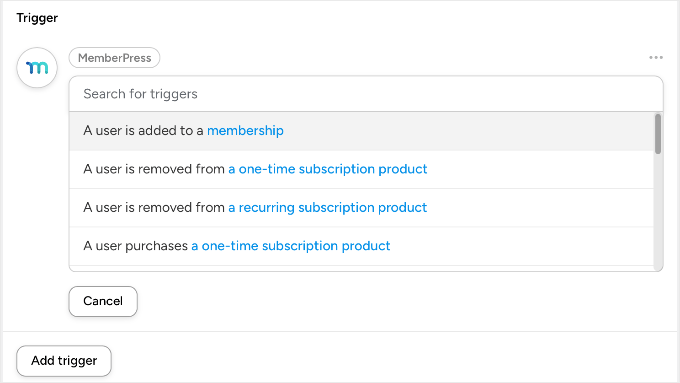
Select the ‘MemberPress’ integration and choose the trigger: ‘A user is added to a membership’. Then, select the specific membership level (for example, ‘Gold Plan’).
Step 2: The Actions
We want to make the user feel famous instantly. Select the ‘BuddyBoss’ integration (or whichever online community platform you are using) and add these two actions:
- Action 1: ‘Add the user to a group’. Select your ‘Welcome’ or ‘Introductions’ group.
- Action 2: ‘Post to the user’s activity stream’. You can automate a message like: “I just joined the Gold Community! Say hello! 👋”
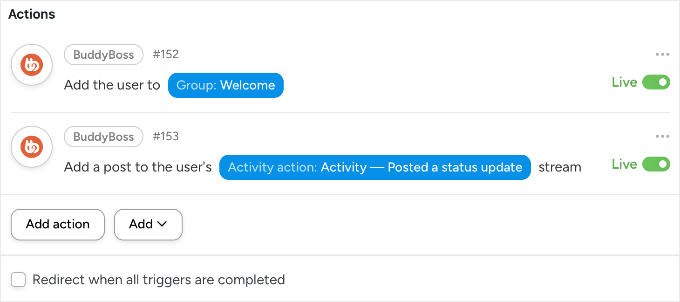
Now, the moment a user buys, they are instantly part of the tribe. Their profile is active, they are in the group, and they have a post that others can like and comment on. This builds immediate ‘social stickiness’.
2. Keep Members Coming Back With Drip-Fed Content
I have seen many membership sites fail because they overwhelm their users on day one. If you give a new member instant access to 500 videos, they often feel paralyzed and eventually cancel because they ‘don’t have time.’
The solution we use at our own video membership site is drip content. By releasing material on a schedule, you give members a compelling reason to stay subscribed month after month.
MemberPress makes this incredibly easy by automatically handling the timeline for each user.
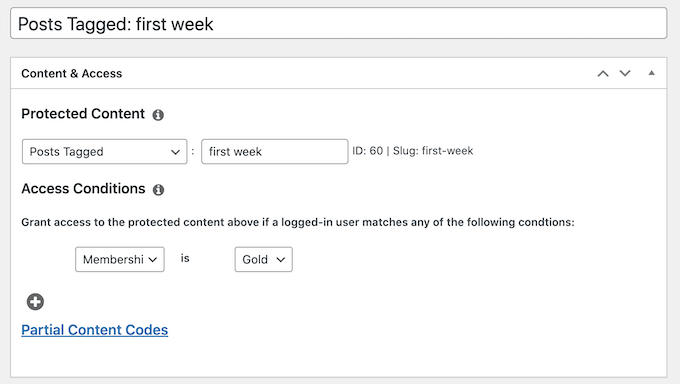
To set this up, go to MemberPress » Rules and click ‘Add New’. Under ‘Protected Content’, select the content (like a specific category of posts or a single course page) you want to delay.
Next, scroll down to the ‘Drip / Expiration’ section and check the ‘Enable’ box.
Here, you can set the rule to trigger after a specific time. For example, you can set it to ‘7’ days after ‘Member Registers’.
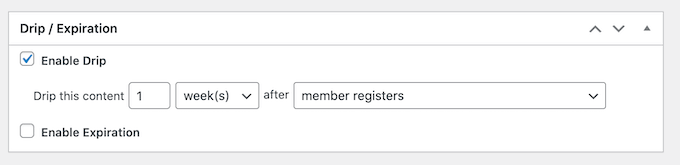
My Favorite Trick: You can also use Fixed Date dripping. I use this to release special holiday content (like a Black Friday bonus) that becomes available to everyone on the same day. It creates a ‘cohort effect‘ where the whole community discusses the new content simultaneously, boosting engagement.
Instead of binging and leaving, members develop a habit of returning to your site. This simple change transforms a one-time visitor into a long-term subscriber.
For step-by-step instructions on setting up both scheduled and fixed-date dripping, see our guide on how to add automatic drip content in your WordPress site.
3. Re-engage At-Risk Members
In my experience, members typically leave for one of two reasons: either they lose interest and drift away, or they get frustrated and angry. The good news is that you can use automation to catch both types before they cancel.
Here are two different ‘watchdog’ automations I use to save these members:
Method 1: Catch ‘The Drifter’ With a FunnelKit Winback
When a member stops logging in, they are usually just weeks away from cancelling. You need to catch them while they still remember you.
For this, I recommend using FunnelKit Automations. Because it lives inside your WordPress dashboard, FunnelKit can see the exact moment a user logs in. Most external email tools cannot access this real-time data.
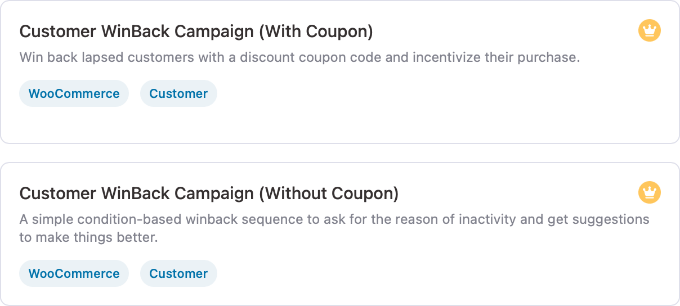
To set up this automation, just go to FunnelKit Automations » Automations and click ‘Create Automation’. You will see two specific templates:
- Customer Winback (No Coupon): I recommend starting here. It sends a ‘We miss you’ email highlighting popular content or asking if they need help. It re-engages users without eating into your profits.
- Customer Winback (With Coupon): Use this for members who have been inactive for a long time (e.g., 60+ days). It automatically generates a unique discount code to incentivize them to return.
For a full walkthrough of setting this up, see our guide on how to send automated coupons to bring back customers.
Method 2: Catch ‘The Complainant’ Using Sentiment Analysis
Sometimes, a member is active but unhappy. If they send a frustrated message to support, then you want to know immediately.
You can use Uncanny Automator‘s OpenAI integration to analyze the text of incoming contact forms. If the AI detects negative sentiment, then you can automate an urgent notification to your team on Slack or email.
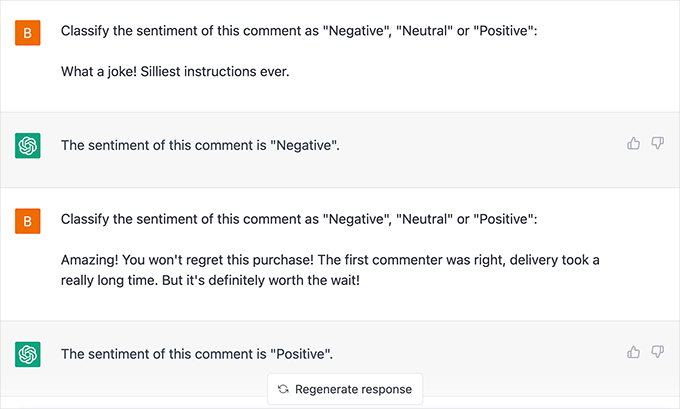
This lets you jump in and save the relationship before they hit ‘Cancel’. To learn exactly how to build this, see our guides on how to use AI for customer service in WordPress and how to use OpenAI on WordPress.
4. Simplify Payment Issues with Automatic Reminders
Involuntary churn is frustrating because these members actually want to stay. Their credit card simply expired, or their bank declined the transaction.
If you do not have a system to catch these failures, then you will lose revenue instantly. Here are two ways to automate your recovery process using MemberPress.
Safety Note: Whenever you customize billing emails or dunning sequences, I recommend performing a test transaction with a test credit card. This ensures your ‘Update Payment’ links work correctly and don’t lead to a 404 error.
Method 1: The Essential Notification (Native Emails)
MemberPress has built-in emails that fire when a card fails. To check them, go to MemberPress » Settings » Emails.
Ensure the ‘Failed Transaction’ and ‘Credit Card Expiring’ emails are checked. I strongly recommend clicking ‘Edit’ to customize the message.
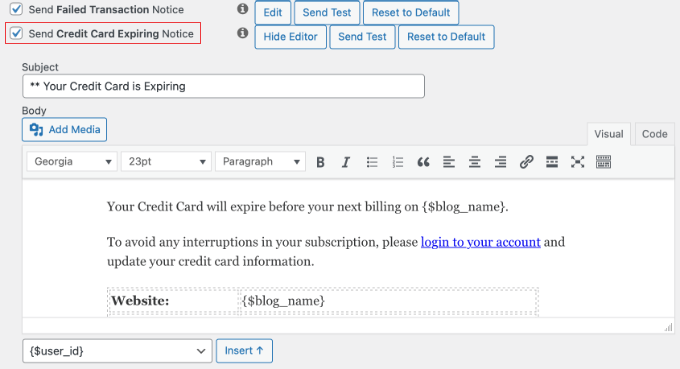
Just make sure you don’t sound like a robot. I recommend using a helpful subject line like ‘Action Required: Don’t lose access to [Site Name]’ rather than a scary ‘Payment Failed’ notice.
Be friendly and provide a direct link to the user’s Account page so they can update their card in seconds.
Method 2: The Dunning Sequence (Automated Recovery)
Sending just one email isn’t enough because people get busy and forget. To send a sequence (say on Day 3 and Day 7), you can use the MemberPress » Reminders feature.
Click ‘Add New’ and set the trigger to ‘After Subscription Expires’.
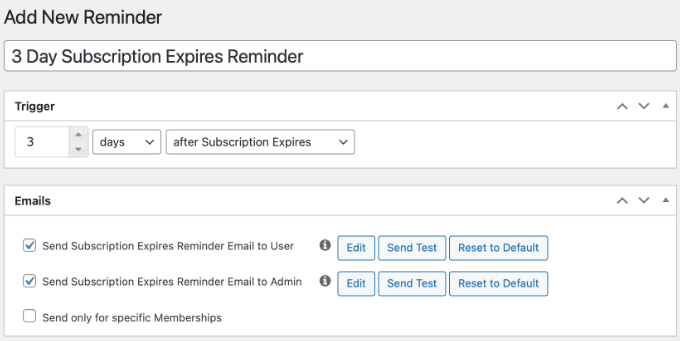
You can create multiple reminders, say one for ‘3 Days After’ and another for ‘7 Days After’. This persistent (but polite) sequence often recovers significantly more revenue than a single notice.
5. Celebrate Loyalty With an Anniversary Gift
One of the biggest reasons members churn is that they feel unappreciated. A simple ‘Thank You’ at the right moment can reset their commitment for another year.
I recommend setting up an automated anniversary gift email. This is not a receipt, it is a celebration.
For instance, you can use automation to celebrate your members in several ways:
- Hidden Bonus Module: Unlock a course or lesson that only becomes available after their first year.
- Digital Loyalty Badge: Send a badge that appears on their community profile.
- Surprise Discount: Offer a discount code they can apply to their next renewal or upgrade.
The goal is to turn a routine billing date into a moment of delight. This makes members feel valued and far less likely to cancel when their bill comes due.
You can do this using the MemberPress » Reminders feature (the same tool we used for payment failures). Simply click ‘Add New’ and configure the timing to send ‘1 Year After Member Signs Up’.
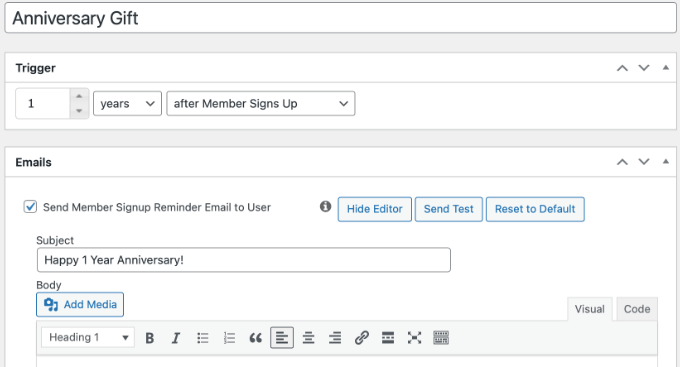
Here’s what you should include in the email:
- A celebration: ‘Happy 1 Year Anniversary!’
- A surprise gift: A link to a hidden bonus video, a PDF cheat sheet, or a special discount code (like
LOYALTY20) that they can apply to their next upgrade.
This creates a ‘positive surprise’ moment. Members who feel valued are far less likely to cancel when their bill comes due.
6. Save Departing Members by Understanding Their Needs
Sometimes, despite your best efforts, a member will decide to leave.
However, the moment they click ‘Cancel’ does not have to be the end of the road. You can use two distinct strategies to turn this negative into a positive.
Strategy 1: The ‘Save’ Offer (Downsells & Pauses)
Before processing the cancellation, offer an alternative. Many members cancel simply because of temporary budget tightness or a lack of time.
The trick is to use OptinMonster, which is the best popup plugin lead generation software for marketers. It offers page targeting rules that trigger a popup specifically when a user visits your ‘Account Cancellation’ page. This is your last line of defense.
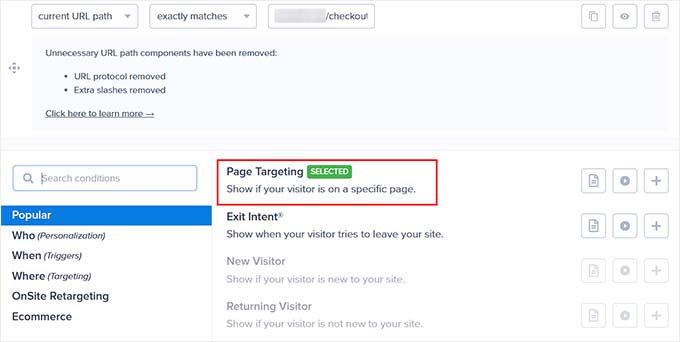
This popup should offer:
- A Pause Option: “Need a break? Pause your membership for 30 days.” First, enable ‘Self-Service Pauses’ in your MemberPress » Settings. Then link the popup button to the MemberPress Account page so they can switch their status to ‘Paused’ instead of cancelling.
- A Downsell: “Switch to our Lite plan for half the price.”
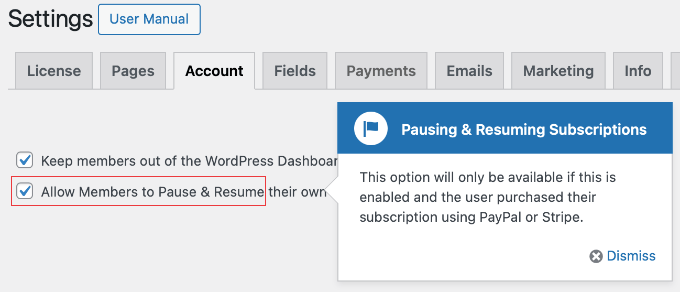
This strategy is powerful because it catches the user right at the moment of decision. By addressing their objection (cost or time) before they click the final button, you give them a valid reason to stay.
See our case study on how OptinMonster boosts conversions to learn more about how targeted popups can influence user behavior.
You can also read our complete OptinMonster review to learn more about how it works.
Strategy 2: The Exit Survey
If the user declines your offer and proceeds to cancel, your goal shifts to gathering data. You need to know why they are leaving so you can fix the problem for future members.
I recommend embedding a simple survey on your ‘Cancellation Confirmation’ page. You can use WPForms or UserFeedback to ask a single question: “What is the main reason you are cancelling?”
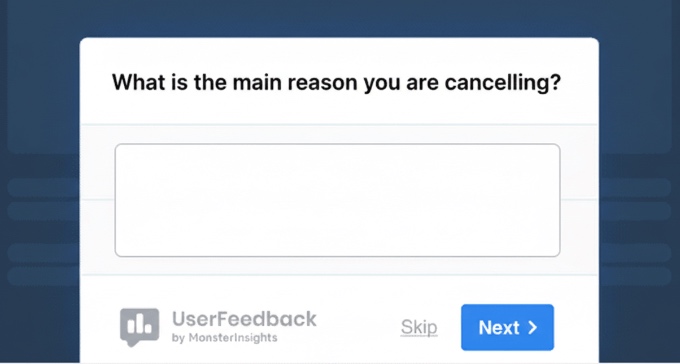
If you see a trend, like lots of people complaining about video playback issues, then you know exactly what to fix.
For more details, see our guide on how to create a survey in WordPress.
Frequently Asked Questions About Membership Churn
Understanding how to use automation to reduce churn on your membership site is important for maintaining and growing your subscriber base.
Here are answers to some of the most common questions, paired with actionable insights to help you make changes effectively.
1. What is the difference between voluntary and involuntary churn?
Voluntary churn occurs when members cancel their subscriptions by choice, often due to dissatisfaction or a perceived lack of value. In contrast, involuntary churn happens when memberships lapse unintentionally, such as through failed payments or expired credit cards.
2. How often should I send re-engagement emails without being annoying?
It’s important to find the right frequency for re-engagement emails. A typical strategy is to send an email after 14 days of inactivity. If there’s no response, follow up once every week or two, adjusting as needed based on user feedback and engagement levels.
Tools like Uncanny Automator and FunnelKit can help automate and personalize these sequences to reduce annoyance.
3. Is it better to offer a discount or a ‘pause’ option to prevent cancellation?
Offering a ‘pause’ option can be more beneficial for long-term retention as it acknowledges the member’s circumstances without completely severing the relationship.
However, discounts can be effective in specific contexts when paired with limited-time offers and incentives. Using OptinMonster’s popups can help present these options strategically.
4. Why are smart engagement triggers important for membership sites?
Engagement triggers, such as those set up through Uncanny Automator, are important for identifying members who might be at risk of churn due to inactivity.
By using smart engagement strategies, you can activate re-engagement campaigns that offer tailored content and support and reduce the risk of losing members.
Additional Resources for Membership Websites
I hope this article helped you learn smart automated solutions to keep members hooked on your membership site.
You might also like to see these additional resources:
- Best WordPress Membership Plugins (Compared) – A comprehensive comparison for small business owners looking for advanced membership automation features like dripping and dunning.
- How to Create Automated Workflows in WordPress With Uncanny Automator – A technical deep dive into Uncanny Automator, providing the recipe foundations for the re-engagement and community triggers discussed in this post.
- How to Easily Add a Client Feedback Form in WordPress – A step-by-step tutorial on setting up the automated exit surveys that help you turn cancellations into actionable business insights.
- How to Track User Engagement in WordPress with Google Analytics – Explains how to set up tracking to identify ‘quiet’ members before they hit the 14-day inactivity trigger.
If you liked this article, then please subscribe to our YouTube Channel for WordPress video tutorials. You can also find us on Twitter and Facebook.
The post 6 Automation Tricks to Reduce Churn on Your Membership Site first appeared on WPBeginner.
Open Channels FM: Jerks and Flows
For myself, in the very early days, lots of teeny jerks, too many to mention.
Jonathan Desrosiers: Open Source Collaboration And A Proud Moment
This past weekend at FOSDEM, I had a proud moment that had me reflecting on open source collaboration.
We all experience moments like this throughout life. On occasion it’s a result of my own efforts, such as finally publishing something I’ve spent a considerable amount of effort on. But it’s more common that the feeling is triggered by something someone else does.
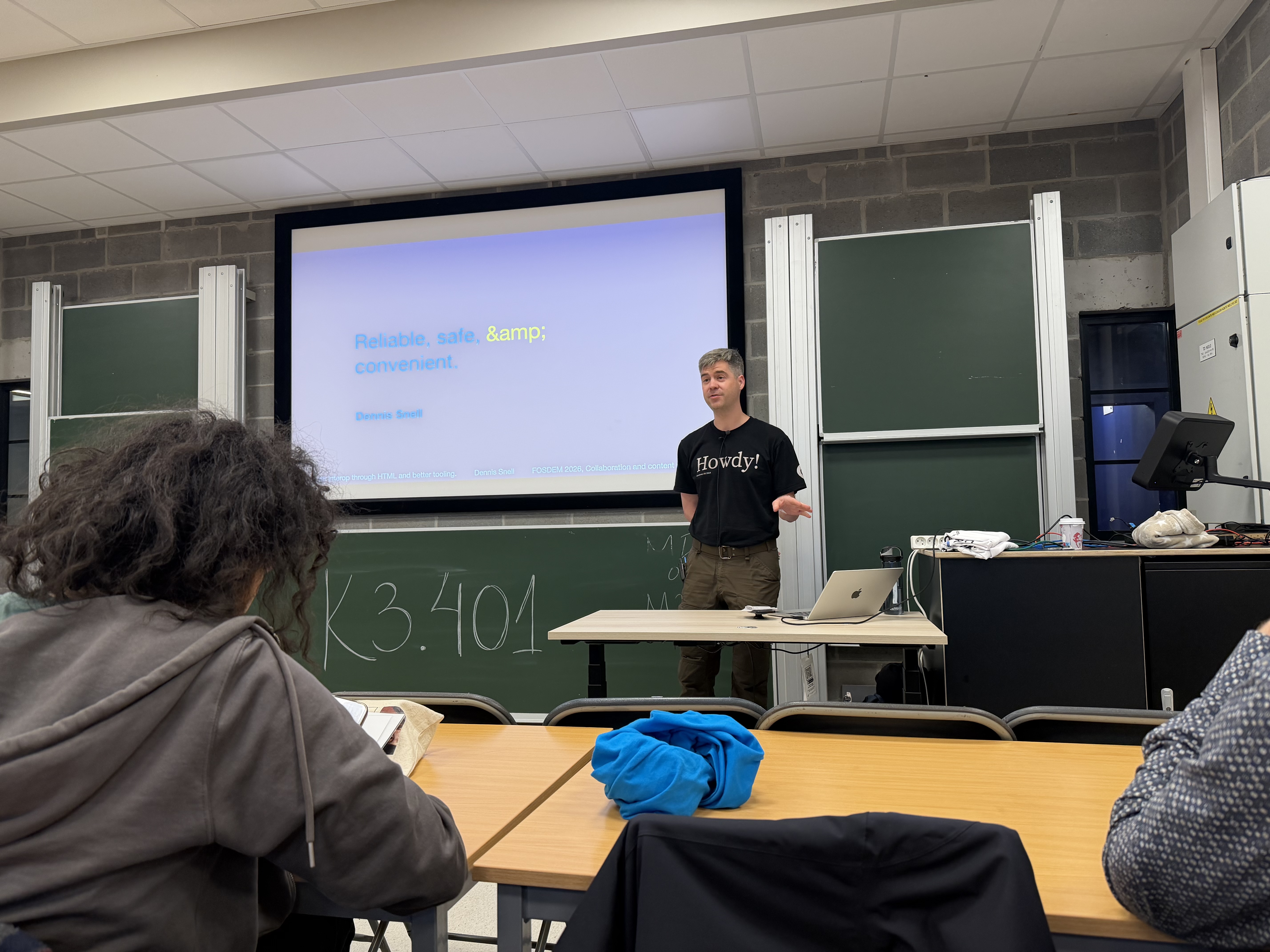
Late on day 1 of the conference, fellow WordPress Core Committer Dennis Snell gave a talk in the Collaboration and Content Management track called Stronger interop through HTML and better tooling (recording can be found on the session page). The talk detailed how the HTML API within WordPress came about, the considerations that were made while building it, and how the end result has helped the broader web in addition to WordPress itself.
Dennis did a fantastic job! While I’m also a Core Committer, I have only been casually involved with this feature at best. It’s impossible to keep track of everything being worked on within a project as large as WordPress. His talk filled in many of the gaps of my knowledge, and I learned a ton!
Letting Go
When you’re involved with a project in a sustained and meaningful way, it can be difficult to “let go” of the urge to weigh in on as many tickets, pull requests, and discussions as you can. While it’s often true that you could add something that’s valuable or mention a non-obvious detail, knowing when to engage is a craft that requires consistent refinement and reflection.
When Dennis was presenting, I found myself thinking “I’m so glad he worked on this project.” He deeply researched prior art both internally and externally to WordPress, and he put a lot of care into thinking through what would be best for the users of the software. In the context of this challenge the users are primarily two groups: the developers interacting with the API and end users viewing sites with HTML manipulated by the API. Watching him present made me realize something important about collaborative work.
In many ways I was relieved. It was a great reminder to “let go”. We need to have confidence in each other to take on challenging problems and share that work openly, creating space for emerging contributors to learn and grow.
Impact On Others
As a number of thoughtful questions were asked following his talk, I couldn’t help but feel proud. Yes, I was proud of Dennis. But I was also proud of everyone that contributed to this feature in some way (he was certainly not the only contributor who invested time and effort into researching and building), and of the software that we all invest so much time and effort into maintaining.
There are so many incredibly smart and talented people who contribute to WordPress and open source. His talk not only reminded me to step back and trust others, but also of the impact we can have on our peers and colleagues by caring about our craft and sharing that generously in the open. Though we try our best, thoughtfulness can be really hard to detect through written communication. In-person presentations and discussions will always be the best way to share passion, enthusiasm, and care with other humans.
As contributors, we are solving real problems with solutions that don’t only benefit users of WordPress. In the case of the HTML API, the contributors working on this feature submitted bug fixes back to the HTML specification to benefit every single person building on and using the Internet. The impact that open source work has is unpredictable and surprising.
Being Project Ambassadors
As a senior mentor within the WordPress community, I’m often asked what it means to be an ideal contributor to an Open Source project. While the qualities of a good open source contributor are long established, I’ve been meaning to publish a “reloaded” breakdown for some time. This recording has been added to my list of examples to include when I finally get around to it.
To some degree, every member of the community is a representative of the project. But this is especially true for Core Committers. I couldn’t have asked Dennis to be a better ambassador for WordPress at the largest open source conference in the world. In an extraordinary way he represented the collective work of all our contributors and the way we advocate for our users above all else.
So thank you, Dennis. And thank you to everyone who contributes to open source. 
Featured image credit: CC0 licensed photo by Jennifer Bourn from the WordPress Photo Directory.
The post Open Source Collaboration And A Proud Moment appeared first on Jonathan Desrosiers.